
Students who take an active part
If you speak up often, look for a microphone you can position close to your mouth and a mute control you can use quickly. Logitech and Trust describe these microphone and control features on specific models.


For a permanent study space, choose a headset with the right connection, a microphone close to your mouth and a mute control you can find by touch. Then weigh up comfort and freedom of movement: a wired headset doesn’t need charging, while a wireless one needs a battery and a suitable connection. A headset won’t brighten the room, and microphone noise cancellation doesn’t guarantee that you’ll hear background sounds clearly.
If you speak up often, look for a microphone you can position close to your mouth and a mute control you can use quickly. Logitech and Trust describe these microphone and control features on specific models.
For longer sessions, fit and ear cushions can make a big difference. Lenovo Netherlands highlights comfort for longer days of studying and lessons; try the headset yourself if you can.
If you need to be able to respond to someone beside you during an online call, a mono headset may be worth considering. HP Poly describes mono and stereo versions in the Blackwire 3200 series.
Start with clear speech and muting: check where the microphone and controls are positioned. Then consider fit, connectivity and whether you want to be able to move around during calls.
| What to consider | What to look for when buying | Who is this important for? |
|---|---|---|
| Speaking clearly | Check whether the microphone boom is adjustable and make a test recording before your session. | If I take an active part in the group discussion, I want my voice to come through clearly on the microphone. Around 29% of consumers prioritise clear speech. |
| Muting in low light | Check where the mute and volume controls are, and try them out in your calling app. | If I want to mute quickly during a call, I want to find the control without having to search for a tiny button. Around 23% of consumers prioritise tactile controls. |
| Comfort during long sessions | Look at adjustability and ear cushions, and choose between mono and stereo; try the fit yourself if possible. | If I have several study sessions in a row, I want a fit that stays comfortable for me. Around 18% of consumers put comfort first. |
| Connection to your device | Compare your device’s port with the connector on the exact headset model, and check whether any required adapter is included. | If my laptop or tablet has a specific connection, I want to be sure the model I choose will work with it. Around 18% of consumers choose mainly on the basis of connectivity. |
| Freedom of movement | For wireless models, check the device connection and stated battery life. | If I want to move around during a call, I don’t want to be tethered by a headset cable. Around 12% of consumers give freedom of movement top priority. |
A microphone feature doesn’t automatically tell you how much background noise you’ll hear yourself. The way a headset is worn also affects whether one ear is left free.
Consider the microphone features and wearing style separately, and test how clearly you can be heard in your own calling set-up.
Connections and included accessories can vary by model. The wrong version may not fit the port you want to use.
Compare the full model number, connector and package contents with your laptop or tablet.
A wireless connection needs a suitable pairing method and a charged battery.
Decide whether you really want to move around during calls. If you usually stay at your desk, compare wired models too.
A flat battery can interrupt a call, and you’ll need to remember to charge between sessions.
The H390 is a wired USB headset for calls at a desktop computer. Check the USB and colour options for the specific model.
The wired Ayda USB-ENC is designed for calls and has a flip-up microphone boom; the separate Ayda Wireless ENC is designed for use without a headset cable.
The wired Blackwire 3200 series includes mono and stereo versions, so you can decide whether you want one ear to remain free.
The wired Evolve2 30 SE is designed for calls, with a choice of fit and the right UC or Teams version to suit your needs.
This Joybuy selection includes wired headsets with microphones and controls for online group calls. Check each model’s connection and mute controls to make sure they suit your study space.
 No image available
The flip-up microphone boom is designed to let you mute quickly during a group call.
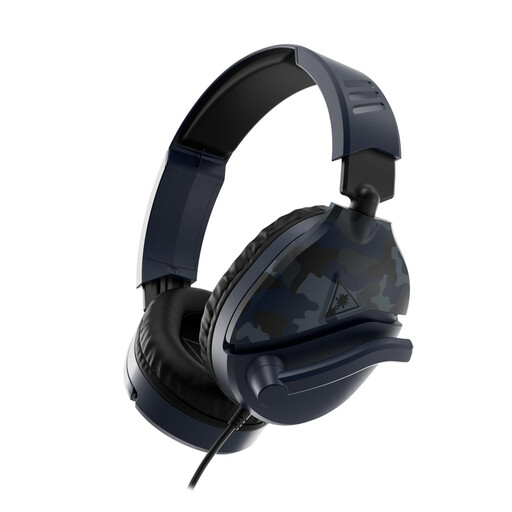
3.5 mm connection; USB audio adapter included; flip-up microphone boom for muting. The description mentions a lightweight headband and memory foam ear cushions.
 No image available
The flip-up microphone and earcup controls are useful features if you want to mute and adjust the volume during calls.
3.5 mm connection; volume wheel; adjustable flip-up microphone boom for muting. The description mentions a padded headband and soft ear cushions.
 No image available
The listed microphones and mute controls are useful for calls where you need to switch quickly between speaking and muting.
USB-A connection; compatibility with a USB-C adapter is listed; two integrated microphones; volume and mute controls. The description mentions memory foam ear cushions and an adjustable headband.
 No image available
A microphone close to your mouth and a separate mute button can be useful if you speak often during group sessions.
Analogue 3.5 mm connection; cardioid microphone; mute button and volume control on the earcup. The description mentions a lightweight design and memory foam ear cushions.
 No image available
The mute function and volume controls can be handy if you want to adjust settings quickly during an online group call.
3.5 mm, USB-A and USB-C connections; detachable noise-cancelling microphone with mute function; volume controls on the earcup. The description mentions memory foam in the headband and ear cushions.
Select the right microphone and speaker in your calling app and test them before joining. Google Meet offers a microphone indicator and speaker test, among other features; in Windows, you can test your chosen input and play it back. Also check that your headset isn’t muted.
A headset won’t make the room brighter, but it can help you speak and listen during an online group call. Choose controls you can find without being able to see them clearly. If you also want to be visible on video, you’ll need to assess the room’s lighting separately.
Keep the volume down and take listening breaks. The World Health Organization identifies volume, listening time and how often you’re exposed to loud sounds as factors that can affect your hearing.
Online consumer purchases generally come with a 14-day cooling-off period from delivery, subject to exceptions and conditions that can vary depending on the circumstances. Separately, Dutch law provides a legal guarantee if a product doesn’t do what you could reasonably expect under normal use. ACM ConsuWijzer says the seller must then resolve the problem free of charge with an appropriate solution; this does not mean there is a fixed guarantee period of exactly two years.