Who is this choice relevant to?

Quiz host in a noisy room

You want to know whether participants can still hear you clearly when your housemates are talking. Pay attention to the microphone position and test the sound in the app you use. Logitech and Trust describe noise cancellation on certain microphones, but a test call will show how it performs in your room.

Quiz host who needs to listen closely

You want to follow the questions and answers when things are busy at home. Distinguish between a feature that helps the microphone reduce background noise and a design or feature that blocks out sound for your own ears. HP and Jabra describe these features for each model and version.

Quiz host with a changing setup

You might move around while presenting or switch between devices. In that case, the connection method, freedom to move and mute controls all matter. Also check which adapter comes with the version you choose.

What should you look for when choosing?

What to consider What to look for when buying Who is this important for?
Speaking clearly Check that you can position the microphone comfortably and that there’s a mute control. Test it with someone listening in from another connection while there’s the usual background noise at home. If you’re hosting a quiz while housemates are talking in the same room, you’ll want to know whether your voice remains clear. Around 29% of consumers say clear quiz hosting is their top priority.
Hearing participants Compare mono and stereo sound, the wearing style and the fit. Decide whether you want to leave one ear uncovered. If you need to follow participants closely when things are busy at home, consider how the headset fits around your ears and how much background noise you can hear. Around 23% of consumers prioritise a quieter listening experience.
Sharing quiz clips Test both speaking and playing clips in your quiz app. In Teams, the high noise suppression setting filters out non-speech sounds; Microsoft Support also explains how to share computer audio for music. If you use music or sound questions, you’ll want participants to be able to hear the clips. Around 18% of consumers say sharing quiz audio is their top priority.
Connection and muting Check the full version name and make sure the connection is compatible with your device. Select the headset as both the microphone and speaker in the app, then test the mute control. You’ll want to know before the quiz that your headset works with your device and app, without having to try out connections while you’re presenting. Around 18% of consumers prioritise compatibility and controls.
Freedom to move Choose a wired headset if you’ll be staying in one place. For wireless use, check the connection, talk time and included adapter for the exact version. If you want to walk around during the quiz or switch devices, freedom of movement matters more than a fixed wired connection. Around 12% of consumers say this is their most important consideration.

Which mistakes can you avoid?

  • Assuming noise cancellation works the same way at both ends of the call

    Microphone noise cancellation is designed to affect what participants hear; it doesn’t automatically mean you’ll hear less noise from the room yourself. HP describes microphone noise cancellation and ANC separately for the Blackwire 8225. Jabra does not list ANC for the Evolve2 65.

    Check who the feature is designed for, then test how clearly you can be heard in your own room.

  • Choosing a headset based only on its product family

    USB or 3.5mm connections can vary between versions. The included adapter may also differ from one version to another.

    Compare the full model name with your device’s port and check what’s included in the box.

  • Assuming talk time is the same as music playback time

    For the Jabra Evolve2 65, Jabra quotes up to 37 hours of music playback and up to 35 hours of talk time with the Busylight off, or 24 hours with it on. Battery life therefore varies depending on use and settings.

    For a long quiz, check the talk-time specification for the exact version and charge the headset beforehand.

  • Leaving noise suppression on without testing a music round

    According to Microsoft Support, the high noise suppression setting in Teams filters out non-speech sounds. This may matter if you want to play quiz music through the microphone.

    Test a music round beforehand. If you use Teams, also check whether sharing computer audio works with your setup.

Brands to compare

Logitech

The H390 is a wired USB headset with a microphone boom and in-line controls, designed for a fixed computer setup.

  • Logitech describes the H390 as having a noise-cancelling microphone.
  • The cable limits how far you can move around. Check whether your chosen version uses USB-A or USB-C; microphone noise cancellation is not ANC for your own ears.

Trust

The Ayda USB-ENC is an on-ear USB option for a fixed spot at a PC or laptop.

  • Trust lists a noise-cancelling microphone, an adjustable headband and a flip-to-mute microphone.
  • The product description doesn’t establish how the microphone performs when housemates are talking, so test it in your own room.

Jabra

The Evolve2 65 is available as a wireless headset with a microphone boom, with versions for connecting to a computer and mobile device.

  • Jabra specifies three microphones and a sound-isolating design for this model.
  • Jabra does not list ANC for the Evolve2 65. Check the exact Teams or UC version, adapter and packaging; talk time varies depending on the Busylight setting.

HP Poly

The Blackwire 3300 series includes wired versions with different wearing styles and connection options. The Blackwire 8225 is a separate model.

  • HP lists microphone noise cancellation for the Blackwire 3300 series. For the Blackwire 8225, HP lists both microphone noise cancellation and ANC.
  • The 3.5mm option applies specifically to the Blackwire 3315 and 3325; features of the 8225 don’t automatically apply to the entire series.

JLab

The GO Work range is worth considering if you want wireless connectivity or the option to switch between devices.

  • JLab describes the original GO Work as offering both wired and wireless use.
  • Separate product information for the GO Work 2nd Gen lists a USB-C dongle. Compare generations and box contents as separate versions.

Joybuy products for a fixed quiz setup

The Joybuy options below are wired headsets for a fixed quiz setup, with a 3.5mm or USB connection. Before buying, check that the connection is compatible with your device.
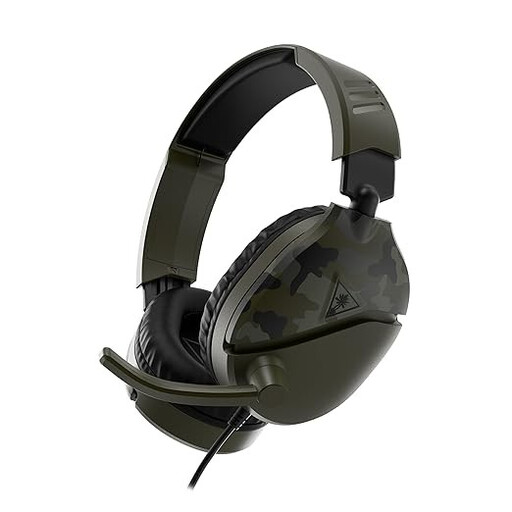
Turtle Beach Recon 70 wired gaming headset, 3.5mm, Green Camo

Turtle Beach Recon 70, Green Camo

A wired option for hosting a quiz from a fixed spot.

The product name lists a 3.5mm connection, a flip-to-mute microphone and PC compatibility. Check that your device has a suitable connection.

Joybuy

Logitech H540 wired USB headset

Logitech H540 USB headset

A wired headset for anyone staying at a fixed computer setup during the quiz.

The product name lists USB and a wired design. Check which USB port your computer has.

Joybuy

Logitech PC 960 wired USB headset

Logitech PC 960 USB headset

A wired option for presenting from a fixed computer setup.

The product name lists a USB headset. Check that the connection works with your quiz setup.

Joybuy
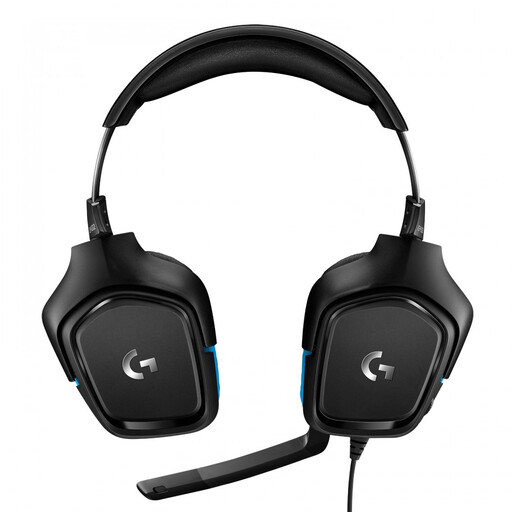
Logitech G G432 7.1 wired gaming headset

Logitech G G432 7.1

A wired headset for hosting quiz rounds from a fixed spot.

The product name lists a 7.1 gaming headset. The product description mentions 3.5mm and USB-DAC connection options; check which one works with your device.

Joybuy

Razer BlackShark V2 X 7.1 wired gaming headset

Razer BlackShark V2 X 7.1

A wired option if you host the quiz from a fixed spot.

The product name lists a 7.1 gaming headset. The product description mentions a 3.5mm connection; if your PC has separate audio and microphone ports, it says you’ll need a splitter.

Joybuy

Frequently asked questions

How can I check just before the quiz that my headset is being used?

Select the connected headset separately as the microphone and speaker in your quiz app, then make a test call. In Teams, you can choose both sources in the audio settings; if you’re using browser or device permissions, check those too. Microsoft Support explains these settings for Teams.

Should I turn up noise suppression for a music round?

Not without testing it first. Microsoft Support says the high setting in Teams filters out non-speech sounds and mentions sharing computer audio for music. This advice applies to Teams and not automatically to other quiz apps.

What can I try if a USB headset has no sound or microphone input?

Check the USB port, mute setting and selected input and output sources in your app. For the Logitech H390, Logitech also recommends trying another USB port and connecting directly to the computer rather than to a USB hub; these steps are specific to that model.

In the Netherlands, am I always entitled to exactly two years of legal warranty?

No. The Dutch government explains that you’re entitled to a product that works properly, and that its expected useful life depends on the product and the circumstances. If there’s a problem, the seller must provide a solution; a manufacturer’s warranty may offer additional cover.

Can I return a headset bought online if I don’t like the fit?

For many distance purchases, you have a 14-day cooling-off period, according to the Dutch government. Check the applicable terms and who the seller is: not every online transaction counts as a distance purchase.
