
Joining in while others are talking
You want to ask questions while other people in your home are talking. The position of the microphone and an easy-to-reach mute button are important things to consider.


For an online history lecture, a wired headset with a boom microphone and an easy-to-reach mute button is a sensible choice if you mainly want to ask questions while other people in your home are talking. If your priority is hearing the speaker clearly, focus on the fit and passive noise isolation for your ears. Microphone noise cancellation and noise isolation for your ears are different features. Also check the connection and test the microphone and sound in the app you’ll be using.
You want to ask questions while other people in your home are talking. The position of the microphone and an easy-to-reach mute button are important things to consider.
You want to follow the lecture clearly, so focus on the fit and noise isolation around your ears rather than just freedom of movement.
You may use different devices, so check the connection, compatibility with your computer or phone, and how well it works with your meeting app.
First decide whether your priority is speaking clearly or hearing the speaker. Then check the connection, controls and fit for your device and how you plan to use the headset.
| What to consider | What to look for | Who is this most important for? |
|---|---|---|
| Speaking clearly | Check the microphone’s position and whether there’s a mute button you can reach easily. Test the microphone with the room at its usual noise level. | If you want to ask questions while other people in your home are talking, you’ll want to know what your microphone picks up. Around 33% of consumers say speaking clearly is their main consideration. |
| Hearing the speaker | Check the fit and whether the headset is mono or stereo. Passive isolation and ANC are designed to reduce the sound you hear, not necessarily what your microphone picks up. | If room noise makes it difficult to follow the lecture, focus on your own listening experience. Around 27% of consumers say uninterrupted listening is their top priority. |
| Connection and app | Check that the exact USB connection is compatible and that the headset works with the device and meeting app you use. | If you switch between a computer and other devices, you’ll want to know in advance whether the headset connects directly and is recognised correctly. Around 20% of consumers focus on connection reliability. |
| Comfort and controls | Check the adjustability, ear cushions and position of the controls. If you choose a wireless model, also consider connectivity and charging. | For a longer lecture or if you’ll need to mute yourself frequently, a well-fitting headset with easy-to-reach controls is important. Around 20% of consumers prioritise comfort and controls. |
Noise isolation for your ears and microphone noise cancellation are different features. A quiet listening experience doesn’t automatically mean other people on the call won’t hear your housemates.
Work out which side of the conversation is affected by the noise and check that feature separately. If possible, make a test recording with the room at its usual noise level.
A product range may include mono or stereo sound, USB-A or USB-C connections, and different levels of app or platform support.
Compare the full model and variant name with the ports on your device, and check which accessories are included with the version you’ve chosen.
Audio playback while using the microphone can depend on the headset, computer and software.
Before the lecture, test speaking and listening at the same time on the device and in the app you’ll actually use.
Logitech positions the wired Zone Wired for calls in busy workspaces. The H390 is a USB computer headset with a boom microphone and in-line controls.
According to Jabra, the wired Evolve2 40 SE is available in mono and stereo versions, with different USB and UC/Teams variants.
The Blackwire 3325 range is worth considering if you’re looking for a wired stereo headset with a boom microphone. Connection options vary by version.
The wireless IMPACT 1000 range is worth exploring if freedom of movement matters. ANC is only relevant to versions that include it.
This selection includes wired headsets and earphones with microphones for online calls. Check that each model’s connection and design suit your device and listening preferences.
 No image available
Wired in-ear earphones for calls on a compatible USB-C device.
USB-C connection, built-in microphone, stereo sound and in-line controls.
 No image available
A wired stereo headset for calls and listening to media.
The version described has USB-A, two microphones, mute control and memory foam ear cushions. Check your device’s connection.
 No image available
A wired computer headset for anyone looking for an adjustable boom microphone and in-line controls.
The product information lists a noise-cancelling microphone, a mute indicator and a USB connection. Test the sound in your room.
 No image available
Wired in-ear earphones with a microphone for calls on a compatible USB Type-C device.
The product information lists in-line controls and microphone mute. Several ear tip sizes are mentioned.
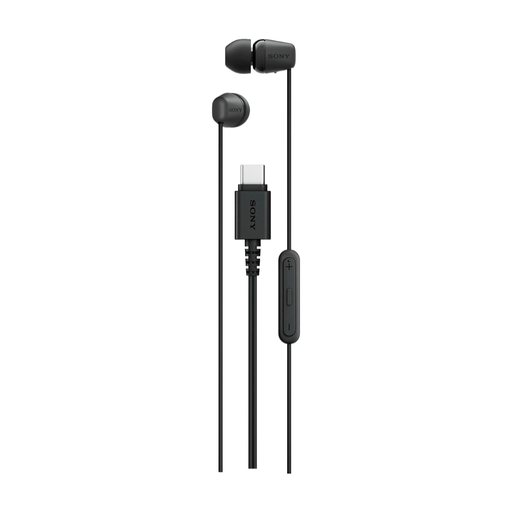 No image available
Lightweight, wired in-ear earphones for calls on a compatible USB Type-C device.
The product information lists a built-in microphone and call controls. Check that your device supports USB Type-C.
No, not on the basis of ANC alone. ANC and passive isolation are designed to reduce the sound you hear. Assess the microphone separately and, if possible, make a test recording with the room noise.
Check the connection and select the intended speaker and microphone in your meeting app. If you’re joining a meeting on Zoom, you can use its official test meeting in advance to check your device and connection settings.
Not always. Microsoft says that stereo playback while using the microphone on Windows 11 requires specific support from the computer, driver and Bluetooth LE Audio device. Without that support, playback may be mono.
Check the full model and variant name, the USB connection and which accessories are included with that version. Product ranges may differ in connection, mono or stereo sound, and compatibility with devices or apps.
According to ACM ConsuWijzer, ordinary online consumer purchases generally come with a 14-day cooling-off period after delivery, subject to exceptions that the seller must explain. If a product develops a fault too soon through no fault of your own, your statutory guarantee may entitle you to an appropriate solution. The manufacturer’s guarantee is separate.