If you usually stay at your computer, choose a wired headset with a connection and cable route that work for your desk. If you want to walk away during the lecture, compare wireless models with Bluetooth or a receiver that suits your setup. Also check that you can mute the microphone quickly and that the style suits how you want to hear the speaker while staying aware of your surroundings.
Who is this guide for?
Active questioner
You want to ask questions during the lecture and need a microphone you can position easily, with a mute control close to hand. Logitech and Jabra describe these features on specific headsets, but the design and where you speak from still matter.
Active sit-stand desk user
You change position or sometimes walk away from your desk while listening. Check the cable route and available length, or, for a wireless model, check the connection, receiver and charging method. Logitech and EPOS list model-specific options for this.
Focused listener
You want to follow the speaker clearly and choose deliberately between leaving one ear free and getting more isolation from background noise. The HP Poly Blackwire 3200 series offers mono and stereo wearing options; the specific version you choose matters.
What should you look for when buying?
Wired via USB
A good fit if: you usually stay at your computer and would rather not have to charge your headset.
Keep in mind: the cable limits how far you can move; also check whether you need the USB-A or USB-C version.
Wireless via Bluetooth or receiver
A good fit if: you regularly walk away from your desk during the lecture.
Keep in mind: check that the connection or included receiver works with your computer, and remember that the headset will need charging.
Wired via 3.5 mm
A good fit if: your device has a suitable headset socket.
Keep in mind: check that the socket also supports microphone input; a headphone output alone is not enough to confirm compatibility.
| What to consider |
What should you check? |
Who is this important for? |
| Clear speech and quick muting |
Check the position of the microphone boom, the mute control and which microphone is selected in your calling app. |
If I ask questions during the lecture, I want my voice to come across clearly and to be able to mute the microphone quickly. Around 33% of consumers prioritise clear speech. |
| Freedom of movement |
Measure the cable route with the desk at its highest setting; for wireless use, check the receiver and charging connection. |
I want to be able to change position without pulling the cable taut, or briefly walk away from my desk. Around 27% of consumers prioritise freedom of movement. |
| Connection to your device |
Note which ports are available and check whether a 3.5 mm socket also supports microphone input. |
Before I choose, I want to know whether both the sound and microphone will work through my computer. Around 20% of consumers prioritise compatibility with their own device. |
| Listening comfort and background noise |
Compare mono and stereo, and consider the fit, adjustability and type of ear cushions. |
If I want to follow the speaker clearly but still hear something of my surroundings, I look at the wearing style and level of isolation. Around 20% of consumers prioritise listening comfort and awareness of their surroundings. |
Buying pitfalls
-
Confusing microphone noise reduction with ANC for your ears
A feature that applies to the microphone does not automatically tell you how much background noise you will hear yourself.
Assess the microphone and listening isolation separately, using the specifications for the exact version.
-
Measuring only the distance from your computer
With a sit-stand desk, the cable must be able to run along the desk without being pulled taut, even when it is at its highest setting.
Compare the full route with the stated cable length, or choose a wireless connection that works with your computer.
-
Assuming a similar model name means it is the same version
USB variants and product generations can differ, so the connection or included receiver might not match what you need.
Check the full model name, port and box contents before placing your order.
-
Equating an extended warranty with your legal rights
In the Netherlands, the legal guarantee does not have a fixed duration. What you can expect from a product depends, among other things, on the product and the information provided. The Dutch government explains that the seller must resolve problems with faulty products.
Compare the terms of any additional cover with your existing rights before paying for it.
Brands worth considering
Logitech
The H390 is a wired USB option; the H151 is worth considering if your device has a suitable 3.5 mm headset socket.
- Logitech lists in-line volume and mute controls for the H390. The stated cable length is 1.9 m.
- According to Logitech, the H390 is available with USB-A and USB-C. Check which version and connection you need.
Jabra
The wired Evolve2 40 SE is worth considering if you are comparing USB versions, mono or stereo, and passive isolation.
- Jabra describes the Evolve2 40 SE as having three microphones and passively isolating ear cushions.
- Available versions differ in features such as USB-A or USB-C/A and Teams or UC variants. Jabra recommends keeping the microphone close to your mouth.
HP Poly
The wired Blackwire 3200 series is worth comparing if mono or stereo and the connection are important to you.
- HP Poly lists adjustability and mono and stereo wearing options; mono can leave one ear free.
- The series includes different connection options. Check the connection on the specific model you are considering.
EPOS
The ADAPT 260 is a wireless option to compare if you want more freedom of movement around your sit-stand desk.
- EPOS specifies Bluetooth and a USB dongle for this model.
- Check that the included receiver and connection work with your device, and remember that the headset will need charging.
JLab
The GO Work 2nd Gen is an option for comparing Bluetooth, a USB-C dongle and wired use within a single product range.
- JLab lists a microphone boom and several connection options for this generation.
- Check the generation and exact version; specifications for the 2nd Gen do not automatically apply to other GO Work models.
Headsets on Joybuy
These products are intended for joining an online lecture using a wireless or wired connection; check that each headset’s connection works with your computer.
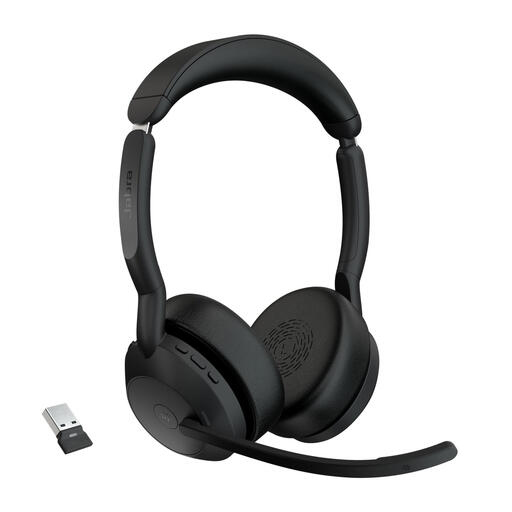 Image unavailable
Jabra Evolve2 55 Link380a MS Stereo
A good fit if you want to join the lecture wirelessly and manage the connection via Bluetooth or the included adapter.
The product information lists Bluetooth 5.2, connection to two devices, a Link380a adapter, three microphones and call-muting controls. The built-in battery needs to be charged.
View at Joybuy
 Image unavailable
Logitech PC 960 USB
A good fit if you stay at your computer and want a wired headset with an adjustable microphone boom and mute control.
The product information lists USB, stereo audio, an adjustable microphone boom and a mute indicator on the controls.
View at Joybuy
 Image unavailable
Jabra Evolve2 65 USB-A Black MS Mono
A good fit if you want to join wirelessly and have deliberately chosen a mono version.
The product information lists Bluetooth 5.0, a USB-A Bluetooth adapter, three microphones and call-muting controls. The built-in battery needs to be charged.
View at Joybuy
 Image unavailable
Trust Ayda wired USB headset
A good fit if you want a wired headset with a microphone you can mute using the headset controls.
The product information lists USB-A, a USB-C adapter cable and a flip-to-mute function.
View at Joybuy
 Image unavailable
Logitech H150 white 981-000350
A good fit if you use a device with a suitable 3.5 mm headset socket and want an adjustable microphone.
The product information lists stereo sound, a 3.5 mm connection, a 180 cm cable and volume and mute controls. If your device has separate headphone and microphone ports, you may need a splitter; according to the product information, one is not included.
View at Joybuy
Frequently asked questions
How should you set up your headset before asking a question during the lecture?
In your calling app, select the headset for both the speaker and microphone, then run a quick voice test beforehand. Position the microphone boom close to your mouth; Jabra gives this usage advice for the Evolve2 40 SE. Also check how to mute the microphone.
Do you need ANC to stop other people hearing background noise?
Not based on the name alone. The passive isolation Jabra describes for the Evolve2 40 SE concerns the sound you hear yourself. For your call, assess the microphone, its position and the mute control separately.
What if a headset you bought online is disappointing or faulty?
According to the Dutch government, for an applicable distance purchase you will generally have a 14-day cooling-off period; check the terms of your purchase. In the Netherlands, faulty products are covered by a legal guarantee with no single fixed statutory duration: what you can expect depends, among other things, on the product and the information provided. The seller must resolve problems with faulty products.


