
Applicant sitting near colleagues who are talking
You want to stop conversations around your desk reaching the interviewer. Making a test recording in your own space helps you assess what the microphone picks up.


For an online job interview in a noisy office, look for a well-positioned microphone boom and test how much background conversation the interviewer can hear during a trial call. Noise cancellation for your own ears is no substitute for testing the microphone. A wired headset may suit you if you’ll be sitting still and want a simple connection. Choose a wireless option if freedom of movement and quieter listening matter too, and check the exact model, connection and charge level.
You want to stop conversations around your desk reaching the interviewer. Making a test recording in your own space helps you assess what the microphone picks up.
You want to follow the questions clearly despite office noise, so pay attention to the fit and any noise isolation. ANC for the wearer is separate from how the microphone signal is processed.
You want to check in advance that your headset, connection and meeting app all work. Microsoft Support explains how to make a test call in Teams to check your microphone and speaker.
A good fit if: you’ll be sitting at a computer with a compatible USB port during the interview.
Keep in mind: the cable limits your freedom of movement, and USB-A and USB-C are different connections.
A good fit if: you want to hear less background noise yourself and be able to move around during the interview.
Keep in mind: check the exact model, connection and battery charge. ANC doesn’t tell you how much background conversation the microphone will pick up.
A good fit if: your device has a compatible headset socket and you want to use that connection.
Keep in mind: check whether the port supports both microphone and audio, and test the connection beforehand.
| What to consider | What should you check? | Who should consider this? |
|---|---|---|
| Microphone clarity | Check the microphone boom and any mute button. Make a test recording with background conversation similar to what you’d hear in your office. | If I want the interviewer to hear me clearly while my colleagues are talking, I test the microphone in that environment. Around 36% of consumers prioritise being clearly heard by the interviewer. |
| Hearing the questions clearly | Look for a comfortable fit and clearly stated noise isolation or ANC. Try listening in an environment with similar levels of noise. | If I want to follow the questions during the interview despite office noise, I also consider what I can hear. Around 29% of consumers prioritise quieter listening. |
| Connection and app | Check that USB-A, USB-C or 3.5mm matches your device, then select the headset as both the microphone and speaker in your meeting app. | If I want to be ready to start at the scheduled time, I check the port and audio settings beforehand. Around 21% of consumers prioritise a working connection and setup. |
| Freedom of movement | For a wireless model, check the connection, any adapter and the charge level. Test everything before the interview starts. | If I want to be able to get up from my laptop during the interview, a wireless connection matters. Around 14% of consumers say freedom of movement is their main consideration. |
Reducing background noise for yourself doesn’t automatically stop the microphone picking up your colleagues.
Check separately what the manufacturer says about microphone noise reduction and noise isolation for the wearer. Test the microphone in a similar environment.
USB connections can vary between models. Not every 3.5mm port supports both headset audio and a microphone either.
Check that the plug and port are compatible with your device. Some devices have separate audio and microphone ports, so you may need a suitable splitter; check whether one is included with the headset.
The wrong input source or a flat wireless headset could disrupt your interview.
Charge a wireless model beforehand and use the test feature in the app you’ll use for the interview.
The H390 and H151 are wired options with a microphone boom; the connection varies by model.
The Evolve2 65 Flex is a wireless option with microphone noise reduction and ANC; the Evolve 20 is a wired USB option.
The Blackwire 3320 USB-C is a wired office headset for anyone looking for a USB-C connection.
The ADAPT 160T ANC USB is a wired stereo option with ANC for the wearer.
The GO Work is a wireless on-ear option for anyone who values freedom of movement or switching between devices.
This selection includes wired and wireless headsets with a microphone. They’re for anyone who wants to check the connection and make sure their headset works with their own meeting app before an online job interview.
 Image unavailable
The product information describes a USB headset with a cardioid microphone for communication. Try it out to see how it sounds in your office.
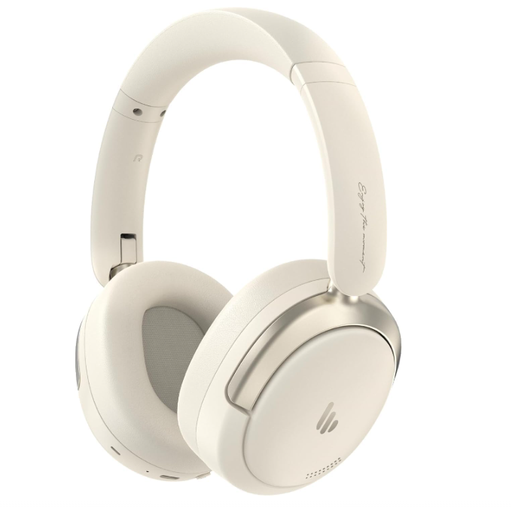 Image unavailable
This wireless option may suit you if you also want quieter listening and freedom of movement. Test the microphone and connection with the meeting app you use.
The product information lists Bluetooth 5.4, hybrid ANC, microphone noise reduction and a foldable design. Check the exact model and charge level before the interview.
 Image unavailable
This wired headset may suit you if your device has a compatible 3.5mm headset socket. Position the adjustable microphone boom near your mouth when testing it.
The product information lists in-line controls. Devices with separate audio and microphone ports may need a splitter; according to the product information, one isn’t included.
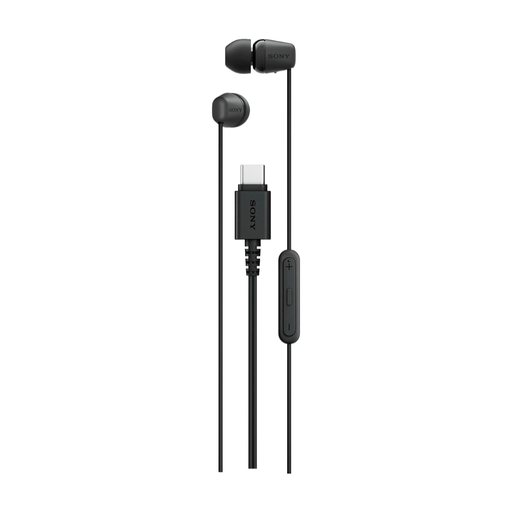 Image unavailable
This wired in-ear option may suit you if your device supports USB-C and you want to use a built-in microphone. Check the connection before the interview.
The product information lists a built-in microphone and in-line controls.
 Image unavailable
This single-sided USB headset may suit you if you’re looking for a wired office option. Check that the design works for the way you like to listen.
The product information lists a flexible microphone boom and a noise-cancelling microphone. Test the result in your own space.
No. ANC can reduce background noise for the wearer, while microphone noise reduction processes the microphone signal. Check both features separately and, if possible, listen to a test recording made in the room you plan to use.
Select the microphone and speaker you plan to use, then run a test beforehand. Microsoft Support explains how to make a test call in Teams for Windows or Mac; Zoom offers a microphone and speaker test. Also try it with background noise similar to what you’ll hear at work.
Microsoft Teams offers settings to reduce background noise during calls. Check which setting is available and listen to the result in your room. It can’t guarantee that all background conversation will disappear.
Adjust the headband for a comfortable fit and position the microphone boom level with your mouth. Also check that the microphone isn’t muted. Logitech gives this positioning advice for the H390; adjustments may vary by headset.