Start with a microphone designed to help reduce background noise for other meeting participants, then consider separately whether the earcups give you enough quiet to follow the conversation. For a fixed workstation, a wired USB headset is a practical choice. If you want to move around, compare wireless models by their adapters, charging options and exact Teams or UC version. Manufacturer specifications describe the features, but they can’t tell you how clearly your voice will come across in your workplace.
Who is this relevant for?
Someone who often speaks in meetings
If colleagues are talking nearby, look at the microphone features and assess them separately from the noise reduction for your own ears. Microsoft Support explains how to select your microphone and make a test call in Teams.
Someone who finds it hard to hear the meeting
If office noise distracts you from what others are saying, consider the fit, how well the earcups seal and whether they have ANC for your own listening. These features are different from microphone noise reduction.
Someone who moves between workstations
If you take your headset with you or move around during calls, check the wireless connection, any PC adapter, charging options and the right meeting version, as well as the microphone.
What should you look for when choosing?
First decide whether being heard clearly, hearing others well, freedom to move or wearing comfort matters most to you. Then check the features and connection options of the exact model.
| What to consider |
What should you check? |
Who is this important for? |
| How clearly your voice comes across |
Check the microphone features of the exact model and, if possible, make a test call in a similar working environment. |
If I often speak in a noisy office, I want to know how my voice sounds with colleagues in the background; around 36% of consumers say being heard clearly is their top priority. |
| Being able to follow the meeting yourself |
Compare the fit and any ANC in the earcups; this is not the same as microphone noise reduction. |
When background noise makes conversations difficult to follow, I pay attention to what I can hear and whether I still need to hear my colleagues; around 29% of consumers prioritise hearing the meeting. |
| Connection and freedom to move |
Check whether it uses USB-A or USB-C, which adapter is included and whether the model is suitable for Teams or your other meeting app. |
If I need to connect a headset to my computer or want to move around during calls, I want to know which connection and controls suit my workstation; around 21% of consumers say connection or freedom to move is their main consideration. |
| Wearing comfort |
Consider the headband, ear cushions and design; try the fit yourself if possible. |
If I wear a headset for long periods, I want it to feel comfortable; around 14% of consumers put wearing comfort ahead of the other considerations. |
Common mistakes when choosing
-
Assuming ‘noise cancelling’ means just one thing
ANC for your ears and microphone noise reduction serve different purposes. ANC for your own listening does not, by itself, tell you how clearly other participants will hear your voice.
Check the product specifications separately to see what the microphone does for your voice and what the earcups do for your listening experience.
-
Choosing a product family without checking the exact version
Teams and UC versions, bundles and connections can differ. A specification for a product range does not necessarily apply to every model in it.
Before ordering, check the full model code, what’s in the box, the computer port and the Teams controls you want.
-
Treating battery life as guaranteed usage time
For a specific Dutch Voyager Focus 2 Teams bundle, HP quotes up to 19 hours of talk time with ANC on. This manufacturer figure applies to the stated usage conditions and does not automatically apply to other versions or your working day.
Only compare battery life figures when they are based on the same stated usage conditions, and check whether the model you’re considering can be used with a USB cable.
Brands to compare
Logitech
The Zone Wired is a wired option for a fixed USB workstation. The Zone Wired 2 for Business Teams version is a separate model with ANC, according to its stated product specifications.
- Logitech describes the Zone Wired as having a dual microphone with noise reduction and in-line controls.
- The Zone Wired and Zone Wired 2 are wired options; check the exact Zone Wired 2 model and USB connection.
EPOS
The IMPACT 800 series is a family of wired office headsets to compare if you’re looking for microphone features and, potentially, ANC.
- EPOS’s technical data sheet lists USB-C with a USB-A adapter and a microphone boom for the series.
- ANC is available on ANC models. Check whether the exact version you’re looking at has this feature.
HP Poly
The Voyager Focus 2 is a wireless option for the office if you want to compare headsets with a microphone boom and adjustable ANC.
- HP says its Acoustic Fence feature provides microphone noise reduction.
- For a specific Dutch Teams bundle, HP quotes up to 19 hours of talk time with ANC on; check the connection and bundle contents for each model.
Jabra
The foldable Evolve2 65 Flex is a wireless option to compare if you take your headset between workstations.
- Jabra lists ClearVoice and hybrid ANC for this model; these are manufacturer claims, not the result of an independent comparison.
- According to Jabra, the MS and UC versions differ in their plug-and-play controls for Teams. Check which version suits the way you work.
Headsets at Joybuy
These Joybuy models are suitable for meetings in a noisy office, with wired and wireless options for different workstations.
 No image available
Jabra Evolve2 75 USB-A MS Teams
A wireless Teams model to consider if you want to move around during calls while also looking for noise reduction for your own listening.
The product description lists Bluetooth, connection to two devices, eight beamforming microphones and active noise cancellation.
View at Joybuy
 No image available
Logitech PC 960 USB headset
A wired USB option to compare for a fixed computer workstation where you speak regularly.
The product description lists an adjustable microphone boom, volume and mute controls, and background noise filtering for the microphone.
View at Joybuy
 No image available
Kingston USB Hi-Fi headphones with microphone
A wired USB option to consider if you speak regularly during meetings and want a microphone boom.
The product description lists a microphone boom that rotates 270 degrees and compatibility with Windows, Mac and Chromebooks.
View at Joybuy
 No image available
Trust Ayda wired headset for calls, USB-A
A wired option for online meetings if you’re looking for a USB-A connection and a microphone with noise filtering.
The product description lists a USB-C adapter cable, volume control and a flip-up microphone mute.
View at Joybuy
 No image available
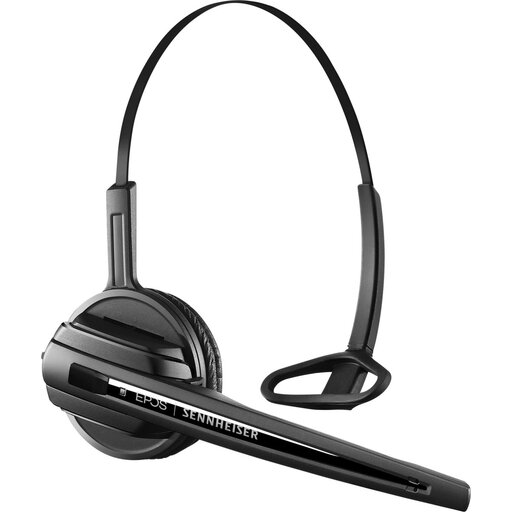
EPOS Sennheiser D10 DECT OE headset
A wireless office option to compare if you want to move around during calls and need a microphone boom.
The product description lists a noise-cancelling microphone boom, a range of up to 180 metres and 12 hours of talk time. A DECT-compatible device is required.
View at Joybuy
Frequently asked questions
How can you check that your microphone is set up correctly before a team meeting?
In Teams’ device settings, select your preferred speaker and microphone, then make a test call. Microsoft Support recommends checking your audio settings; if possible, compare how your voice sounds with ordinary office noise in the background.
Can noise reduction in Teams replace a suitable headset microphone?
No. Don’t rely on the software setting alone when choosing a headset. Teams has settings to reduce background noise, but they don’t prove that every nearby voice will be filtered out or that testing the headset in your own workplace is unnecessary.
Do you always need to buy the MS version for Teams?
No. According to Jabra, you can set up the UC version of the Evolve2 65 Flex as an audio device in Teams, but it doesn’t offer the same plug-and-play experience as the MS version. Check which meeting app and controls you need.
What are your rights regarding warranties and returns when buying online as a consumer in the Netherlands?
According to the Dutch government, there is no fixed statutory warranty period in the Netherlands. However, consumers are entitled to a product that works as it should and can contact the seller if it doesn’t. For online purchases from a business, you generally have a 14-day cooling-off period, subject to legal exceptions. Check the terms for your specific purchase, especially if your employer is ordering on a business account.


