
Voice-focused creator
You record spoken summaries and want to position the microphone correctly without having a separate stand on your desk. RØDE and Audio-Technica describe models with a microphone attached to the headset.


Start with a headset whose microphone boom you can position close to your mouth, then check that its connection is compatible with your recording computer. A headset designed for recording may need an XLR interface or a specific cable, while a USB model can be simpler to connect directly. Wireless gives you more freedom to move, but you’ll need to consider the receiver, charging and recording quality in your room.
You record spoken summaries and want to position the microphone correctly without having a separate stand on your desk. RØDE and Audio-Technica describe models with a microphone attached to the headset.
You want to record directly onto a computer at a small desk and need a connection that suits your device. Audio-Technica describes a USB-A version, while HyperX lists several connection options for the wired Cloud III.
You don’t want a headset cable across your desk while recording, and you’re happy to factor in a wireless receiver and charging. Logitech G describes the PRO X 2 LIGHTSPEED as a wireless headset.
Choose this option: if recording your voice is your priority and you have a compatible connection.
Bear in mind: the XLR version of the Audio-Technica ATH-M50xSTS needs a compatible audio interface or mixer. Also check which cable is suitable for the RØDE NTH-100M.
Choose this option: if you want to record without a separate XLR interface and need a compatible USB connection.
Bear in mind: check that the USB-A connection on the ATH-M50xSTS-USB is compatible with your computer. The Cloud III’s gaming and voice chat description is not a comparative test of film synopsis recordings.
Choose this option: if freedom to move and avoiding a headset cable on your small desk are important to you.
Bear in mind: check the receiver and compatibility with your recording device. The stated battery life and microphone performance are manufacturer specifications, not measurements of your recordings.
| What to consider | What should you check? | Who is this important for? |
|---|---|---|
| Clear voice recordings | Check whether the microphone boom is adjustable and make a test recording at your usual speaking volume. | If I want my film synopsis to be easy to follow, I want to position the microphone close to my mouth and listen back to my voice. Around 31% of consumers are said to prioritise voice recording. |
| Desk space | Consider where a headset cable or wireless receiver will go, and whether the microphone boom suits your working position. | If my desk is small, I don’t want a separate microphone stand taking up space, and I also pay attention to cables. Around 25% of consumers are said to prioritise having a clear workspace. |
| Compatible connection | Check the full model variant, your computer’s ports and whether your recording software recognises the microphone. | If I want to record without extra equipment, I want to know in advance whether the headset works directly with my computer. Around 25% of consumers are said to prioritise the connection. |
| Comfort | Check the fit and ear cushions, and review the returns policy. If possible, try the headset on before recording for a long time. | If I’m recording longer pieces, I want the headset to feel comfortable and stay a good fit while I listen back. Around 19% of consumers are said to prioritise comfort. |
According to Audio-Technica, the analogue Audio-Technica ATH-M50xSTS has an XLR microphone output. The USB model is a separate version with a different connection.
Before buying, check the full model name and the connections on the version you’ve chosen.
You may need a compatible audio interface or mixer for the XLR microphone connection.
HyperX describes the Cloud III as suitable for gaming and calls, among other things. This doesn’t show how its microphone will capture a spoken film synopsis in your room.
Make a short test recording in your own space and listen back before relying on product claims like these.
The Dutch government states that there is no fixed statutory warranty period in the Netherlands. It’s therefore worth assessing the cover offered by an additional plan separately.
Compare the terms of an extra plan with your existing rights, paying particular attention to cover for accidental damage.
The NTH-100M is a headset with a detachable microphone, designed in part for content creation and podcasting.
The ATH-M50xSTS family includes an analogue XLR version and a separate USB-A version.
The wired Cloud III is a gaming headset that HyperX also describes as suitable for voice chat and calls.
The MMX 300 PRO is a closed-back, wired headset with an analogue connection.
The PRO X 2 LIGHTSPEED is a wireless gaming headset with a detachable microphone.
These Joybuy products are headsets with microphones for recording voiceovers at a small desk, including wired models with USB or 3.5 mm connections.
 No image available
A headset with a microphone for recording without a separate microphone stand on your desk.
The product description lists a cardioid microphone and a weight of 285 g.
 No image available
A USB headset to consider if you want to position the microphone close to your mouth.
The product description lists USB and a microphone boom that rotates through 270 degrees.
 No image available
A wired headset for anyone who wants to use a USB connection on their computer.
The product description lists USB-A and a USB-C adapter cable. The microphone can be flipped up to mute it.
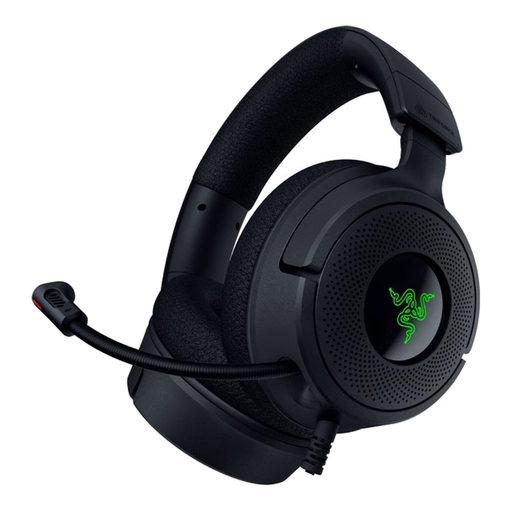 No image available
A wired headset to consider if you’re looking for a foldable microphone and a USB connection.
The product description lists a foldable microphone and USB-C and USB-A connections.
 No image available
A wired headset with a microphone for recording without a separate microphone stand.
The product description lists a cardioid microphone, a 3.5 mm connection and a splitter included for PCs with separate ports. The stated microphone position is approximately 1–2 inches from the mouth.
For the microphone signal from the analogue ATH-M50xSTS, Audio-Technica lists an XLR connection to an audio interface or mixer. According to the manufacturer, the separate ATH-M50xSTS-USB version has USB-A for a direct connection to a computer.
First, connect the correct version, select the intended microphone input in your recording software and read a short piece of text at your normal volume. With the RØDE NTH-100M, also check that the detachable microphone is securely attached; RØDE describes it as having a rotating mount.
If the product is faulty, contact the seller. According to the Dutch government, there is no fixed statutory warranty period in the Netherlands. Normal wear and tear and damage caused by the user are not the same as a defect.
For online purchases from a business, the Dutch government says that a 14-day cooling-off period applies in many cases. Check the terms and any exceptions that apply to your specific purchase.