
Quiet-speaking presenter practising
Wants to record the talk and listen back to check whether the words are clear, so microphone position and a suitable recording connection are important.


For practising at home and listening back, a USB computer headset with an adjustable microphone boom is a practical choice, provided it’s compatible with your computer; Logitech specifies USB-A for the H340. If you want to practise while walking around, choose a separate headworn microphone that’s compatible with your recording or sound equipment. For wireless use in a museum in the Netherlands, also check the frequency at the venue. A microphone on its own won’t amplify your voice for an audience.
Wants to record the talk and listen back to check whether the words are clear, so microphone position and a suitable recording connection are important.
Wants to practise hands-free and move naturally, perhaps using a setup similar to the one they’ll use for the presentation. For wireless use in the Netherlands, you’ll need to check the frequency at the venue, according to the Dutch Authority for Digital Infrastructure.
Already has a computer, recorder, mixer or bodypack and wants to check whether the microphone is compatible with the connection and any power requirements of that equipment.
| What to consider | What should you check? | Who is this important for? |
|---|---|---|
| Clarity when speaking quietly | Position the microphone boom near your mouth and listen back to a recording at a normal speaking volume. The polar pattern can help you consider how much sound from outside the speaking direction is picked up, but it doesn’t guarantee clarity. | If I speak quietly, I want to be able to assess my words clearly after practising. Around 33% of consumers put clarity first. |
| Freedom of movement | Decide whether a cable will be suitable while practising or whether you’ll need a wireless transmitter and receiver. For wireless use, check the frequency for your location in the Netherlands. | If I want to practise walking around the room and gesturing, I’ll look for a setup that allows me to do that. Around 27% of consumers put freedom of movement first. |
| Connection to a computer or recorder | Check the input and any microphone power requirements: the RØDE HS2 needs a 3.5mm microphone input with plug-in power for a direct connection; the Audio-Technica PRO8HEx has a three-pin XLR output. | If I mainly want to record on my computer without a separate transmitter or mixer, I’ll check the connection route first. Around 20% of consumers prioritise simple computer recording. |
| Fit during a talk | Check whether the headband and microphone boom are adjustable, and whether the cable or ear cushions could get in the way. Trying it on will help you make your final choice. | If I want to wear it for a full practice talk, I’ll look for a headset that’s easy to adjust and doesn’t get in the way. Around 20% of consumers put wearing comfort first. |
A standalone headworn microphone isn’t automatically a complete setup that lets an audience hear you. Models such as the RØDE HS2, Audio-Technica PRO8HEx and Shure PGA31-TQG have specific connections and requirements for use.
First decide whether you only want to record or also want an audience to listen in. Then check the complete signal chain, including the recording input, transmitter, receiver and any amplification.
You may need additional recording or amplification equipment for your chosen setup.
A plug that fits physically doesn’t confirm that the microphone is electrically compatible with the input or transmitter. The HS2, ME 3 and PGA31-TQG each have their own connection and usage requirements.
Compare the full model designation with the documentation for the input or transmitter, including any power requirements.
According to the Dutch Authority for Digital Infrastructure, available frequencies vary, and some bands require a licence.
Before buying and using your chosen set, check its frequency for the intended location in the Netherlands.
The H340 is designed for anyone who wants to practise a talk on a computer and listen back.
The HS2 is a separate headworn microphone for hands-free speaking and recording with compatible equipment.
The wired PRO8HEx is suitable for a setup with a compatible three-pin XLR microphone input.
The PGA31-TQG is an option if you use or are considering a compatible Shure wireless bodypack.
The ME 3 is a cardioid headworn microphone for use with a compatible wireless system.
Below are Joybuy product picks for hands-free speaking and practising with a compatible device. Connections and features vary by model; a headset or earbuds on their own don’t make up a sound system for an audience.
 No image available
A wired headset option for practising with a device that has a compatible connection.
Wired with a 3.5mm connection; flip-up mic with mute function. The product name lists PC, PS5, Switch 2 and Xbox Series X|S.
 No image available
A wired USB headset to consider if you want a microphone for computer use.
The product description mentions a cardioid microphone and a USB connection for PC. The polar pattern isn’t a measure of how clearly a quiet voice can be heard.
 No image available
A headset option for hands-free speaking; check that the connection options are compatible with your practice equipment.
The product description mentions Bluetooth and wired use with a USB-C cable. The microphones and HD Voice listed don’t prove measured clarity for a quiet voice.
 No image available
A computer-focused headset option to consider for practising and recording a talk.
The product information lists USB-A, a USB-C adaptor cable and a flip-up mic with mute function. It’s a wired headset and doesn’t offer wireless freedom of movement on its own.
 No image available
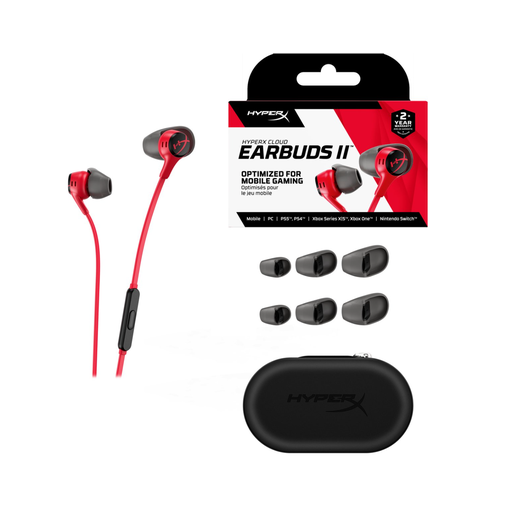
An option to consider if earbuds with a microphone suit your practice setup; this model isn’t a headband headset.
The product information lists a 3.5mm TRRS connection and an in-line omnidirectional microphone. Some computers with separate audio and microphone connections may need a splitter.
No, not if you mainly record at a computer: a compatible USB headset may be another option. Wireless is most relevant if you want to move around without a cable; in that case, also check that the transmitter, receiver and recording or amplification equipment work together.
Adjust the microphone boom while speaking at a normal volume, then listen back to a recording. Logitech recommends positioning the H340 boom at mouth level; check the position again if you move your head a lot.
Check the full model variant, connector, microphone input and any power requirements. According to RØDE, the HS2 needs a 3.5mm input with plug-in power for a direct connection; the PRO8HEx has an XLR connector, while the PGA31-TQG is designed for compatible Shure bodypacks.
It depends on the system and the frequency you choose. According to the Dutch Authority for Digital Infrastructure, a licence usually isn’t needed for wireless microphone use, but you must use the correct frequency band; some bands require a licence. Check the frequency for the museum you plan to visit before using the set.
Contact the seller if it’s faulty. In the Netherlands, there’s no fixed statutory guarantee period for all products; according to the Dutch government, this is because products don’t all last the same length of time. For online purchases from a business, you’ll also often have a 14-day cooling-off period, subject to legal exceptions.