If you mainly record on a computer and don’t have an audio interface, choose a wired USB headset with a connection that’s compatible with your device. If you already have a suitable audio interface and want a separate broadcast microphone, an XLR headset could be a good fit, but check the headphone connection too. Make a test recording before you practise: manufacturers’ noise-cancellation claims don’t necessarily tell you how natural your storytelling voice will sound.
Who is this guide for?
Laptop storyteller
You want to record and listen back to an introduction and a story without extra recording equipment. Check the headset connection and test the recording level with a sample recording. Logitech describes the H390 as a computer headset, while Audacity explains how to connect a microphone and record.
Storyteller in a shared space
You may be practising with background noise and want to check that your voice remains clear. A quiet spot and a test recording are useful, alongside the manufacturer’s description of the microphone. Trust and Audio-Technica describe the features and connections of their headsets, while Audacity explains how to record with a microphone.
Storyteller with recording equipment
You have an audio interface or want a more advanced recording set-up. Make sure the microphone and headphone connections are compatible: Audio-Technica lists separate connections for the BPHS1, and Audacity explains how to use an interface with an XLR microphone.
What should you look for?
Wired USB headset
A good fit if: you want to record directly on a computer without an audio interface.
Bear in mind: the cable limits how far you can move; also check that the USB connection is compatible with your computer.
Wireless headset
A good fit if: you want more freedom to move while telling your story.
Bear in mind: make sure pairing, the recording source and battery charge are all sorted before a longer session.
XLR broadcast headset
A good fit if: you already have a suitable audio interface or deliberately want a more advanced recording set-up.
Bear in mind: the microphone and headphone connections are separate; this isn’t a complete USB headset.
| What to consider |
What to look for |
Who should consider this? |
| Connection |
Check whether the exact model uses USB-A, USB-C or XLR. Select the correct microphone as the input in your recording software. |
If I want to record on my computer without extra equipment, the connection needs to work straight away. Around 34% of consumers say being able to connect directly is their main purchasing concern. |
| Voice levels |
Test both a quiet introduction and your loudest storytelling passage, and set the input level in advance. |
I want to record softer sentences clearly without louder passages distorting. Around 27% of consumers prioritise control over changes in voice level. |
| Background noise |
Listen back to a test recording in the room where you’ll be practising; assess both background noise and the sound of your voice. |
If I’m not practising in a completely quiet room, I want to know whether my voice still comes across clearly. Around 20% of consumers prioritise the recording environment. |
| Fit and freedom to move |
Check the style, adjustability, cable length or battery life, and whether you could accidentally mute the microphone. |
I want to wear it comfortably and tell my story freely, without having to search for a cable or mute button during practice. Around 19% of consumers give fit or freedom to move top priority. |
Avoiding common buying mistakes
-
Assuming a microphone for calls will deliver better storytelling audio
A manufacturer’s description of noise cancellation doesn’t prove how clear or natural your own voice will sound. Your recording environment also makes a difference.
Make test recordings in the room where you practise, including both quieter and louder storytelling passages, and listen back to them.
-
Assuming different versions have the same connection
Product names can refer to versions with different connections. Trust describes the Ayda USB-ENC as a USB model, while a separate product description for the wired Ayda lists a 3.5mm connection.
Before buying, check the full model number, port and any adapter included.
-
Treating an XLR headset like a USB headset
The Audio-Technica BPHS1 has an XLR microphone connection and a separate 6.3mm headphone connection. Audacity explains that an XLR microphone needs an audio interface to connect to a computer.
Check both signal paths and make sure you have a suitable audio interface and headphone connection before choosing this set-up.
Brands to consider
Logitech
Logitech describes the H390 as a wired computer headset, available with USB-A or USB-C. Check which connection comes with the model you choose.
- The manufacturer lists on-cable volume and mute controls, as well as an adjustable microphone boom.
- The description of clear calls isn’t an independent test of spoken stories.
Trust
Trust describes the Ayda USB-ENC as an on-ear computer headset and the Ayda Wireless ENC as a separate wireless version.
- For the USB-ENC, Trust lists USB connectivity and a microphone that mutes when you flip it up.
- Claims about background noise and battery life come from the manufacturer, not independent recording tests. Check the version and connection.
Audio-Technica
Audio-Technica describes the BPHS1 as a broadcast headset for a set-up with separate microphone and headphone connections.
- The manufacturer specifies a dynamic cardioid boom microphone, closed-back earcups, a 3-pin XLR microphone connection and a 6.3mm headphone plug.
- The BPHS1 isn’t a straightforward single-plug USB option; check that it’s compatible with your recording equipment and headphone connection.
HP Poly
HP describes the Blackwire 3200 series as wired computer headsets available in different wearing styles and connection types.
- HP lists mono and stereo wearing options, as well as an adjustable headband for the series.
- The series includes several versions; check the connection and features of the exact model.
Headsets at Joybuy
This selection includes wired USB headsets and a wireless headset for recording on a computer. Before choosing, check that the connection and the freedom to move you want suit your practice set-up.
 No image available
Logitech PC 960 USB headset
A wired USB headset for recording on a computer, with a microphone you can position or mute while practising.
The description lists USB, an adjustable microphone boom, and volume and mute controls. Requires a USB port; the headset is wired.
View at Joybuy
 No image available
Logitech H340 USB headset, black
A wired USB headset for recording directly on a computer, with an adjustable microphone boom.
The description lists USB, an adjustable microphone boom and an adjustable headband. Requires a USB port; the headset is wired.
View at Joybuy
 No image available
Jabra Evolve2 65 USB-A, black, MS, mono
A wireless headset for more freedom to move while telling your story, with a USB-A Bluetooth adapter for connecting.
The description lists Bluetooth via the included adapter and three microphones. The headset needs charging.
View at Joybuy
 No image available
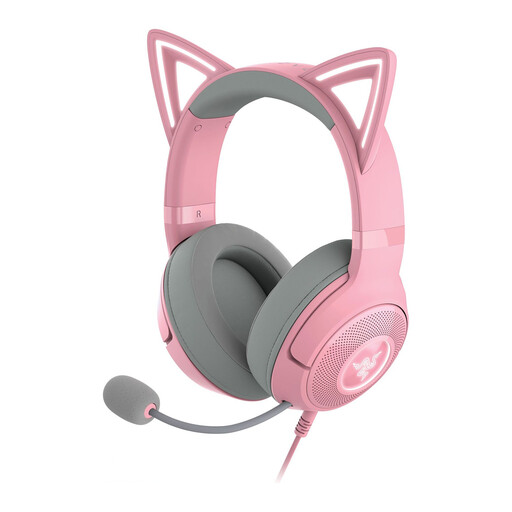
Razer Kraken Kitty Edition V2, Quartz
A wired USB headset with a detachable microphone, if that feature is important to you.
The description lists USB connectivity, a detachable microphone and an adjustable headband. Check that the USB connection is compatible with your computer or recording set-up.
View at Joybuy
 No image available
Edifier G2II USB headset for PC, black
A wired USB headset for PC use, with microphone and volume controls on the inline remote.
The product information lists USB and microphone and volume controls on the inline remote. Requires a compatible USB port.
View at Joybuy
Frequently asked questions
How can you stop your introduction sounding too quiet and your story becoming distorted?
First, select the correct microphone as your input and test it at the volume you’ll use when telling your story. Audacity recommends peaks between −18 dB and −6 dB for normal speech; at 0 dB, clipping occurs and can’t be fixed afterwards.
Can you connect an XLR broadcast headset directly to your laptop?
Not using the XLR microphone connection alone: you need a suitable audio interface to connect an XLR microphone to a computer. With the Audio-Technica BPHS1, also check the separate 6.3mm headphone connection.
What can you do if you hear yourself with a delay while practising?
Check whether software monitoring is switched on. The sound may come back through your computer with a delay; direct monitoring is only possible if your equipment actually supports it.
Can you publish a practice recording of a story you’ve read aloud?
Making a recording for your own use isn’t the same as sharing or publishing it. The Dutch government says that permission from the creator is generally required to use a copyright-protected text; you may not share or publish a private copy made for your own use. Permission from another creator isn’t relevant if the text is your own original work.
What should you consider if a recording includes other people’s voices?
Consider separately whether you’re making other people’s personal data public and what legal basis applies. The Dutch Data Protection Authority states that publishing other people’s personal data online generally requires their consent. The limited exception for purely personal or household use doesn’t automatically apply to public sharing.


