
The pronunciation-focused storyteller
You listen back to your takes to assess your pronunciation, tone and clarity. A sample recording using your own voice can help you decide whether the sound suits your practice.


Choose a headset with an adjustable microphone boom and a connection supported by your recording device. Record a sample using your own text to assess how your voice sounds. For a series of short takes, a wired USB headset with a mute button offers a straightforward setup. If you want to record and listen back through the headset, you may need to check the cable and ports more carefully. Noise cancellation for calls does not guarantee natural-sounding voice recordings.
You listen back to your takes to assess your pronunciation, tone and clarity. A sample recording using your own voice can help you decide whether the sound suits your practice.
You want to be able to start again quickly after each recording and compare takes individually. So check the mute setting, selected input source and recording controls.
You might use both a computer and a tablet, for example. Check the exact connection type and make sure your device and recording app support the microphone.
A good fit if: you mainly record short takes on a computer and have the right USB port available. The Logitech H390 is one example, with USB-A and in-line controls.
Bear in mind: USB-A and USB-C are not interchangeable. Also check that your recording software is using the headset microphone as its input.
A good fit if: you switch between devices and the version you choose connects to a port with microphone input. For the Poly Blackwire 5220 version 8X231AA, HP lists USB-C, a USB-A adapter and 3.5 mm.
Bear in mind: these connection options apply to the version specified. Check the model variant and any adapter you may need before ordering.
A good fit if: you want to listen back to your recording and storytelling voice straight away. RØDE positions the NTH-100M for uses including podcasting and content creation.
Bear in mind: according to RØDE, the microphone works with the supplied TRRS cable. If your device has separate microphone and headphone ports, the supplied splitter may be useful.
A good fit if: freedom of movement matters more to you than a wired setup.
Bear in mind: check the connection mode and battery level, and test the microphone on the device and in the app you use to record.
| What to consider | What to look for when buying | Who it matters to |
|---|---|---|
| Clarity and voice quality | Choose an adjustable microphone boom and listen to a sample recording of your own text in the room where you practise. Assess the recorded voice and how it handles background noise separately. | When I listen back to my pronunciation, I want a clear voice and a sound that suits my storytelling voice; around 36% of consumers rank voice quality as their top buying priority. |
| Multiple short takes | Check where the mute button is and make some test recordings. See whether the headset is selected as the input in your recording software; the Audacity Manual explains how to record on a new or existing track. | When recording a series of takes, I want to be able to start again quickly and check the mute setting straight away; around 29% of consumers prioritise controls for short takes. |
| Connection to your device | Note which ports are available, check the exact headset variant and make sure the connection supports microphone input. With separate 3.5 mm ports, you may need a suitable splitter. | When I switch between devices, I want to be sure the microphone works with my recording device; around 21% of consumers put compatibility first. |
| Fit and listening back | Check the adjustability and type of ear cushions. Review the returns policy if you cannot try the headset on first. | When I want to listen back straight after a take, the headset needs to feel comfortable; around 14% of consumers give fit and listening back top priority. |
Recording quality and how a headset handles background noise are two different things. A claim about call quality does not necessarily tell you how your voice will sound in a storytelling recording.
Make a sample recording using your own voice and compare its clarity and tone in the room where you practise.
A plug that fits does not guarantee that your device and recording app will recognise the headset microphone as an input. The headset variant and any adapter you need also matter.
Check the exact version, the available ports and microphone support before ordering.
Some connections may require a suitable adapter or splitter.
ACM ConsuWijzer explains that statutory warranty in the Netherlands depends on what you could reasonably expect from the product. There is no general statutory period that is always exactly two years.
Distinguish between your statutory rights against the seller and any additional manufacturer’s or paid-for warranty.
The H390 is a wired computer headset with a USB connection.
RØDE positions the NTH-100M for uses including podcasting and content creation.
The Blackwire 5220 is a wired headset; check its connection options for the specific version you choose.
The PC 8 USB is a stereo USB headset for computer use, with in-line controls.
The Evolve2 40 is a wired headset available in different connection and wearing styles.
This selection at Joybuy includes headsets for short takes and listening back to audio. For each model, check that the microphone and connection work with your device and recording app.
 Image unavailable
This wired over-ear headset has a detachable, flexible microphone and physical mute controls, which may be useful if you want to control the microphone directly between short takes.
3.5 mm connection; volume controls; 50 mm drivers.
 Image unavailable
The flip-up microphone and headphone playback make this a possible wired setup for recording and listening back. Test the sound of your recording using your own voice.
3.5 mm connection and USB audio adapter; directional microphone.
 Image unavailable
These over-ear headphones may suit listening back without a headset cable. Check the wireless connection and make a test recording before relying on them for storytelling recordings.
Wireless; up to 60 hours of battery life according to the product name; four beamforming microphones for calls; supplied 3.5 mm audio cable.
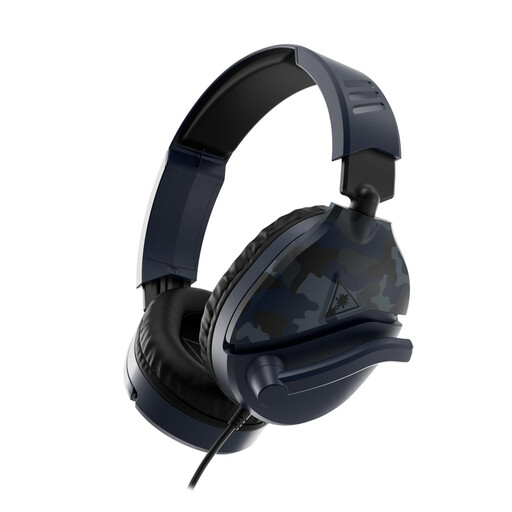 Image unavailable
This wired headset has a microphone boom that flips up to mute, which is handy if you want to control the microphone physically between short takes.
3.5 mm connection; volume wheel.
 Image unavailable
This wired headset has a microphone that flips up to mute. Check that your recording device’s 3.5 mm connection supports microphone input.
3.5 mm connection; flip-to-mute microphone.
First, select the headset as your input and check the recording level with a test sentence. The Audacity Manual explains how to record on a new or existing track. Listen back after your first take before carrying on. The controls vary between software versions.
No, you cannot assume that it will. Jabra states that not all USB-C devices or apps support audio with the Evolve2 40. Check the headset variant, device and recording app together.
Check the physical mute setting, the selected input source and whether your computer is receiving audio from the headset. These checks help you review the input settings, but they do not in themselves prove that the headset is faulty.
For an online purchase, you generally have a statutory 14-day cooling-off period from delivery, subject to exceptions explained by ACM ConsuWijzer. Your statutory rights if a product does not meet reasonable expectations are separate from the manufacturer’s warranty. ACM ConsuWijzer states that there is no general statutory warranty period of exactly two years.