
Softly spoken sports commentator
You want to record a quiet voice clearly, so you’re paying attention to microphone position, connections and adjustable recording gain. Audio-Technica and Shure offer guidance on microphone placement and recording.


Choose based on where you’ll be recording and the connections on your recorder or computer. For a noisy sports venue, a closed-back broadcast headset with a directional microphone could be a good fit, while USB can be convenient when recording on a computer. A headset with a 3.5mm connection will only work if your equipment also supports the microphone signal. Position the microphone carefully, set the recording gain and make a test recording at your intended location.
You want to record a quiet voice clearly, so you’re paying attention to microphone position, connections and adjustable recording gain. Audio-Technica and Shure offer guidance on microphone placement and recording.
You’re recording among crowds and other sounds, and want to monitor your recording without having to reposition the microphone repeatedly. Audio-Technica and Sennheiser describe broadcast headsets designed for broadcasting and production environments.
You’re looking for a headset that works with both the microphone input and headphone output on your recording equipment. Sennheiser, Audio-Technica and RØDE describe models with different connections and cable configurations.
The main choice comes down to microphone placement, background noise and finding a connection that suits your recording equipment.
| What to consider | What should you check? | Who is this most important for? |
|---|---|---|
| Clarity of a quiet voice | Check whether you can position the microphone close to your mouth and whether the recorder lets you adjust the recording gain. When you make a test recording, listen out for the quietest words too. | If I speak softly, I want my voice to remain clear without relying solely on extra gain. Around 36% of consumers prioritise clarity for a quiet voice. |
| Noise at the venue | Check the microphone’s polar pattern and whether a windscreen is included with the version you’re considering. A directional microphone won’t guarantee that crowd noise or wind disappears. | When reporting from the touchline, I want my voice to come through while taking crowd noise and wind into account. Around 29% of consumers say intrusive background noise is their main concern. |
| Connection and monitoring | Compare the exact connectors with the microphone and headphone inputs on your equipment. Also check whether you can hear yourself while recording. | If I’m using a computer or field recorder, I want to know in advance that both the microphone signal and monitoring will work. Around 21% of consumers prioritise connection and monitoring. |
| Comfort and maintenance | Consider the fit and type of ear cushions. Check which cables, microphones or cushions are replaceable for the specific version. | For a longer report, I want a comfortable headset with replaceable parts if needed. Around 14% of consumers say comfort and maintenance matter most. |
How well the ear cups block sound, the microphone’s polar pattern and how the recording signal is processed are all different features. A quiet voice will still depend on microphone position and settings.
Make a short test recording using your own voice and the expected background noise. Assess the recorded microphone signal, not just what you hear through the ear cups.
Headsets can connect the microphone and headphones via separate connectors, USB or TRRS. A device with only a headphone output won’t automatically record the microphone signal too.
Compare the connectors on the exact headset version with the inputs on your recorder or computer, then test that both recording and monitoring work.
Equipment with separate microphone and headphone ports may need a suitable splitter or connection cable. Check which accessories are included with the version you choose.
Not every frequency band is available in every location, and some bands require a licence. This doesn’t apply to wired headsets.
Before use, check the specific frequency and location against the information provided by the Dutch Authority for Digital Infrastructure.
Audio-Technica positions the BPHS1 for news and sports broadcasting. The ATH-M50xSTS and ATH-M50xSTS-USB are separate versions with different recording connections.
The HMD 300 X3K1 and HMD 26 are broadcast headsets that Sennheiser describes as suitable for production environments, among other uses.
The NTH-100M combines over-ear headphones with a detachable headset microphone for broadcast and podcast use, among other applications.
The WH20 is a standalone dynamic headset microphone for anyone who already has headphones and recording equipment.
This selection features wired headset options with microphones. For a sports report, check that the connections suit your recorder or computer, and test how your voice sounds when recorded at your intended location.
 No image available
Could be suitable if you’re looking for a wired headset; check that your recorder supports the microphone signal via the connection you choose.
The product name specifies a 3.5mm connection and a flip-to-mute microphone.
 No image available
A wired option to consider if the 3.5mm connection is compatible with your recording equipment’s microphone input.
The product name specifies a flip-to-mute microphone and compatibility with Nintendo Switch, Switch Lite, Switch OLED, PC and mobile devices.
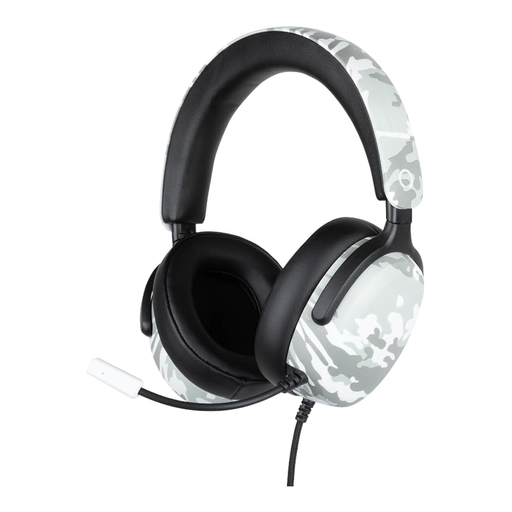 No image available
Could be worth considering if you’re looking for a flexible microphone boom. Position the microphone towards your mouth as directed in the product instructions, then assess the sound with a test recording.
The product name specifies a wired 3.5mm connection, a microphone and a 1.5 m cable.
 No image available
Could be suitable for recording on a computer with a compatible USB connection. Check that the microphone is selected as the input in your recording software.
The product name specifies a USB connection and built-in microphone.
 No image available
Could be an option for recording on a computer if the USB connection and software work with the headset. Test how a quiet voice sounds at your intended location beforehand.
The product name specifies a wired USB Type-A headset. The product description says it is not intended for outdoor use.
Position the microphone boom according to the instructions for your model, then record a passage using your usual speaking voice. Listen out for the quietest words and background noise, and adjust the gain on your recording device. Extra gain won’t make up for poor microphone placement or acoustics.
Yes. RØDE describes the supplied splitter as suitable for separate 3.5mm microphone and headphone ports. Then check in your recording software that the microphone signal is coming through.
Check whether the version includes the cable, splitter or windscreen you need, and whether parts such as cables or ear cushions can be replaced. If the headset is sold without a cable, find out which compatible cable you’ll need.
Not always. According to the Dutch Authority for Digital Infrastructure, wireless microphones generally don’t require a licence, but some frequency bands do. You’ll need to use the right frequencies and take the location into account, so check before using the system. This frequency requirement doesn’t apply to a wired headset.
According to the Dutch government, distance purchases generally come with a 14-day cooling-off period, subject to exceptions. You also have statutory rights in the Netherlands if a product is faulty; there is no fixed statutory guarantee period. Contact the seller if your product is faulty.