Who is this buying guide for?

Home speakers who listen back to their recordings

If you practise both language versions using a computer or another recording device, listening back can help you assess your voice, pace and clarity. Logitech and RØDE describe products for recording and listening, with connections that vary by model.

Speakers who want to practise quietly in the evening

For repeated practice, look for a comfortable fit and easy controls for playback volume and muting. What you hear and what the microphone records are two separate considerations. Product information from Logitech, Jabra and RØDE describes different models and features.

Speakers who want to recreate a stage setting

If you want to practise while walking around or gesturing, check that the microphone is compatible with the transmitter and sound system you use. Shure specifies that the PGA31 is for compatible bodypacks with a TA4F/TQG connection.

What should you look for when choosing?

Wired USB computer headset

Choose this option: if you practise on a computer, record your voice and want to listen back straight away. Check that the USB model is compatible with your device and is recognised as a microphone.

Bear in mind: the cable restricts your movement, and a USB headset is not necessarily suitable for a venue sound system.

Over-ear headset with detachable microphone

Choose this option: if you want to listen back and use a microphone with a single headset, and your device supports the required headset connection.

Bear in mind: RØDE says the NTH-100M microphone works with the supplied TRRS cable. A connection that only carries headphone audio is not sufficient.

Presentation microphone with a separate transmitter or sound system

Choose this option: if you want to practise moving around and positioning the microphone as you would during a performance, and already have a compatible sound system or plan to buy one.

Bear in mind: the Shure PGA31 is a microphone for compatible Shure bodypacks, not a complete headset or standalone wireless system.

What to consider What to look for when buying Who is this important for?
Clear test recording Check the microphone position and listen for plosive sounds, changes in volume and background noise in a recording. A manufacturer's claim does not prove how your voice will sound. If I want to assess both language versions, I need to be able to hear my voice clearly when I listen back. Around 36% of consumers prioritise clarity in a test recording.
Connection to your recording device Check whether your device has USB-A, USB-C or a suitable headset connection, and whether the microphone works as an input. Don’t assume an adapter or splitter is included or compatible. When I record at home, the microphone needs to work with my own device; being able to play audio is not enough. Around 29% of consumers prioritise having the right connection.
Listening back and wearing comfort Try the fit for yourself and choose mono or stereo to suit your preference. Noise isolation around your ears is different from background noise in a microphone recording; start with the playback volume low. When practising repeatedly in the evening, I want to listen comfortably and control the volume. Around 21% of consumers prioritise listening and wearing comfort.
Stage setup Check that the microphone, bodypack, receiver and sound system are compatible. For the Shure PGA31, Shure specifies a TA4F/TQG connection for compatible bodypacks. If I want to recreate my performance while moving freely, the microphone needs to work with the transmitter and sound system I use. Around 14% of consumers prioritise a stage-ready setup.

Avoid common buying mistakes

  • Mistaking a stage microphone for a complete headset

    The Shure PGA31 is designed for compatible bodypacks and is not a standalone USB recording and playback device. You may therefore need other components to record and listen back.

    Before buying, work out which components and connections you already have.

    This option may require a compatible bodypack, receiver and separate listening equipment.

  • Assuming every model in a product range is the same

    The H390 and Jabra Evolve2 30 SE are available in models with different connections or wearing styles. The product range name alone doesn’t tell you whether the version you choose will work with your device.

    Compare the exact model with the ports on your recording device.

    An unsuitable connection may mean you need a different model or a compatible adapter.

  • Confusing microphone noise reduction with what you hear

    Reducing background noise in a microphone recording does not automatically mean there is noise isolation around your ears when listening back.

    Make a test recording in your usual evening surroundings, then assess the recording and playback separately.

Brands to consider

Logitech

For the model mentioned, Logitech specifies that the H390 is a wired computer headset with USB-A, in-line controls and an adjustable microphone boom.

  • The specified connection and controls may be useful for practising at a computer.
  • These specifications say nothing about performance on stage or whether it will fit every user.

Jabra

The Evolve2 30 SE is available in separate connection and wearing-style variants.

  • Jabra describes a two-microphone system for this product.
  • Check the exact model; the variants are not interchangeable if the connection or wearing style matters. Jabra's performance descriptions are manufacturer claims, not an independent test of this practice scenario.

RØDE

According to RØDE, the NTH-100M combines an over-ear headset with a detachable microphone.

  • The microphone can be removed when you only want to listen back, according to the manufacturer.
  • RØDE says the microphone works with the supplied TRRS cable. Check that your recording device supports this microphone connection.

Shure

The PGA31 is a wearable microphone designed for use with a compatible bodypack and sound system.

  • Shure specifies a cardioid microphone and a TA4F/TQG connection for the PGA31.
  • On its own, the microphone is not a pair of headphones or a complete wireless set; check the bodypack connection.

HP Poly

According to HP Poly, the Blackwire 3200 series includes wired computer headsets with different wearing styles and connection options.

  • The range includes mono and stereo options.
  • Check the specifications of the individual model; features listed for the range do not automatically apply to every version.

Headsets at Joybuy

These Joybuy products are headsets worth considering for recording and listening back while you practise. For each model, check that the connection works with your recording device and software.

Logitech PC 960 USB headset

Logitech PC 960 USB headset

A wired USB headset worth considering for computer-based practice involving recording and listening back; check that your device recognises the microphone as an input.

The product name specifies USB and a wired connection. The cable restricts your movement compared with practising wirelessly.

View at Joybuy

Logitech H340 USB headset, black

Logitech H340 USB headset, black

A wired USB headset worth considering for practising at a computer; check that your recording device supports the microphone.

The product name specifies a USB headset with a cable. The cable restricts your movement while practising.

View at Joybuy

Jabra Evolve2 55 wireless stereo headset

Jabra Evolve2 55 wireless stereo headset

A wireless stereo headset worth considering if you want to record and listen back while practising; check what type of connection your recording device requires.

The product name specifies a wireless stereo headset. Check the connection and settings before making a test recording.

View at Joybuy

Kingston USB Hi-Fi headphones with microphone

Kingston USB Hi-Fi headphones with microphone

USB headphones with a microphone worth considering for computer-based practice and listening back; check that the microphone works with your recording device.

The product name specifies USB and a microphone. The cable may restrict your movement.

View at Joybuy
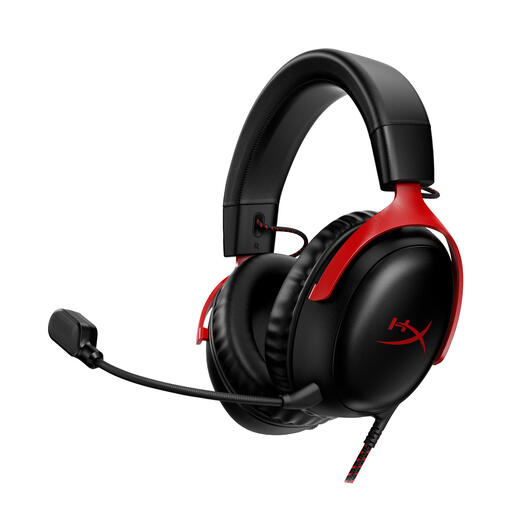
HyperX Cloud III Gaming Headset, PC, PS5 and Xbox Series X|S, black and red

HyperX Cloud III Gaming Headset, PC/PS5/Xbox Series X|S, black/red

This gaming headset is worth considering if you want to use a headset for listening and speaking while practising; check that it connects to your recording device.

The product name mentions PC, PS5 and Xbox Series X|S. Before recording, check which connection and microphone settings your device requires.

View at Joybuy

Frequently asked questions

How can you check whether the headset is recording your voice?

Select the headset as the input device in your operating system and recording software, check that mute is off, then make a short recording in both languages. Logitech includes these input and mute checks in the H390 manual.

Can you connect a stage headset directly to your laptop?

It depends on the connection. Shure says the PGA31 is designed for compatible Shure bodypacks with a TA4F/TQG connector and is not a standalone USB computer headset. Check the complete audio setup before choosing this microphone for laptop recordings.

What can you do if the headset doesn’t work properly after you buy it?

When you buy goods as a consumer in the Netherlands, you are entitled to a product that works properly, and the retailer is your point of contact if it is faulty. According to the Dutch government, the Netherlands has no fixed statutory guarantee period. For online purchases from a business, you are also entitled to a 14-day cooling-off period in many cases; check the terms that apply to your purchase.

What should you consider if someone else speaks during your recording?

If you process other people’s personal data in a non-private context, the Dutch Data Protection Authority says you must have a valid legal basis under the GDPR. Consent is one possible legal basis, but it is not automatically the only one.
