What should you look for when buying?
Recording-focused headset
A good fit if: you record voice regularly and want to monitor your voice as you record; the RØDE NTH-100M is one model to compare.
Bear in mind: the XLR setup described by RØDE requires suitable equipment that provides plug-in power.
Broadcast headset
A good fit if: you already have a compatible XLR microphone input and a separate headphone output; the Audio-Technica BPHS1 has a positionable microphone.
Bear in mind: the European version has separate XLR and 6.3mm plugs, so it won’t automatically connect to a single laptop port.
USB call-centre headset
A good fit if: a USB connection to your computer is your priority; Jabra lists USB-A and USB-C versions of the Evolve2 40 SE.
Bear in mind: the manufacturer describes its microphone technology for calls, not as proof of how it reproduces a softly spoken quiz narrator.
Wired gaming headset
A good fit if: you also want to use the headset for other computer or console tasks; HyperX and Trust describe models with wired connections.
Bear in mind: the models mentioned are designed for gaming or calls, not as tested solutions for soft-spoken voice-overs.
Compare each option using the same short script and your own recording device; specifications alone can’t predict how a quiet voice will sound.
| What to consider |
What to look for when buying |
Who is this important for? |
| Clarity of a softly spoken voice |
Record quiet and louder words, check the microphone position and keep an eye on the recording meter. Audacity recommends lowering the level if the meter peaks too high. |
If I want my softly spoken narration to come through clearly, I test the microphone at my natural speaking volume. Around 42% of consumers put clarity first. |
| Background noise and voice quality |
Make a short recording in the room where you plan to record the intro, and listen to the quiet parts too. Claims about call quality don’t prove how soft narration will sound. |
If I’m recording in a noisy room, I want to hear what happens to both my voice and the background noise. Around 25% of consumers prioritise the recording environment. |
| Connection to your recording setup |
Check the exact USB version, available microphone input and whether you have a separate headphone output. According to Audio-Technica, the BPHS1 uses separate XLR and 6.3mm plugs; for the NTH-100M’s XLR setup, RØDE specifies compatible plug-in power. |
If I want to use my existing recording equipment, I first check which inputs are available. Around 17% of consumers put connectivity at the top of their list. |
| Ease of use and aftercare |
Check the mute control and what else you’ll need to connect the headset. Keep your purchase details in case you need to contact the seller. |
If I want to get started quickly and keep using the headset in the future, I look at the controls and maintenance. Around 16% of consumers give ease of use and aftercare top priority. |
Joybuy products
These Joybuy products are wired gaming and USB headsets to compare for recording a quiz intro.
 No image available
JBL Quantum 300 wired gaming headset, black
An option to compare if you want to use a wired headset microphone and switch between 3.5mm and USB connections.
The product description lists a directional flip-up boom microphone that mutes when raised, a 3.5mm connection and an included USB audio adapter.
View at Joybuy
 No image available
JBL Quantum 120 wired gaming headset, black
Worth comparing if you’re looking for a wired headset with a detachable microphone and your device has a 3.5mm connection.
The product description lists a detachable cardioid microphone and a 3.5mm connection.
View at Joybuy
 No image available
Logitech H540 wired USB headset
An option to compare if your recording device has a USB Type-A port and you want to control the microphone from the headset.
The product description lists USB Type-A, a noise-cancelling microphone and a mute control.
View at Joybuy
 No image available
Logitech H340 wired USB headset, black
Worth comparing if you want to connect to a computer via USB and are looking for an adjustable microphone.
The product description lists a USB connection with plug-and-play use and an adjustable microphone for computers.
View at Joybuy
 No image available
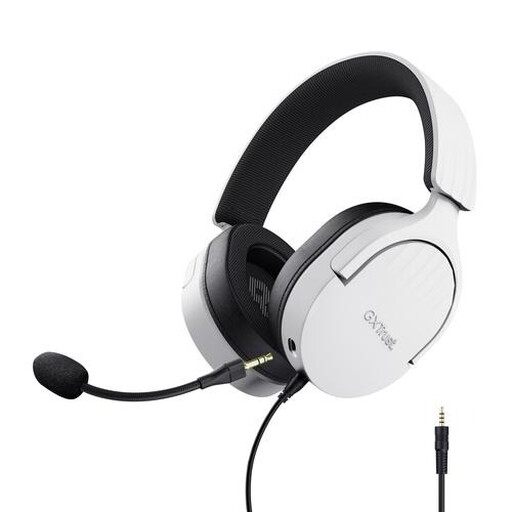
Trust GXT 489W Fayzo wired gaming headset, white
An option to compare if you want a headset with a positionable microphone and your device has a 3.5mm connection.
The product description lists a flexible, detachable microphone, volume control and an extension cable for PC use.
View at Joybuy
Frequently asked questions
How do you set up a quiet voice without distortion?
First, make a test recording with quiet and louder words, then check the recording meter. Audacity recommends lowering the recording level if the meter peaks too high; correcting clipping afterwards isn’t the same as making a recording without clipping.
Can the Audio-Technica BPHS1 connect directly to a single laptop port?
Not based on the connections listed by Audio-Technica: the BPHS1 has separate 3-pin XLR and 6.3mm plugs. Check which inputs your recording device has before choosing this headset.
What should you check before recording a new quiz intro?
Make a short test recording, listen back to it and check that the microphone isn’t muted. HyperX describes the Cloud III as having a mute indicator; Audio-Technica lists a replaceable cable and ear pads for the BPHS1.
What can you do if a headset bought online isn’t suitable?
ACM ConsuWijzer explains that online purchases generally come with a statutory 14-day cooling-off period from delivery, subject to exceptions that may apply before purchase. The legal guarantee is separate from any commercial warranty; if a product doesn’t do what you could reasonably expect during normal use, the seller is responsible for offering a suitable solution.
Can you use music or recognisable voices by other people in a quiz intro?
For copyright-protected music, the Dutch government says that permission from the creator is generally required for use beyond a private copy for personal use. The Dutch Data Protection Authority describes recognisable audio recordings as personal data; if you process this type of data, you need an applicable legal basis under the GDPR. The appropriate legal basis depends on the specific production, not on the headset you choose.


