What should you look for when buying?
Start by checking the connections and any microphone power requirements for your recording equipment. Then test the microphone level and listen back to the recording before choosing based on the stated microphone type.
| Buying concern |
What to look for |
Who is this important for? |
| Soft voice and noise |
Make a test recording at a normal speaking volume and assess the signal using your intended microphone distance and interface. |
If I’m recording a soft voice, I want enough level without distracting noise or clipping. Around 36% of consumers give voice level and noise their highest priority. |
| Background noise and plosives |
Test the headset in the recording room and check the microphone position for breath sounds and plosives. |
In a room with audible background noise, I want to be able to position the microphone carefully and listen back to the recording. For around 29% of consumers, background noise is their main buying concern. |
| Connection and power |
Make a note of your recording equipment’s inputs and outputs; check the cable, plugs and required microphone power for the exact variant. |
If I’m using an existing recorder, mixer or interface, I want to know that both signals can be connected correctly. Around 21% of consumers prioritise connections and power. |
| Fit and maintenance |
Check that the microphone boom can be positioned easily and find out which cables and parts are replaceable or included. |
If I’m wearing the headset for a long recording session, I want a comfortable fit and to know which parts I can replace. For around 14% of consumers, comfort and maintenance come first. |
Joybuy products
These Joybuy products are wired headsets with microphones. Check the connection for the specific model and make a test recording with the narrator speaking at their usual volume before you record.
 No image available
JBL Quantum 300
A wired headset with a microphone to consider if you’re looking for a headset for a short voice recording. Check the results with a test recording.
The product name specifies an over-ear design and flip-up microphone. The product description mentions a 3.5mm connection and a USB audio adapter.
View at Joybuy
 No image available
Turtle Beach Atlas 200
A wired headset with a boom microphone to compare if you want to position the microphone near your mouth while using it. Check the recording with your own equipment.
The product name specifies a 3.5mm connection. The product description mentions a flip-to-mute microphone.
View at Joybuy
 No image available
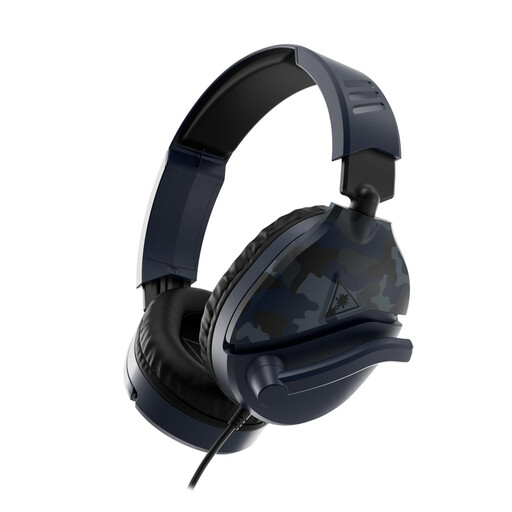
Turtle Beach Recon 70
A wired headset with an adjustable microphone boom to consider if you want to adjust the microphone position for the narrator. Test the recording with your own set-up.
The product description specifies a four-pole 3.5mm connection and a flip-up microphone with a mute function.
View at Joybuy
 No image available
Turtle Beach Airlite Fit
A wired headset with a microphone to compare if you want a microphone that can be lowered while speaking and flipped up when not in use.
The product name specifies a 3.5mm connection. The product description mentions a bidirectional flip microphone.
View at Joybuy
 No image available
JBL Quantum 120
A wired headset with a detachable microphone to consider if you also want to use the headset without a microphone. Assess the voice recording with your own recording set-up.
The product description mentions a cardioid boom microphone and a 3.5mm audio cable.
View at Joybuy
Frequently asked questions
Can I use a dynamic broadcast headset for a soft-spoken narrator?
Yes, if the connections are compatible and a test recording produces a sufficiently usable level without distracting noise. Focusrite notes that quiet vocals, particularly with a dynamic microphone, may need more gain. That doesn’t guarantee that a specific headset model will suit your recording set-up.
How do I connect the RØDE NTH-100M to a mixer with an XLR microphone input?
According to RØDE, use the included splitter and, for the microphone’s XLR input, a suitable adapter that supplies plug-in power. Connect the headphone plug to a compatible monitor output.
Can post-production rescue a noisy test recording?
First, reduce noise during recording and make another test recording if needed. The Audacity manual warns that aggressive noise reduction can produce an audible metallic or bubbling sound, so use post-production sparingly.
Do I need to make any arrangements for an identifiable voice in the broadcast ident?
An identifiable voice recording may be personal data. The Dutch Data Protection Authority states that an organisation needs a valid GDPR legal basis for processing; consent is one possible basis. You should also agree with the narrator how the recording will be used. What arrangements are needed in a particular case doesn’t depend on the headset you choose.
Can I add music to the radio ident and broadcast it?
Check the rights for the specific music and the planned broadcast. The Dutch Business.gov website states that businesses need permission or a licence from the rights holders to use music; BumaStemra states that a licence is required for music in commercial radio programmes. This music-related question doesn’t apply to a spoken-word recording only.
What connection costs or extra parts should I check in advance?
Above all, check whether you need the right connection cable or an adapter. Beyerdynamic states that the DT 297 is supplied without a connection cable, and Sennheiser says the same for the HMD 26. For connecting the RØDE NTH-100M microphone to XLR, RØDE describes an adapter that supplies plug-in power. What you need depends on your recording set-up and the exact variant.


