Who is this choice relevant to?

Soft-spoken reviewer

You want the ends of quiet sentences to remain audible. Keep the microphone at a consistent distance and make a test recording at your normal speaking volume. RØDE describes audio processing settings that can affect quiet speech.

Home recorder in a noisy room

You record in a room with echo or background noise and want to capture your voice up close. Shure warns that a microphone can’t separate direct speech from echo after the fact, so a headset is no substitute for a quiet recording space.

Reviewer who wants a simple connection

You want to get started with minimal extra equipment. Before choosing, compare the headset connection with the ports and inputs on your computer or recorder.

What should you look for when choosing?

USB headset for a computer

Choose this if: you want to record directly on a computer with the right USB port.

Bear in mind: check whether the model uses USB-A or USB-C. Noise processing doesn’t prove that quiet words will be preserved.

Analogue headset with monitoring

Choose this if: your device has a compatible headset input and you want headphones and a microphone in one set.

Bear in mind: check the included cable and whether a splitter is needed; specifications aren’t a comparative recording test.

Broadcast headset with XLR

Choose this if: you already have suitable separate microphone and headphone inputs, or specifically want to use them.

Bear in mind: check the exact cable configuration and whether your recording setup can capture a soft voice clearly.

What to consider What should you check? Who is this important for?
Soft voice and ends of words Record the ends of quiet sentences, keep the microphone at a consistent distance, and check the input level and any processing. If I speak quietly, I don’t want the ends of my sentences to disappear. Around 36% of consumers prioritise capturing their voice.
Echo and background noise Make a test recording in the intended space and listen to how clearly your voice comes through during quiet passages. If my room echoes or background noise is audible, I want to know what the microphone picks up. Around 29% of consumers prioritise the recording environment.
Connection and extra equipment Compare the exact headset model and cable with the inputs on your computer, recorder or any interface you use. If I want to record with my existing equipment, I want to be sure the connectors fit. Around 21% of consumers prioritise the connection.
Comfort and monitoring Check how adjustable it is and whether you can monitor the microphone through your recording device. If I’m recording a longer review, I want a comfortable headset that lets me check the recording. Around 14% of consumers prioritise comfort and monitoring.

Common pitfalls

  • Assuming noise reduction guarantees that quiet words will be preserved

    Processing that reduces sound below a threshold can also affect quiet speech if the setting isn’t right for your voice. RØDE explains how noise gate settings affect sound below a set threshold.

    Test with the quietest ends of your own sentences and listen back to the recording before adjusting the processing.

    An unusable test recording could mean extra editing or having to record again.

  • Assuming every headset connects in the same way

    USB, TRRS, dual analogue plugs and XLR with a separate headphone connection all require different inputs.

    Before buying, check the exact model, the cable in the box and the connections on your recording device.

    Depending on the combination, you may need a compatible interface, splitter or cable.

  • Expecting a headset to fix an echoey room

    Shure explains that a microphone can’t effectively separate direct speech from unwanted reverberation.

    First, try a quieter recording space and keep the microphone close to your mouth in a fixed position.

Brands to consider

RØDE

The NTH-100M combines headphones with a detachable headset microphone.

  • According to the RØDE manual, you need the supplied TRRS cable to use the microphone.
  • The product description doesn’t prove that this model captures softly spoken reviews better than other headsets.

Audio-Technica

The BPHS1 is a broadcast headset for a recording setup with separate connections.

  • Audio-Technica specifies a dynamic cardioid boom microphone and separate XLR and 6,3mm plugs for the BPHS1.
  • Check the model: the BPHS1-XF4 has a different connection.

Logitech

The H390 is a computer headset, available in USB-A and USB-C versions.

  • Logitech lists a positionable microphone arm and controls on the cable.
  • The product description focuses mainly on calls and isn’t an independent assessment of quiet voice-over recordings.

EPOS

The H6PRO Closed is an analogue headset with a detachable boom microphone.

  • The EPOS specification sheet lists a closed design and a bidirectional microphone.
  • Check that the included PC or console cable suits your recording device; specifications don’t prove recording quality for this use.

Headsets on Joybuy

These Joybuy products are wired headsets with a microphone. Check that each model’s connection is compatible with your recording device, and make a test recording before making your final choice.

JBL Quantum 300 wired over-ear gaming headset with flip-up microphone, black

JBL Quantum 300, wired headset with flip-up microphone

The boom microphone lets you set it in a fixed position close to your mouth for a test recording.

3,5mm connection and included USB audio adapter. The product information mentions microphone monitoring through PC software.

View at Joybuy

Turtle Beach Atlas 200 PC wired gaming headset with flip-to-mute microphone

Turtle Beach Atlas 200 PC, wired headset with microphone

The flip-up boom microphone can be adjusted to a suitable position for a test recording close to the speaker.

3,5mm connection and USB adapter. Flip the microphone up to mute it; the product information mentions monitoring through PC software.

View at Joybuy
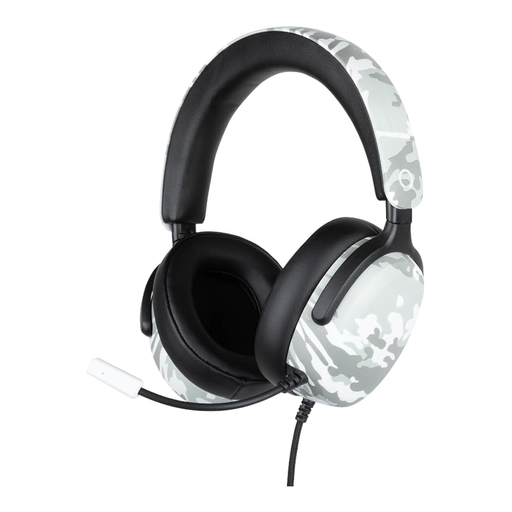
Konix Nexus over-ear wired headset with flexible microphone, camouflage pattern

Konix Nexus, wired over-ear headset with flexible microphone

You can position the flexible microphone towards your mouth; check with a test recording that the position works for your voice.

3,5mm connection, 1,5 m cable and 40 mm drivers. The product name mentions a camouflage pattern.

View at Joybuy

JBL Quantum 120 wired multi-platform gaming headset with microphone, black

JBL Quantum 120, wired headset with detachable microphone

The detachable boom microphone gives you a practical setup to test close to the speaker.

Wired 3,5mm connection and cardioid microphone. The product information mentions an included foam windscreen.

View at Joybuy

Kingston USB Hi-Fi headphones with microphone and adjustable headband

Kingston USB Hi-Fi headphones with microphone

You can adjust the rotating boom microphone to find the right position for your test recording.

USB connection, 1,8 m cable and adjustable headband. The product information lists a 270-degree swivel range for the microphone.

View at Joybuy

Frequently asked questions

How can I check whether my soft voice is being recorded clearly?

Speak at your usual volume, keep the microphone in a fixed position close to your mouth, then listen back to the test recording, including the quietest ends of your sentences. Only adjust any noise gate processing afterwards: it reduces sound below a set threshold.

Can I connect an XLR broadcast headset directly to my laptop?

Only if your recording setup has compatible connections. Audio-Technica specifies a separate XLR microphone plug and 6,3mm headphone plug for the BPHS1, so check whether your laptop or other equipment supports both connections.

What if my headset breaks too soon during normal use?

According to ACM ConsuWijzer, the seller is responsible for the statutory guarantee in the Netherlands if a product doesn’t meet what you could reasonably expect from it. A separate manufacturer’s warranty doesn’t replace this right.

Can I read aloud from a book in a public book review?

Not without limits. The Dutch government states that permission is generally required to use copyright-protected work. Auteursrecht.nl explains that a short, relevant quotation from a published work may be used in a review under certain conditions, with the source and author credited and no more text than necessary. Don’t assume that a longer extract is allowed.
