Who is this buying guide for?

Speaker recording themselves

You rehearse while seated, want to listen back to your wording and mainly need a well-positioned microphone and a reliable connection to your computer. Logitech and Jabra describe adjustable microphones on their relevant headset models.

Speaker with long practice sessions

You record several takes in a row, so you want an adjustable fit and a microphone that stays in place. Ultimately, comfort comes down to how it feels on your own head. Logitech and HP Poly describe adjustable features on specific models or versions.

Speaker who practises in different places

You want to practise without being tethered by a cable, or sometimes use a venue sound system. These two needs call for different connections and checks. JLab describes a wireless headset option, while Shure documents a headworn microphone with an XLR connection for a compatible audio setup.

What should you look for when choosing?

Wired USB computer headset

Choose this option: if you record at your computer while seated or rehearse online, and the USB version you choose works with your device.

Bear in mind: the cable limits how far you can move. Check the connection and controls on the specific version.

Wireless computer headset

Choose this option: if you want to stand up while practising or switch between devices, provided your recording device supports the connection offered.

Bear in mind: you’ll need to pair and charge it, and the stated playback time isn’t necessarily the same as talk time. JLab lists 55 hours of playback and 34 hours of talk time for the GO Work Wireless On-Ear Headset 2nd Gen.

Headworn microphone for a venue sound system

Choose this option: if you’ll actually be practising through a venue sound system with a compatible microphone input.

Bear in mind: also check the cable and whether you can record and listen back. Shure describes the WH20XLR as having a three-pin XLR connection; it is not a USB computer headset.

What to consider What to look for when buying Who is this important for?
Clear voice recordings Check whether the microphone boom is adjustable and make a short test recording from your usual seat. If you mainly want to listen back to your pronunciation and wording, consider microphone placement and how the recording sounds in your room. Around 36% of consumers give clear recordings top priority.
Connection and controls Check the exact USB version, your computer’s port and the selected microphone input in your recording app. If you want to connect and pause without any fuss, check how to mute the microphone too. Around 29% of consumers prioritise connection and controls.
Comfort Check how adjustable it is and whether it’s a mono or stereo version; try it on if possible. For repeated or longer practice sessions, fit may matter more than other features. Around 21% of consumers name comfort as their top priority.
Freedom to move or venue sound Decide whether you need a wireless computer connection or a venue sound system’s microphone input, then check the relevant connection. If you want to move around or practise using venue equipment, first check which connection is actually available. Around 14% of consumers put freedom to move or using a venue sound system at the top of their list.

Common buying mistakes

  • Assuming noise cancellation guarantees a clear recording

    A product description mentioning noise cancellation doesn’t tell you how a recording will sound in your room. Microphone placement and room acoustics still matter; Shure explains how placement affects the recording.

    Make a test recording from your usual seat, using your own voice at a normal speaking volume, then listen back.

  • Looking only at the model name

    A model may be available in different USB versions, while an XLR headworn microphone needs a different connection and signal path from a computer headset.

    Compare the exact product version with your computer’s port or the venue’s actual microphone input.

  • Confusing playback time with talk time

    For the JLab GO Work Wireless On-Ear Headset 2nd Gen, JLab lists 55 hours of total playback time and 34 hours of talk time. These figures refer to different types of use.

    Compare battery figures on a like-for-like basis and charge a wireless headset before a long rehearsal.

Brands worth comparing

Logitech

The H390 is a wired computer headset. The Logitech product page lists USB-A and USB-C versions.

  • Logitech describes an adjustable microphone boom and in-line controls.
  • Check which connector you’re choosing. A product description mentioning background noise reduction isn’t a measurement of how your recording will sound.

HP Poly

The Blackwire 3200 series includes wired computer headsets with different wearing styles and connection options.

  • HP lists mono and stereo versions. For the Blackwire 3220 USB-C, HP describes connection via USB-C or a USB-C/A adapter.
  • Features listed for the series don’t necessarily apply to every version or pack.

Jabra

The Evolve2 30 SE is a wired computer headset available in separate USB-A and USB-C versions.

  • The Jabra manual describes two microphones and recommends positioning the microphone close to your mouth.
  • A USB-C port on a mobile device doesn’t guarantee that every recording app supports audio. Check your device and app.

JLab

The GO Work Wireless On-Ear Headset 2nd Gen is a wireless option for anyone who uses devices other than a computer.

  • JLab lists Bluetooth, multipoint and a USB-C dongle.
  • JLab gives a total playback time of 55 hours and talk time of 34 hours. These manufacturer specifications refer to different types of use.

Shure

The WH20XLR is a headworn microphone for an audio setup with a compatible XLR microphone input.

  • The Shure manual specifies a three-pin XLR plug.
  • Check that the required connection, cable and recording or playback setup are available. This model is not a complete USB computer headset.

Joybuy products for computer-based rehearsals

This selection focuses on wired headsets for computer-based rehearsals. Check that each model’s connection and controls work with your device and recording app.

Logitech USB Headset H540 Wired

Logitech USB Headset H540 Wired

A wired USB headset for computer-based rehearsals when you want to record yourself and listen back.

View at Joybuy
Logitech PC 960 USB Wired Headsets

Logitech PC 960 USB Wired Headsets

A wired USB option if you want to use a headset with your computer to practise a presentation.

View at Joybuy

Logitech Headset H650e Stereo Wired

Logitech Headset H650e Stereo Wired

A wired stereo headset to compare if you’re looking for a headset with a microphone for computer-based rehearsals.

View at Joybuy

Logitech H340 USB Headset Black, Wired

Logitech H340 USB Headset Black, Wired

A wired USB headset to consider for a practice session where you want to speak into your computer and listen back.

View at Joybuy
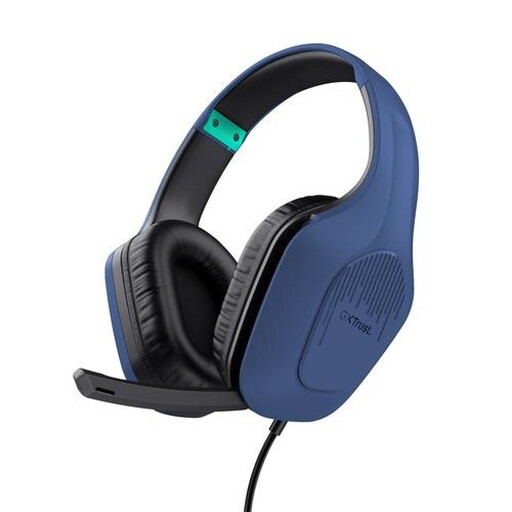
Trust GXT 415B Zirox Gaming Headset, Wired, 50mm Drivers, Over-Ear

Trust GXT 415B Zirox Gaming Headset, Wired, 50mm Drivers, Over-Ear

A wired over-ear headset to compare if you’re looking for a model with a microphone for computer use.

The product name lists 50mm drivers.

View at Joybuy

Frequently asked questions

How do I set up my headset before recording my whole presentation?

Connect the right USB version, select the headset as the microphone input in your recording software and position the microphone near your mouth. Make a short test recording and listen back first. For the Evolve2 30 SE, Jabra recommends positioning the microphone close to your mouth.

Will a USB headset connect directly to a venue sound system’s microphone input?

Not if the venue has an XLR microphone input: a USB computer headset and an XLR headworn microphone use different connections. According to Shure, the WH20XLR has a three-pin XLR plug. Before buying, check which input and recording or playback setup the venue provides.

What are my rights if a headset I bought online is faulty?

For consumer purchases in the Netherlands, products must be of satisfactory quality, and the retailer is your point of contact if something is wrong, according to the Dutch government. The Netherlands does not have a fixed statutory warranty period of two years. When buying online from a business, you will also generally have 14 days to change your mind, although exceptions may apply.

Can I record my own practice presentation?

Article 2 of Regulation (EU) 2016/679 excludes the processing of personal data by a natural person as part of a purely personal or household activity from the regulation. If identifiable people are recorded, or the recording is used outside that private setting, this does not mean you can do so without further consideration. Discuss the recording with the people involved beforehand and check which rules apply.
