
Speaker who listens back to recordings
You practise on your laptop and want to compare your voice across successive rehearsals. Consider the recording source, microphone position and connection on the exact model you choose.


If you mainly practise at a computer and want to listen back to recordings, choose a headset with a suitable connection and an adjustable microphone boom. Keep the microphone in the same position and make a test recording. If you want to practise while walking or recreate a presentation with venue amplification, a separate headworn microphone or complete wireless set may be a better fit, provided its connections and, where relevant, frequency are compatible with your equipment and venue.
You practise on your laptop and want to compare your voice across successive rehearsals. Consider the recording source, microphone position and connection on the exact model you choose.
You rehearse your presentation frequently and value a comfortable fit and a stable microphone position. If possible, try your intended wearing style during a full practice session.
You want to recreate movement or venue amplification. So distinguish between a computer headset, a separate headworn microphone and a complete wireless set.
Start with how you practise: a computer headset is designed for recording and listening back, while a presentation setup may require different connections and equipment.
A good fit if: you rehearse at a computer, want to listen back to recordings and have a suitable USB port.
Consider: the cable limits your freedom of movement, and the headset will not amplify your voice through a venue sound system by itself.
A good fit if: you already have suitable audio equipment and want to practise with a microphone close to your mouth, without earcups.
Consider: you may need additional compatible equipment for computer recordings or amplification.
A good fit if: you want to walk around while practising and recreate a presentation setup with a receiver and bodypack.
Consider: you will need to manage more components and power. Also check that the frequency is available at your practice venue in the Netherlands.
| Consideration | What should you check? | Who is this important for? |
|---|---|---|
| Comparable speech recordings | Check whether you can position the microphone boom and whether the correct input is selected on your computer and in your recording software. | If I want to compare rehearsals side by side, I keep the microphone in the same place and check the recording source. Around 33% of consumers give comparable speech recordings top priority. |
| Comfort and fit | Compare the wearing style and adjustability; if you are considering a mono or stereo version, check which model you are choosing. | For long practice sessions, I want a headset that stays in place without the microphone shifting. Around 27% of consumers prioritise comfort and a secure fit. |
| Freedom of movement | Check whether you are buying a separate microphone or a complete set, and whether the receiver connects to your sound system. | If I want to practise my presentation while walking, I don't want to be tied to my laptop. Around 20% of consumers make freedom of movement their top consideration. |
| Compatibility with your equipment | Compare the exact connection with the ports on your computer or mixer, and decide how you will listen back to recordings. | When the ports on my computer or venue equipment are the deciding factor, I first check the full model specification. Around 20% of consumers put equipment compatibility first. |
A computer headset and a microphone or receiver output are designed for different setups. A USB connection does not automatically provide sound through a venue system.
Decide in advance whether you only want to record and listen back, or also practise using the venue sound system. Then compare the connections with your equipment.
A separate microphone and a complete wireless set do not contain the same components. A headworn microphone such as the Shure WH20 is not automatically a USB headset with headphones.
Check the full model name, connector and box contents. Also decide how you will record and listen back.
To listen back, you will also need a suitable listening solution alongside a separate headworn microphone.
The Dutch Authority for Digital Infrastructure (RDI) points out that not all frequencies are available at every location in the Netherlands.
Check the exact frequency variant and consult the latest RDI information for your practice venue before use.
The Dutch government states that the Netherlands does not have a fixed statutory warranty period; what you can expect from a product depends partly on the product itself.
Keep your proof of purchase and contact the seller if there is a fault. Distinguish between your statutory rights and any separate manufacturer’s warranty.
The H390 is an example of a wired computer headset for practising and listening back on a laptop.
The Evolve2 40 SE is a wired office headset available in mono and stereo versions for practising at a computer.
The Blackwire 3300 series includes wired USB office headsets in different wearing styles.
The WH20 is a separate headworn microphone for practising with suitable recording or amplification equipment.
The XSW 1-ME3-E is a complete wireless presentation setup with a headworn microphone, bodypack and receiver.
This selection is aimed at practising at a computer and listening back to recordings through a headset. For each model, check that the connection and recording settings are compatible with your equipment.
 No image available
Could suit practising with a headset microphone and listening back through the headphones, if your computer supports the connection.
The product description mentions a flexible 360° microphone and a 3.5 mm connection.
 No image available
An option for practising at a computer with a headset microphone and headphone playback; check which connection suits your setup.
The description lists Bluetooth 5.2 and a USB-C cable for wired use. It also mentions an adjustable headband, soft ear cushions and a battery life of up to 36 hours.
 No image available
Designed for computer use; the adjustable microphone boom can help keep the microphone in a consistent position during repeated recordings.
The description lists a USB connection, stereo audio, volume and mute controls, an adjustable headband and soft ear cushions.
 No image available
Could be suitable for practising and listening back on a computer with a compatible USB connection.
The description mentions plug-and-play USB, stereo audio and a flexible, adjustable microphone. It also lists a lightweight design and adjustable headband.
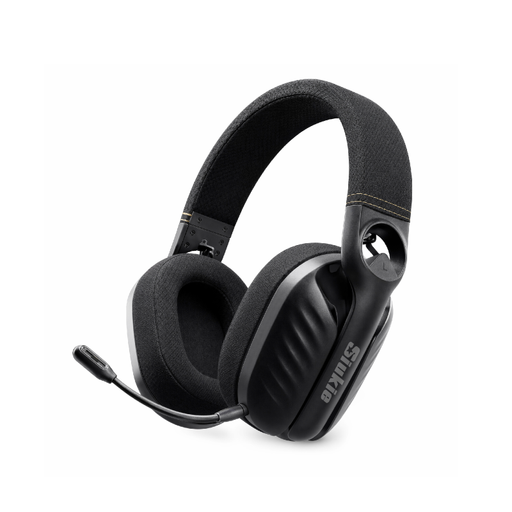 No image available
The listed headset microphone and headphone playback may be useful if you want to speak and listen back during rehearsals.
The product description mentions Bluetooth, 2.4 GHz wireless use via a USB dongle and a wired mode. It also lists a built-in microphone and an over-ear design.
Use the same microphone position each time and check which input your recording software is using before every session. Record a short clip and listen back; product specifications cannot predict how your voice will sound in your room.
That depends on the connection on the exact microphone and on your laptop. The Shure WH20XLR has an XLR connection, while a USB computer headset uses a different connection. Also check how you will make the recording and listen back to it.
For many online distance purchases from a business, you have a 14-day cooling-off period; check the applicable exceptions and returns policy. You are also entitled to a product that meets legal requirements, and the seller is your point of contact if something is faulty. The Dutch government states that the Netherlands does not have a fixed two-year statutory warranty period for all products.
No. The RDI publishes licence-exempt frequencies and power limits, but notes that parts of the UHF broadcasting band are not available at every location. Check the current frequency availability for the exact set and your practice venue; a foreign model variant or an EU declaration of conformity alone will not answer whether it can be used at that location.
Recording only yourself is different from recording or further using identifiable contributions from others. According to the Dutch Data Protection Authority, an organisation needs a legal basis under the GDPR to process personal data; consent is one possible legal basis, but not automatically the only one. Agree in advance on recording and using other people’s contributions.