If you record long takes at a computer and want to listen back straight away, a wired USB computer headset could suit the way you work. Check the connection, fit and microphone boom position. If you want to practise standing or walking, consider a headworn microphone or wireless set, and check that the connection, recording setup and any frequency requirements suit your equipment and location. A standalone headworn microphone is not automatically a complete headset or a full PA system.
Who is this choice relevant to?
Speakers who listen back to long takes
If you usually practise at a laptop and want to record and listen back to your voice without setting up a transmitter, a computer headset is worth considering. Logitech describes the H390 as a USB headset for use with a computer.
Speakers who rehearse on the move
If you want to practise your posture, gestures and head movements, consider how a headworn microphone is worn and connected. RØDE says the HS2 needs a compatible microphone input with plug-in power.
Speakers recreating a venue setup
If you want to practise with a transmitter, receiver or existing sound system, check that all the components work together. The Dutch Authority for Digital Infrastructure (RDI) points out that available wireless frequencies can vary by location.
What should you look for?
Wired computer headset
Choose this option: if you’ll be staying at a computer and want to speak and listen back during your take.
Bear in mind: the cable limits how far you can move; check your computer’s port too.
Wired headworn microphone
Choose this option: if you want to practise your speaking posture with your ears free, and already have a suitable microphone input or recorder.
Bear in mind: the microphone on its own doesn’t provide headphones or a complete recording setup.
Wireless headworn set
Choose this option: if you want to move freely and recreate a setup with a transmitter, receiver and amplification.
Bear in mind: you’ll need to check the components, power supply and frequency for the intended location.
First, choose based on where you practise and how you want to listen back. Then check that the connection and any additional equipment suit the way you work.
| Consideration |
What to check when buying |
Who is this important for? |
| Recording and listening back |
Check the input, microphone boom and any mute control; make a test recording at your usual speaking volume. |
If you want to hear your pace and articulation during long takes, a setup that combines recording and listening is important; around 40% of consumers say this is their main concern. |
| Comfort |
Check the wearing style and adjustability, and whether you want to wear earcups while practising. |
If you rehearse for a long time and an uncomfortable fit could distract you, comfort matters; around 30% of consumers put it first. |
| Freedom of movement |
Decide whether you’ll be practising beyond the cable’s reach; for wireless use, check the set’s components and frequency at your location. |
If you want to practise your presentation standing or walking, a cable could limit how far you can move; around 20% of consumers give freedom of movement top priority. |
| Connection and equipment |
Note the exact input type on your computer, recorder or transmitter, and check which components are included with that version. |
If you already have equipment and want to know whether a microphone will connect to it, compatibility is crucial; around 10% of consumers name this as their main buying concern. |
Common buying mistakes
-
Assuming a headset microphone is a complete recording or PA system
A standalone headworn microphone may need a suitable input, preamp or transmitter. A wireless setup also needs a receiver and a compatible connection to the rest of the system.
Before buying, map out the complete signal path: microphone, connection or transmitter, receiver or computer, recording and playback.
-
Assuming noise cancellation guarantees a good recording
A product description alone won’t tell you how your voice will sound at your usual speaking distance, microphone position and in your room.
Make a test recording using your normal speaking voice and listen back before recording a full take.
-
Choosing a wireless frequency based only on the model name
The RDI says that not every frequency is available everywhere in the Netherlands; some bands require a licence.
Check the exact frequency version and the RDI guidance for the place where you want to practise or present.
Brands to consider
Logitech
Logitech offers computer headsets for recording and listening back at a computer.
- Logitech says the H390 has a USB connection, in-line controls, a rotating microphone boom and an adjustable headband.
- The H390 is a wired computer headset, not a complete wireless PA system; the cable limits your freedom of movement.
HP Poly
The Blackwire 3300 series includes wired computer headsets in a range of versions.
- HP says the series has an adjustable fit and a noise-cancelling microphone boom.
- The 3.5 mm connection is specific to the Blackwire 3315 and 3325; don’t assume every version has this connection.
RØDE
The HS2 is a headworn microphone designed for uses including hands-free presentations.
- RØDE specifies an adjustable boom and a 3.5 mm TRS output.
- RØDE says it needs a suitable microphone input with plug-in power; the HS2 is not a USB headset with earcups on its own.
Shure
Shure offers headworn microphones and wireless sets for setups with a transmitter and receiver.
- Shure specifies a cardioid capsule and a TQG/TA4F connection for the SM35-TQG.
- For wired use of the SM35-TQG, Shure specifies an RPM626 preamp. For wireless use, check the set and frequency.
Jabra
The Evolve2 65 is a wireless computer headset for anyone who wants to move around while practising.
- Jabra describes its microphone setup as suitable for calls and specifies a maximum wireless battery life of 37 hours.
- That battery life is a figure supplied by Jabra, not a measured talk time for this type of practice. Also check the exact MS or UC version and adapter.
Computer headsets at Joybuy
This selection includes wired computer headsets and a wireless headset for practising at a computer. A cable can limit your freedom of movement; for the wireless option, check that the features and connection listed are compatible with your computer.
 No image available
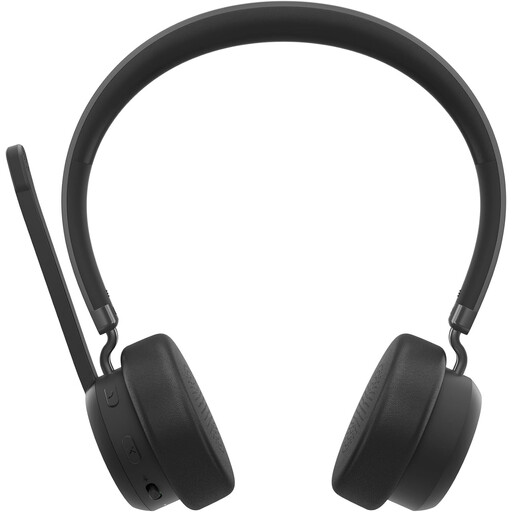
Lenovo 4XD1Q30302 Wireless Headset
This wireless version could suit you if you don’t want to be tethered to a computer while practising.
The Joybuy product listing mentions Bluetooth 5.3, a foldable microphone and up to 31 hours of talk time. Check that the wireless connection works with your recording device.
Joybuy
 No image available
Jabra Evolve2 30 SE
This wired computer headset could suit recording and listening back at a computer; the cable limits how far you can move.
The Joybuy product listing mentions a USB-A connection, two microphones, stereo earcups, an adjustable headband and memory foam ear cushions. Check that your computer has a compatible USB-A port.
Joybuy
 No image available
Logitech PC 960 USB Headset
This wired USB headset is designed for use with a computer; bear in mind that the cable limits how far you can move.
The Joybuy product listing mentions an adjustable microphone boom, volume and mute controls, a mute indicator and stereo audio. Check your computer’s USB connection.
Joybuy
 No image available
Logitech H650e Stereo Wired Headset
This wired headset could suit a computer setup for long calls and listening back; the cable limits how far you can move.
The Joybuy product listing mentions a USB connection, a microphone and in-line controls. Check your computer’s connection.
Joybuy
 No image available
Logitech H340 USB Headset Black, Wired
This wired USB headset could suit recording and listening back at a computer; the cable keeps you within its reach.
The Joybuy product listing mentions an adjustable microphone, adjustable headband and digital stereo audio. Check that your computer has a compatible USB connection.
Joybuy
Frequently asked questions
Can I connect a headworn microphone directly to my laptop?
It depends on the connection and input on both devices. RØDE says the HS2 needs a 3.5 mm microphone input with plug-in power; the Shure SM35-TQG uses TQG/TA4F and requires an RPM626 preamp for wired use.
How can I stop the microphone from ending up in the wrong position while I practise?
Adjust the microphone boom and start with a test recording that you listen back to. For its BLX headset microphone, Shure recommends positioning it near the corner of your mouth and avoiding contact with clothing or jewellery; follow the manufacturer’s guidance for other setups.
Can I use a wireless presentation microphone in the Netherlands without a licence?
It depends on the frequency and the conditions of use. The RDI publishes licence-exempt options, but warns that not every shared UHF frequency is available at every location in the Netherlands; some bands require a licence. Check the exact version and location with the RDI.
What are my rights if a headset I bought online doesn’t work properly?
For a consumer purchase, the product must meet the terms of the agreement, and the seller must provide a solution if there’s a fault. For distance purchases, you generally have a 14-day cooling-off period, with some exceptions. Check the terms that apply to your purchase.


