
Dictating during rehearsals
You want to write on a computer while voices or instruments are audible in the room. Pay attention to the microphone’s position and check how clear your speech is by trying a sample dictation in the room itself.


For dictating directly into a computer, a wired headset with a boom microphone and a compatible USB connection is a sensible starting point. Test a recording with the usual background noise in the rehearsal room. If you’re using an existing audio system or want to move around freely, compare a compatible headset microphone or wireless system, and check what additional equipment and frequency requirements apply. Your headset won’t determine how your dictation software handles your personal text.
You want to write on a computer while voices or instruments are audible in the room. Pay attention to the microphone’s position and check how clear your speech is by trying a sample dictation in the room itself.
You have a microphone input or audio interface and may want to dictate without staying by your computer. The exact connector and the route to your recording or dictation device are key.
You’re dictating personal text and want to know which device or service processes your speech. This is a separate choice from your headset: Microsoft describes Windows voice typing as online speech recognition, while Apple refers to settings for processing dictation input on a Mac.
First, choose a signal path that works with your computer or audio system. Then test a recording in the room where you plan to dictate your diary.
| What matters | What to look for when buying | Who this matters to |
|---|---|---|
| Speech clarity amid rehearsal noise | Check the microphone’s position and listen back to a test recording with the usual background noise in the room. | If I want to hear my voice clearly among other voices or instruments, I need to be able to position the microphone close to me and assess the recording myself. For around 37% of consumers, speech clarity comes first. |
| Connection and dictation | Compare the exact model’s connection with your device and check which dictation feature you’ll use. | If I want to dictate directly into a text field, the microphone needs to work with my computer and the dictation feature needs to be ready. For around 27% of consumers, the connection and the path from speech to text are the top priorities. |
| Freedom of movement and comfort | Consider whether a cable will restrict your movement, and check that the fit and cable suit the way you’ll use the headset. | If I want to move around the room while dictating or wear the headset for longer, cable length and fit matter. For around 18% of consumers, freedom of movement or comfort comes first. |
| Processing personal text | Check the privacy settings for the dictation feature you actually use. | If I’m dictating personal diary entries, I want to know in advance how my chosen dictation feature processes speech. For around 18% of consumers, this is their main concern when buying. |
Earpads that block out ambient noise for the wearer and filtering of the microphone signal are two different things. Manufacturers’ descriptions of office headsets don’t tell you how a diary recording will sound during a rehearsal.
Check the microphone specifications and listen back to a test dictation with the usual background noise in the room.
The Shure WH20 series has several connector options. According to Shure, the WH20XLR has a three-pin XLR plug and isn’t a complete USB computer headset.
Compare the exact model variant with the input on your audio equipment, and work out in advance how the signal will reach your recording or dictation device.
You may need compatible audio equipment for this setup.
The Dutch Authority for Digital Infrastructure distinguishes between frequency bands that can be used without a licence, subject to conditions, and bands that require a licence.
Before use, check the frequency of the exact model and the requirements for your location in the Netherlands.
How your speech is processed depends in part on the software and settings you use; changing your headset won’t change this by itself.
Read the privacy settings for your dictation feature before dictating personal text.
The H390 is worth considering if you want to dictate directly to a computer via USB.
The Blackwire 5200 series is a range of wired computer headsets with different wearing styles and connection options.
The WH20 series may be worth considering if you already have a compatible microphone or stage setup.
Wired USB models from the IMPACT 400 series are an alternative to compare if you’re looking for office-focused microphone features.
The Evolve2 40 SE is an office headset to compare if comfort and conversations around you are important.
This selection includes wired headsets for computer use, including USB models and a headset with a 3.5 mm connection. Check that the connection and dictation software work with your device, and assess the recording with the usual background noise in the room.
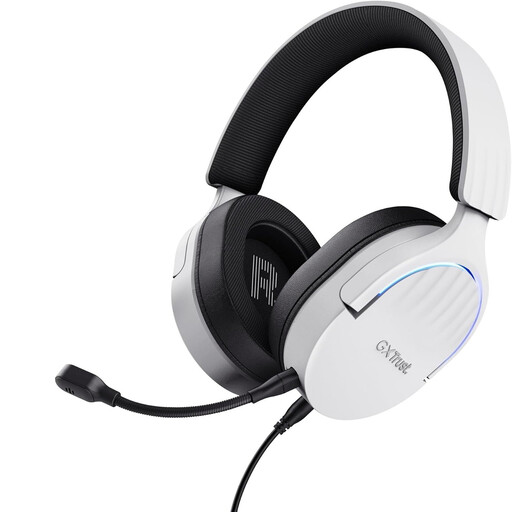 No image available
A wired USB Type-A headset to consider if your computer can use dictation input through this connection; check the selected microphone setting.
USB Type-A; white.
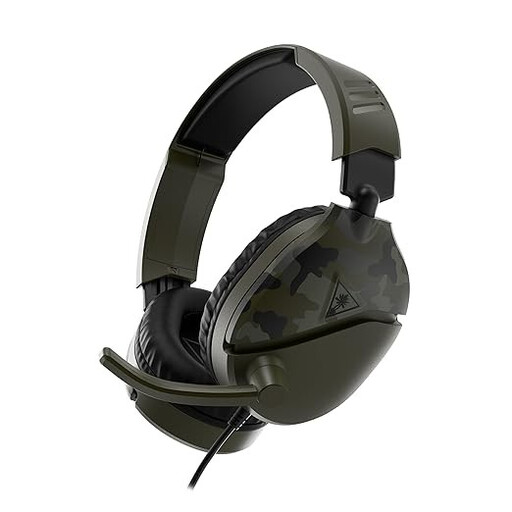 No image available
A wired headset option if your device has a compatible 3.5 mm connection. Check that your computer or dictation software recognises the microphone as an input.
3.5 mm connection; flip-up microphone according to the product name; Green Camo.
 No image available
A headset to consider for computer dictation; check the product information and settings to see which connection works with your device.
 No image available
A wired USB headset to compare for computer dictation; check that the USB version works with your computer and select the microphone as the input.
USB Type-A.
 No image available
A wired USB headset to consider if you want to dictate on a computer; check that the connection and input settings work with your device.
USB connection.
No. Check that the dictation feature is using the connected microphone. Microsoft says Windows voice typing requires a working microphone, an internet connection and a cursor in a text field; Dutch (Netherlands) is listed as a supported language. Select and test the correct microphone before you start.
According to Apple, check that the microphone is connected and selected in the sound or keyboard settings, and that the input volume is high enough. Also check your language and dictation settings.
No. An XLR microphone doesn’t connect directly as a USB headset. The Shure WH20XLR has a three-pin XLR plug, so check that your microphone input or audio interface is compatible and how the recording will then reach your laptop.
That depends on the dictation feature and its settings, not just on the headset. Microsoft describes Windows voice typing as online speech recognition; for general macOS dictation input, Apple refers to a setting that indicates whether processing takes place on the device. Check the feature you actually use.
That depends on the type of wireless connection and the frequency. The Dutch Authority for Digital Infrastructure lists Bluetooth as licence-exempt frequency use under the applicable conditions. Some frequency bands for wireless microphones are licence-exempt, while others require a licence. Check the frequency and requirements for the specific system and your location.