Who is a headset microphone suitable for?

Creator of your own word samples

If you’re mainly recording one voice and want to listen back to the pronunciation, pay attention to the microphone position and start by assessing a test recording. Audacity recommends checking the recording level during setup.

Recording at a small desk

A headset boom microphone takes the place of a separate microphone stand on your desk. With a wired model, though, remember to account for the cable and connection.

Regular speaker

If you make lots of short recordings one after another, compare the fit, controls and connection of the specific version before choosing.

What should you look for in a headset microphone?

Basic wired USB headset

Suitable for: recording on a computer when a boom microphone and simple controls are important.

Bear in mind: check whether your chosen version uses USB-A or USB-C; claims about call quality aren’t a recording test.

Lightweight on-ear headset

Suitable for: regular recording with a lightweight headset and controls on the cable.

Bear in mind: listen back to a recording of your own before using it to record a long list of words.

Business headset with multiple connections

Suitable for: anyone who makes lots of calls as well as recordings, or uses different devices.

Bear in mind: versions may differ in USB type, connections and communications features.

Streaming headset designed for recording

Suitable for: anyone looking for a headset microphone designed for recording and streaming.

Bear in mind: the version without USB has an XLR microphone output and requires a compatible interface or mixer.

What to consider What should you check? Who should take this into account?
Speech intelligibility Microphone position and recording level; test soft and loud sounds, then listen back. If I want to assess individual words clearly, I’ll make a test recording first and check for distortion. Around 36% of consumers prioritise intelligibility.
Clear desk space Whether the boom microphone can be folded away and where the cable runs. If I don’t want a separate microphone stand on my desk, a headset boom suits that setup; the cable will still be part of my workspace. Around 29% of consumers prioritise desk space.
Connection Compare the full model number with the ports on your recording device; also check whether you need an adapter. If I want to connect the headset directly to my existing device, I’ll check the exact version first. Around 21% of consumers prioritise device compatibility.
Comfort and controls Compare the fit and check whether the mute and volume controls are within easy reach. When I’m making lots of short recordings one after another, I want a fit that feels comfortable to me and controls that are easy to reach. Around 14% of consumers prioritise comfort and controls.

Common buying mistakes

  • Taking noise cancellation as proof of good word recordings

    Manufacturers describe noise cancellation and clear calls for communication. This doesn’t show how individual Dutch sounds will be recorded in your space.

    Record a few representative words, check the recording meter and listen back to the result before starting a long session.

  • Assuming every version in a product range is the same

    A model name may cover different connections or communications versions. An XLR microphone output also requires a compatible audio interface or mixer.

    Check the full model number, microphone connection and ports on your recording device.

  • Assuming a small desk means you need a wireless headset

    A headset with a boom microphone takes the place of a separate microphone stand, but with a wired version the cable remains part of your setup.

    Check where the cable will run and how much freedom of movement you need before choosing.

Brands to consider

Logitech

The H390 is a wired computer headset available in different USB versions.

  • Logitech lists a rotatable boom microphone and controls on the cable.
  • Check whether your chosen version has USB-A or USB-C. Its positioning for calls isn’t an independent assessment of word recordings.

EPOS

The PC 8 USB is designed for wired PC or Mac use and has on-ear earcups.

  • EPOS lists a unidirectional microphone and volume and mute controls on the cable.
  • The stated call functionality doesn’t show how individual Dutch sounds will come across in your recording space.

Jabra

The Evolve2 30 SE range combines headset use with computer communications.

  • Jabra describes a two-microphone system and several USB and communications versions.
  • Choose a fully specified version; its positioning for calls isn’t a measured advantage for language recordings.

HP Poly

The Blackwire 3225 is a wired business headset range with different connection options.

  • For version 8X229AA, HP lists USB-C, a supplied USB-A adapter, 3.5 mm and controls on the cable.
  • Check which connection supports the microphone on each device; a microphone specification on its own isn’t an assessment of quality.

Audio-Technica

The ATH-M50xSTS range is designed for recording and streaming and has a boom microphone.

  • According to Audio-Technica, the USB version has a USB-A connection.
  • The version without USB has an XLR microphone output for an interface or mixer. Its positioning isn’t an independent comparison with other headsets.

Headsets with microphones at Joybuy

This selection includes headsets with built-in microphones for different connections and styles. For each model, check that the connection and controls suit your recording device and the way you work.

Razer Kraken V3 X headset, black

Razer Kraken V3 X Headset, Black

This wired USB headset has a cardioid microphone for voice recordings.

The stated weight is 285 g. The description lists use with PC and PS4.

View at Joybuy
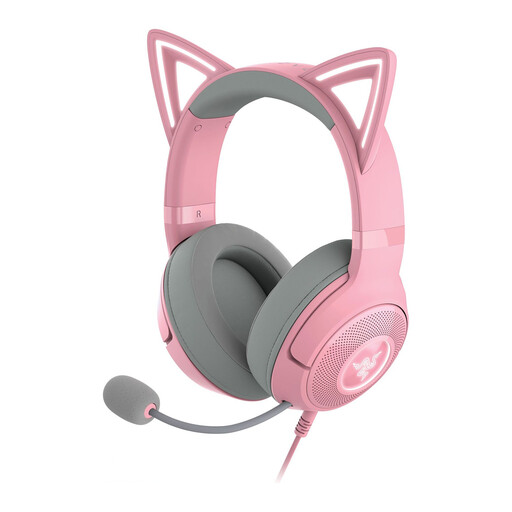
Razer Kraken Gaming Headset Kitty Edition V2 in Quartz

Razer Kraken Gaming Headset Kitty Edition V2, Quartz

The microphone is part of the headset and is detachable; the description lists streaming and content creation as intended uses.

The headset has a USB connection. The description lists PC, PlayStation, Nintendo Switch and mobile devices as compatible devices.

View at Joybuy

Jabra Evolve2 75 USB-A MS Teams, black

Jabra Evolve2 75 USB-A MS Teams, Black

This headset is described for computer communications and recordings; call features aren’t proof of recording quality.

The description lists Bluetooth, connection to two devices and eight microphones. The stated battery life is up to 36 hours.

View at Joybuy

Jabra Evolve 30 II MS stereo headset

Jabra Evolve 30 II MS Stereo

This wired headset has a microphone and can be connected to a computer via the USB controller.

The description lists a 3.5 mm connection, a USB controller and a 0.95 m cable.

View at Joybuy

Samsung EO-IC100 wired in-ear headset with USB Type-C

Samsung EO-IC100 Wired In-ear Headset, USB Type-C, Black

This in-ear headset has a built-in microphone and is designed for a USB Type-C connection.

The description lists microphone mute and controls on the cable. The in-ear fit is an alternative to a headband headset.

View at Joybuy

Frequently asked questions about headset microphones for recording words

How do you set up a headset for your first word recording?

Select the headset as the input device in your recording software, position the boom microphone close to your mouth and make a short test recording. For a single microphone, Audacity generally recommends mono and gives around −6 dB as a guide for the maximum peak during setup; listen back afterwards.

Does the Audio-Technica ATH-M50xSTS without USB need extra equipment?

For the microphone, yes: according to Audio-Technica, this version has an XLR output for an audio interface or mixer. The separate ATH-M50xSTS-USB version has USB-A, according to the manufacturer.

What if a headset bought online doesn’t fit or breaks too soon?

For an online purchase in the Netherlands, you generally have a statutory cooling-off period of up to 14 days after delivery, subject to legal exceptions. The legal guarantee is separate from a manufacturer’s warranty: ACM ConsuWijzer states that the seller must offer an appropriate free solution if a product breaks sooner than you could reasonably expect under normal use.

Can I record and publish Dutch word samples?

Recording your own word samples is different from publishing a recognisable recording of someone else. The Dutch Data Protection Authority explains that processing purely for personal or household use falls outside the GDPR; if someone else can be recognised in an audio recording, that recording may contain personal data. For processing beyond a household context, the applicable GDPR legal basis must be assessed; this does not mean you automatically have permission to publish someone else’s voice.
