What to look for in a headset microphone
For a softly spoken recipe narration, the microphone’s position, kitchen noise and connection to your recording device are all important considerations.
| What to consider |
What should you check? |
Who is this important for? |
| Speech clarity |
Check that the boom adjusts securely, then listen to a test recording of soft speech and pauses. |
If I speak softly, I want ingredients and instructions to remain clear without straining my voice. Around 33% of consumers prioritise speech clarity. |
| Kitchen noise and echo |
Record in the room you plan to use, including with the appliances you normally run; listen to spoken sentences as well as pauses. |
If I record with an extractor fan or other kitchen appliances running, I want to know how much of that sound is picked up alongside my voice. Around 27% of consumers give background noise top priority. |
| Connection |
Check the exact model, available ports and whether microphone power is required. |
I want to connect the headset to my computer or recorder without needing unexpected extra equipment. Around 20% of consumers prioritise ease of connection. |
| Freedom of movement and monitoring |
Check the fit, cable length and whether the product is a complete headset or just a headworn microphone. |
If I want to move around while cooking and listen back to the recording, hands-free use and a suitable way to monitor the audio are important. Around 20% of consumers give freedom of movement and monitoring top priority. |
Wired USB headset
Choose this if: you want to record on a computer without first connecting a separate audio interface.
Bear in mind: check that your computer has the right USB port, and make a test recording with your soft voice.
Analogue headset with XLR microphone output
Choose this if: you already have a compatible interface or mixer and want to connect the headset separately.
Bear in mind: according to Audio-Technica, the analogue Audio-Technica ATH-M50xSTS has an XLR microphone output and a separate headphone connection; the USB version has a different connection.
Standalone headworn microphone
Choose this if: you mainly want a lightweight microphone that keeps your hands free and can monitor your recording separately.
Bear in mind: the RØDE HS2 is a microphone, not a complete headset; according to RØDE, it requires a compatible 3.5mm input with plug-in power.
Closed-back analogue headset
Choose this if: you want headphones and a microphone in one, and your device supports the cable you choose.
Bear in mind: the manufacturer describes the EPOS H6PRO as a gaming headset; you’ll need to make a test recording yourself to assess its suitability for a softly spoken voice-over.
Headsets with microphones at Joybuy
These Joybuy products are headsets with microphones for computer and voice use. Check the connection, intended setup and suitability for your way of recording for each model.
 No image available
Jabra Evolve2 75 USB-A MS Teams Black
Could suit anyone looking for a headset with a microphone for speaking on a computer; the product information describes it for office and call-centre use.
The product information lists USB-A, Bluetooth and eight microphones with beamforming for calls. Check which connection you want to use for your recording.
View at Joybuy
 No image available
HyperX Cloud III S Wireless Gaming Headset
A gaming headset with a detachable microphone could suit you if you also want to listen through a headset while recording.
The product title lists a detachable 10 mm microphone; the product information lists USB-A, USB-C, 2.4GHz and Bluetooth. Check which connection you want and test the recording with your voice.
View at Joybuy
 No image available
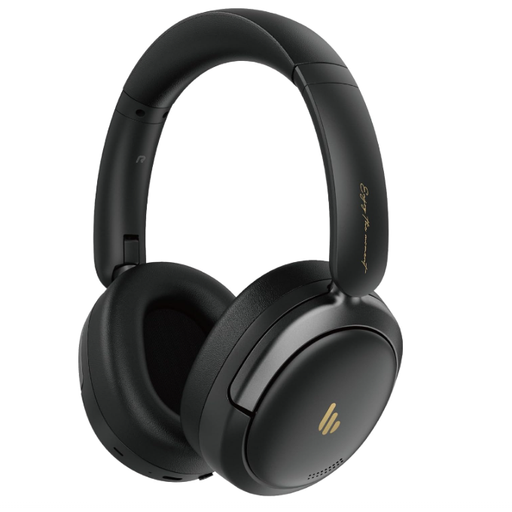
Edifier Atom Max Foldable Over-Ear Headset
An over-ear headset with an integrated microphone could suit you if you want one product for listening and recording speech.
The product title lists active noise cancellation, Bluetooth 5.4 and an integrated microphone. Those features alone don’t tell you how a soft voice will sound in your kitchen; make a test recording.
View at Joybuy
 No image available
Jabra Evolve 30 II MS Stereo
Could suit a wired computer setup where you want to use a headset with a microphone.
The product information lists a 3.5mm connection and a USB controller. The cable is listed as 0.95 m; bear this in mind when positioning your recording device.
View at Joybuy
 No image available
Kingston USB Hi-Fi Headphones with Microphone
Could suit you if you’re looking for a USB headset with an adjustable microphone boom for computer use.
The product information lists a flexible microphone boom that rotates 270 degrees and compatibility with Windows, Mac and Chromebook. Check that the model works with your recording software and make a test recording.
View at Joybuy
Frequently asked questions
Where should I position the microphone for a soft voice?
Position the boom securely close to your mouth, but not directly in front of your breath. Shure recommends positioning the SM35 at the corner of your mouth to reduce plosive sounds; for another model, make a test recording to check the position.
Can I connect a standalone headworn microphone straight to my laptop?
That depends on your laptop’s microphone input and power supply. For the RØDE HS2, the manufacturer specifies a 3.5mm microphone input with plug-in power; check whether your laptop or recorder provides this, and arrange a separate way to monitor the recording.
What can I do if the recording sounds quiet or picks up a lot of room noise?
First, check that the correct microphone is selected as the recording source, adjust the boom properly and make a short recording at your normal speaking volume. Shure says that a microphone can’t correct the acoustics of a room, so also consider where you’re recording and the sound of any appliances.
Do I need to buy an extended warranty for a headset in the Netherlands?
Not just to get a legal guarantee: you’re already entitled to one when you buy the product. According to the Dutch government, the seller must provide a solution if a product is faulty, and the Netherlands has no fixed statutory guarantee period. Consider an extended warranty based on the extra rights and terms it offers.
What product regulations apply to an electronic headset sold in the Netherlands?
According to Business.gov.nl, electrical and electronic equipment sold in the Netherlands must meet the applicable European requirements. Which rules apply, including any CE marking requirements, depends on the product’s characteristics. This general obligation does not prove that a specific model meets the requirements.


