Who is this choice relevant to?

Narrators who prioritise clear speech

If you’re recording recipe steps while seated, consider the microphone position and make a test recording to hear how your voice and the surrounding noise sound together. RØDE explains how the distance from the microphone can affect the amount of gain required and the background noise you can hear.

Creators with a simple laptop setup

If you want to record without separate broadcast connections, check the cable, microphone input and monitoring options together. RØDE specifies the supplied TRRS cable for the NTH-100M microphone; the standard Audio-Technica BPHS1 has separate XLR and 6.3 mm plugs.

Narrators recording longer sessions

If you’re recording longer passages in one go, check in advance that the headset fits comfortably and that the microphone boom stays in place while you read. Sennheiser, Audio-Technica and RØDE describe adjustable features on specific headset models.

What should you look for when buying?

Complete headset with a combined connection

Choose this if: you want to monitor your voice while recording seated, and your device supports the required headset connection.

Bear in mind: RØDE specifies the supplied TRRS cable for the NTH-100M; check that it’s compatible with your device’s microphone input.

Broadcast headset with separate connections

Choose this if: you have compatible recording equipment and want to use the microphone and headphones together as one set.

Bear in mind: the standard Audio-Technica BPHS1 uses XLR and 6.3 mm connections; the cable is not included with the Sennheiser HMD 26, item 700318.

Standalone headset microphone

Choose this if: you already have suitable headphones or don’t need headphones in the same set.

Bear in mind: the Shure WH20 is a microphone, not a complete headset with headphones; check the connector version and your microphone input.

What to consider What should you check? Who is this important for?
Voice and background noise Adjust the microphone boom and make a test recording where you’ll be recording your recipe narration. If I want the spoken instructions to stay clear while I record in my own space, I test the microphone there. Around 36% of consumers prioritise clear speech above all else.
Connection Compare the exact cable and product version with your device’s microphone input and headphone output. If you want to record without extra connection equipment, you’ll want to know in advance whether both the microphone and monitoring work with your setup. Around 29% of consumers put connection first.
Comfort and monitoring Check the fit, adjustability and whether you can monitor your recording through your setup. For longer recordings, I want a comfortable headset with a microphone boom I can position easily. Around 21% of consumers prioritise comfort while recording.
Complete setup Check which cables and other components you’ll need to use with your existing equipment. If I want to put together a working setup, I look beyond the headset to any extra connections or separate headphones I might need. Around 14% of consumers prioritise the complete setup.

Common buying mistakes

  • Assuming a headphone socket will activate the microphone too

    Headsets can use different connections and cables. RØDE specifies the supplied TRRS cable for the NTH-100M microphone.

    Before buying, compare your device’s microphone input with the exact cable and product version.

  • Assuming a broadcast headset is ready to connect straight out of the box

    For the Sennheiser HMD 26, item 700318, the manufacturer states that the cable is not included.

    Check what’s in the box and which cable is compatible with your recording equipment.

  • Assuming a directional microphone will eliminate kitchen noise

    Microphone directionality doesn’t remove the effect of your recording environment; the microphone position can also affect how much background noise you hear.

    Record a short test passage in the room and conditions where you plan to record your recipe narration.

Brands to consider

RØDE

The NTH-100M is an over-ear headset designed for uses including voice recording, and is intended for anyone who also wants to monitor their audio through the same headset.

  • RØDE says the microphone and ear cushions are removable. The manufacturer specifies the supplied TRRS cable for the microphone.
  • Check that the cable is compatible with your recording device’s microphone input; the model information doesn’t establish how well it will record your recipe narration.

Sennheiser

The HMD 26 is a broadcast headset; its connection and cable need to match the version and equipment you choose.

  • For item 700318, Sennheiser lists a dynamic supercardioid microphone and adjustable fit and microphone features.
  • The cable is not included with item 700318. Check the version, as specifications for other HMD 26 versions may not apply.

Audio-Technica

The standard BPHS1 combines headphones with a microphone for speaking in broadcast applications.

  • Audio-Technica says the microphone boom can be worn on either the left or right; the cable and ear cushions are replaceable.
  • The standard BPHS1 has separate XLR and 6.3 mm plugs. The BPHS1-XF4 has a different connection and is not an interchangeable connector version.

Shure

The WH20 is a headset microphone for anyone who doesn’t need integrated headphones for listening.

  • Shure describes the WH20 as having a cardioid pickup pattern.
  • The WH20 is not a complete headset with headphones. Check the connector version and whether your equipment supports it.

EPOS

The closed-back H6PRO is a gaming headset with a detachable microphone boom; check that the cable version is compatible with your recording device.

  • The manufacturer’s specification sheet lists PC and console cables with different 3.5 mm plug configurations, as well as a bidirectional microphone.
  • Its gaming positioning and product specifications alone don’t show how it compares with a broadcast headset for recording recipes.

Headsets and microphones at Joybuy

These Joybuy products include a range of headsets for speaking and monitoring. Check each model to make sure the microphone, connection and monitoring method suit your recording device.

Sennheiser MOMENTUM 4 Wireless, black

Sennheiser MOMENTUM 4 Wireless, black

Worth considering if you want to monitor your recording through over-ear headphones; check how the microphone works with your recording device.

The product information lists Bluetooth, ANC, a supplied 3.5 mm audio cable, four microphones for calls and a 60-hour battery life.

View at Joybuy
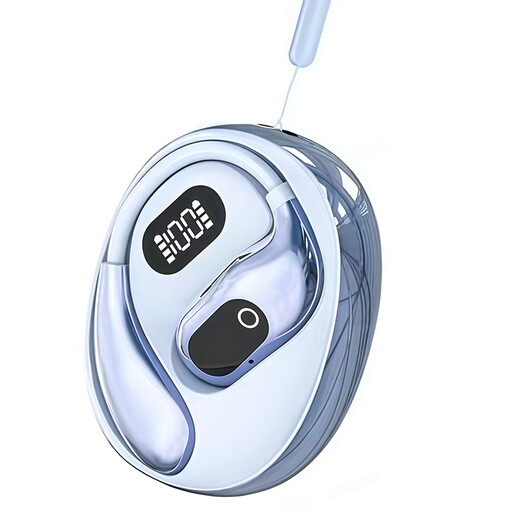
OWS on-ear headphones with built-in condenser microphone, recording function and blue finish

OWS on-ear headphones with built-in condenser microphone, recording function and blue finish

Worth looking into if you want headphones with a stated recording function; check how the function works and whether the microphone is compatible with your equipment.

The product title lists on-ear headphones, a built-in condenser microphone, a binaural mode, simultaneous translation and a charging case with a Type-C connection.

View at Joybuy

Razer Kraken V3 X headset, black

Razer Kraken V3 X headset, black

Could suit you if you’re looking for a wired USB headset with a microphone; make a test recording to see how your voice and background noise sound in your space.

The product information lists a USB connection, a cardioid microphone and a weight of 285 g.

View at Joybuy

Jabra Evolve2 55 Link380a MS Stereo

Jabra Evolve2 55 Link380a MS Stereo

Worth considering if you want to monitor wirelessly while recording; check in advance how the microphone works with your computer or recorder.

The product information lists Bluetooth 5.2, ANC and a pre-paired USB adapter.

View at Joybuy

Jabra Evolve2 75 headset

Jabra Evolve2 75 headset

Worth looking into if you want to monitor longer recordings; check the fit and make a test recording with your recording device.

The product information lists Bluetooth, connection to two devices, ANC, eight beamforming microphones, an adjustable headband and padded ear cushions.

View at Joybuy

Frequently asked questions

How should you position the microphone before recording recipe narration?

Position the boom near your mouth and make a test recording using your normal speaking voice and words with p and b sounds. Check the room sound too: a microphone positioned further away may need more gain, which can make background noise more noticeable. There’s no one-size-fits-all distance for every headset model.

Will every headset work directly with your laptop?

No, it depends on the connection and the version. RØDE specifies the supplied TRRS cable for the NTH-100M microphone; the standard Audio-Technica BPHS1 has separate XLR and 6.3 mm plugs. Check the inputs on your laptop or recording device and the exact product version.

What if the headset doesn’t work properly after you buy it?

When you buy as a consumer in the Netherlands, your product must be of satisfactory quality; the seller is your point of contact for a solution if there’s a fault that isn’t your responsibility. According to the Dutch government, there is no fixed statutory guarantee period in the Netherlands. Many online purchases from businesses also come with a 14-day cooling-off period, subject to applicable exceptions.
