Start with an adjustable microphone boom that you can position beside your mouth, and check that the microphone and headphone connections are compatible with your recorder or mixer. A complete broadcast headset is practical if you want to speak and monitor at the same time; if you already have headphones, a standalone microphone may be a better fit. Also check the power, cable and connection requirements for the exact version you’re considering: a matching plug shape alone doesn’t guarantee a working connection.
Who is this choice relevant to?
Voice artist with a dedicated recording space
Wants to keep the microphone in the same position beside their mouth for repeated takes and reduce plosives. For the SM35, Shure recommends positioning it at the corner of the mouth rather than directly in front of it.
Radio presenter with a mixer
Wants to speak and monitor at the same time, and needs to match the microphone plug, headphone connection and any power requirements to their equipment. The right cable or version varies by model.
Creator with existing headphones
Wants to add just a headset microphone, or is looking for a detachable microphone rather than choosing a complete broadcast headset. Check that the microphone is compatible with the available input and power supply.
What should you look for in a headset microphone?
First, choose the right microphone setup for your recording space and equipment. Then decide whether you need a complete headset or already have headphones. Make a quick test recording with your own voice in your own space before you start.
| What to consider |
What to look for when buying |
Who is this important for? |
| Position and plosives |
Check whether the boom can be positioned beside your mouth and whether a windscreen is available. Test the position with words containing p and b sounds. |
If I record several takes in the same position, I want to keep the microphone boom at the corner of my mouth and avoid directing the burst of air straight at the capsule. Around 33% of consumers prioritise this consistent positioning and control of plosives. |
| Connection and power |
Compare the microphone input, headphone output and available power with the exact headset version and the cable supplied. |
If I want to use my existing recorder or mixer, the microphone must connect to it and receive the right power. Around 27% of consumers prioritise the connection and power requirements. |
| Monitoring while you speak |
Decide whether you want to listen through the same headset while speaking, and check the headphone connection. |
If I want to listen back during a take, I need a setup that lets me connect both the microphone and headphones to my equipment. Around 20% of consumers make monitoring their first-choice requirement. |
| Cable and replaceable parts |
Check what’s in the box and which cable and replaceable parts are compatible with the exact model. |
If I want to connect everything straight away or replace a part later, I want to know in advance which cable or wear parts I’ll need. Around 20% of consumers focus on what’s included and whether parts can be replaced. |
Common buying mistakes
-
Assuming a matching plug is all you need
A microphone may require a specific power supply. For the NTH-100M, RØDE specifies plug-in power when connecting to an XLR microphone input; the Shure SM35 also comes in versions with different power requirements.
Check both the plug and the power requirements of the exact microphone version against your recorder or mixer.
You may need a suitable power adapter or a different version of the microphone.
-
Assuming a connection cable is included
According to their manufacturers, the Sennheiser HMD 26 and beyerdynamic DT 297 PV MK II are supplied without a connection cable. Without the right cable, you won’t be able to connect the headset to your equipment.
Check what’s in the box and choose a cable to match your equipment’s connections and, where relevant, pin configuration.
For these models, you’ll need to choose the right connection cable separately.
-
Positioning the capsule directly in front of your mouth for close-mic recording
According to Shure’s SM35 user guide, positioning the microphone directly in front of your mouth can cause plosives.
Start with it at the corner of your mouth, use a windscreen if the model has one, and listen back to a short test recording.
Brands to consider
Audio-Technica
The BPHS1 and BPHS2Ca are complete headsets for speaking and monitoring at the same time.
- According to the product specifications, the BPHS1 has an adjustable boom and separate XLR microphone and 6.3 mm headphone plugs. The BPHS2Ca also has separate connections.
- For the BPHS2Ca condenser version, check the power requirements of your recording setup. These connection details don’t prove any sound-quality advantage for a radio ident.
Sennheiser
The HMD 26 is a complete broadcast headset with a dynamic microphone and a choice of modular cables.
- The manufacturer specifies a supercardioid dynamic microphone, closed ear cups and several cable options.
- The HMD 26 is supplied without a connection cable. Check which cable is compatible with your chosen version and equipment.
Shure
The SM35 is a headset microphone without integrated headphones; the BRH31M is a single-sided broadcast headset.
- The SM35 user guide describes positioning the microphone at the corner of the mouth and distinguishes between TA4F and XLR connection versions. Shure specifies that the BRH31M has a dynamic microphone with an adjustable boom.
- Check the power requirements for the exact SM35 version. For the BRH31M, choose the right cable and connector version. These features don’t demonstrate any sound-quality advantage for radio idents.
RØDE
The NTH-100M is a complete headset with a detachable microphone and a 3.5 mm connection option.
- RØDE specifies a detachable microphone and an included TRRS splitter.
- According to RØDE’s connection instructions, connecting the microphone to XLR requires a suitable adapter that supplies plug-in power. The manufacturer’s claims about voice quality are not independent measurements.
beyerdynamic
The DT 297 PV MK II is a closed broadcast headset with a condenser microphone and a separately selected cable.
- The manufacturer specifies an adjustable gooseneck and several types of replaceable connection cable.
- The DT 297 versions are supplied without a connection cable. Choose a cable to match your equipment’s plug and pin configuration.
Headsets and microphones on Joybuy
These Joybuy products are headset options with a microphone for speech and monitoring. Several product names refer to gaming or call use; that doesn’t mean the model is a broadcast headset. So check the connection and make a test recording before choosing a headset for a radio ident.
 No image available
Trust GXT 498W Forta wired gaming headset, white
An option if you’re looking for a wired headset with a detachable, flexible microphone; the product name positions this model as a gaming headset.
The product description specifies a 1.2 m 3.5 mm cable and a pop filter. Check that the connection is compatible with your recording equipment.
Joybuy
 No image available
HyperX Cloud Stinger II wired gaming headset, white, PS5 and PS4
An option if you’re looking for a wired headset with a microphone you can position flexibly; check that the connection is suitable for your recorder or mixer.
The product description specifies a four-pole CTIA connection and a pop filter for the microphone. The product name mentions use with PS5 and PS4.
Joybuy
 No image available
Jabra Evolve2 55 wireless stereo headset
A wireless headset option if you’re looking for a microphone boom and stereo headphones; check that the connection works with your recording setup.
The product description specifies a flexible microphone boom and an included Link 380 USB-C Bluetooth adapter.
Joybuy
 No image available
Jabra Evolve2 65 USB-A Black MS mono headset
A mono headset if you want to speak and listen using a single headset; check that the connection is suitable for your recorder or mixer.
The product description specifies Bluetooth and an included USB-A Bluetooth adapter. The model name indicates that this is the mono version.
Joybuy
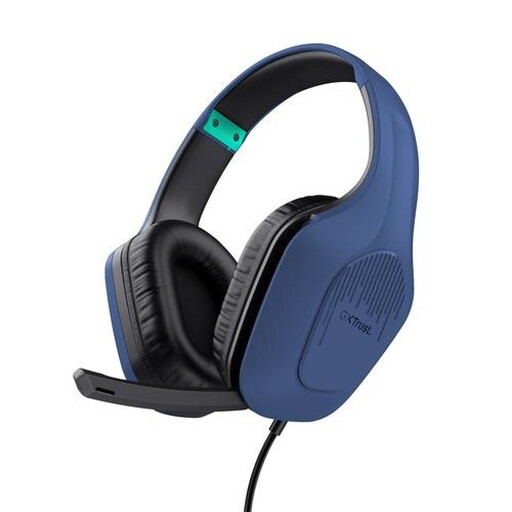 No image available
Trust GXT 415B Zirox wired gaming headset
An option if you want a wired headset with a microphone that folds up when not in use; the product name positions this model as a gaming headset.
The product description specifies a fixed 2 m 3.5 mm cable and a fold-up microphone. Check that the connection is compatible with your recording equipment.
Joybuy
Frequently asked questions
Where should you position the microphone for a close-mic radio ident?
Start with the capsule at the corner of your mouth, not directly in front of it. Shure’s SM35 user guide recommends this position to reduce plosives. Use a windscreen if the model has one, and listen back to a short test with p and b sounds.
Can a headset microphone with a 3.5 mm connection plug straight into an XLR microphone input?
Not without checking the power requirements of the exact microphone and the adapter you need. For the NTH-100M, RØDE specifies a suitable VXLR PRO or VXLR+ adapter for an XLR input, which supplies the required plug-in power.
What extra parts should you check when buying a broadcast headset?
Check whether the connection cable is included and whether it matches your equipment’s plug and pin configuration. Sennheiser states that the HMD 26 is supplied without a cable; beyerdynamic says the same for the DT 297 versions.
What are the rules on cooling-off periods and guarantees for online purchases in the Netherlands?
According to ACM ConsuWijzer, consumers who buy online generally have up to 14 days after delivery to change their mind, subject to exceptions, including certain unsealed hygiene products. Your statutory guarantee is separate from any manufacturer’s guarantee: if a product used normally doesn’t meet what you could reasonably expect, the seller must put things right under the applicable terms. Check the returns policy for the specific headset and purchase.


