
Quiz creators with limited desk space
If you want to record and listen back to a quiz intro without putting a separate microphone or boom arm on your desk, consider a headset with a boom microphone.


For recording a quiz intro at a cramped desk, a headset with a built-in microphone is a practical choice if you don’t want to set up a separate mic. Then choose based on the inputs on your recording device: USB connects directly to a compatible computer, while a 3.5 mm headset may need a suitable microphone input or splitter. A broadcast headset with separate XLR and 6.3 mm plugs is best suited to an existing audio interface or mixer. Always make a test recording to check your voice and the room sound.
If you want to record and listen back to a quiz intro without putting a separate microphone or boom arm on your desk, consider a headset with a boom microphone.
If you want to record clear speech, position the microphone close to your mouth and use a test recording to check how the room sounds.
If you plan to use a computer, mixer or audio interface, compare the headset plugs with the available microphone and headphone inputs.
Choose this option: if you’re recording on a computer with a suitable USB port and don’t want a separate microphone on your desk.
Keep in mind: check that your recording software is using the headset microphone as its input. Logitech describes the Zone Wired as being for calls in busy workspaces; that alone doesn’t tell you how a recorded quiz intro will sound.
Choose this option: if your recording device has a suitable headset or microphone input, or you can use the right splitter.
Keep in mind: a headphone output alone doesn’t mean the microphone will work too. RØDE states that the supplied TRRS cable is required to use the microphone on the NTH-100M.
Choose this option: if you already have a mixer or audio interface with compatible connections.
Keep in mind: the Audio-Technica BPHS1 described here has a 3-pin XLR microphone plug and a 6.3 mm headphone plug. These connections require compatible equipment and may take up more desk space.
| What to consider | What to look for | Who is this important for? |
|---|---|---|
| Available desk space | Check whether the microphone is attached to the headset and whether you’ll need any cables or extra equipment. | If I want to keep my desk clear, I’m looking for headphones and a microphone in one, without a separate mic stand. Around 36% of consumers say having clear desk space is their main concern when buying. |
| Clear voice recordings | Make a short test recording and listen for plosive sounds, room noise and noticeable processing. | If I want to know how my voice sounds in the actual room, I want to listen back before finalising the intro. Around 29% of consumers prioritise clear speech. |
| Compatible connection | Compare the plugs and cables with both the microphone and headphone inputs, then select the right input in your software. | If I’m using my own computer, mixer or interface, I want to make sure the headset fits the microphone input. Around 21% of consumers put the right connection first. |
| Listening back and wearing comfort | Check the fit, mute and volume controls, and whether you can listen back on your device. | For a short recording, I want to wear the headset comfortably and listen to the intro straight away. Around 14% of consumers say listening back and wearing comfort matter most. |
Headsets can use different plugs and cables. A connection designed for headphone output alone won’t automatically carry the microphone signal.
Before buying, compare the connections on both the headset and recording device, including any microphone input and splitter you may need.
A feature described for video calls doesn’t show how a quiz intro will sound in your room. A microphone close to your mouth also won’t automatically eliminate echo in the room.
Record a few sentences in the room where you’ll make the intro and listen back before recording the full script.
The Audio-Technica BPHS1 described here has separate microphone and headphone connections. Without compatible inputs, it won’t connect directly in the same way as a USB headset.
Check which inputs you already have and what connections you’ll need before choosing this option.
The NTH-100M combines headphones with a detachable headset microphone. RØDE lists it for uses including media and podcasting.
Logitech describes the Zone Wired as a USB headset for calls in busy workspaces.
The wired Cloud III is a gaming headset with a boom microphone.
The BPHS1 is a broadcast headset for spoken presentations, with separate connections for the microphone and headphones.
These wired headsets combine headphones and a microphone for a compact recording setup. For each model, check that the 3.5 mm connection, splitter or USB adapter is compatible with your recording device.
 No image available
The integrated microphone makes this a good option if you don’t want a separate microphone on your desk.
The headset has a 3.5 mm connection and a flip-up microphone. You’ll need the supplied USB audio adapter to use it with USB; check which connection your recording device supports.
 No image available
The built-in microphone and headphones let you record and listen back with a single wired headset.
It has a 3.5 mm connection and a flip-up microphone that mutes when raised. Check that your recording device has a compatible connection.
 No image available
This wired headset combines a microphone and headphones for a compact recording and listening setup.
The headset has a 3.5 mm connection and a flip-up microphone. If your computer has separate headphone and microphone ports, you’ll need the supplied Y-splitter.
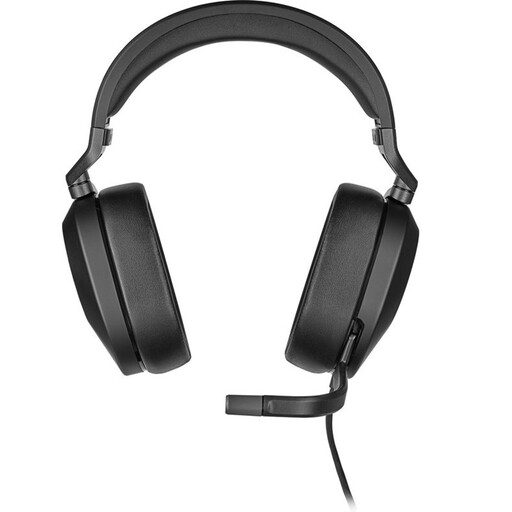 No image available
The integrated microphone and headphones are designed for anyone who wants to record and listen back using a single headset.
The product description lists a 3.5 mm connection, a supplied USB adapter and a flip-up microphone that mutes when raised. Use the connection that’s compatible with your recording device.
 No image available
The headset combines a microphone with headphone speakers, so you can record and listen back without a separate desk microphone.
It has a 3.5 mm connection. The product description lists a supplied splitter for computers with separate headphone and microphone ports; also check the microphone position with a test recording.
Position the microphone beside your mouth rather than directly in front of it. Shure recommends this placement for its headset microphone to help reduce plosives. Check the position with a test recording, as the right adjustment varies from one headset to another.
No, it depends on the connections on your device and headset. The RØDE manual states that the supplied TRRS cable is required to use the NTH-100M microphone, while the Audio-Technica BPHS1 described here has separate microphone and headphone plugs. Check the microphone input and select it as the input in your recording software.
When you buy from a business online in the Netherlands, you generally have a 14-day cooling-off period, although exceptions may apply. This is separate from your rights if a product is faulty. According to the Dutch government, there’s no fixed statutory guarantee period in the Netherlands; check the terms that apply to your purchase.
This depends in part on who can be identified and how the recording is used. According to the Dutch Data Protection Authority, an organisation that collects and uses personal data needs a lawful basis under the GDPR; consent is one possible basis. The authority describes an exception for personal or household use only.