
Puppeteer with their hands full
You want the microphone to stay close to your mouth as you move and operate the puppet. Shure recommends positioning the SM35 by the corner of your mouth.


For puppetry, an adjustable microphone boom that you can position by the corner of your mouth is a practical starting point. You’ll also need a connection that works with your computer, recorder or audio interface. A broadcast headset lets you record and monitor audio at the same time, while a USB headset can be easier to connect — but that doesn’t automatically make it suitable for the sound of a character voice. If possible, make a test recording with both soft and loud lines before you decide.
You want the microphone to stay close to your mouth as you move and operate the puppet. Shure recommends positioning the SM35 by the corner of your mouth.
You want to record without an existing audio interface, so you’ll need to check which connections your computer and recording software support.
You want to hear the audio as you speak, and need to choose between a headset with headphones and a separate headworn microphone with a separate monitoring solution.
A good fit if: you record through a suitable audio interface or recorder and want to monitor audio at the same time.
Check: the Audio-Technica BPHS1 has separate XLR and 6.3 mm connections; check that you have both inputs.
A good fit if: your device supports the microphone through a combined headset socket.
Check: according to RØDE, the supplied TRRS cable is required to use the microphone on the RØDE NTH-100M.
A good fit if: a direct connection to your computer is your main priority.
Check: Logitech positions the H390 for calls; that doesn’t prove it will record every character voice well.
A good fit if: you’d rather not wear a headset or already have separate headphones.
Check: the Shure SM35 is a headworn microphone, not a complete headset with headphones; check the connection on the version you choose.
| What to consider | What should you check? | Who should pay particular attention? |
|---|---|---|
| Positioning and plosives | Position the boom by the corner of your mouth and check during a test recording that the microphone stays in place when you move. | If you operate the puppet while speaking, you’ll want to be able to position the microphone accurately without freeing up your hands; around 36% of consumers put positioning first. |
| Connection | Check that your recording device supports the USB, TRRS, XLR and headphone connectors you’ve chosen. | If your existing computer or recorder needs to work directly with the headset, you’ll want to avoid incompatible plugs or missing connections; around 29% of consumers prioritise connectivity. |
| Monitoring | Decide whether you want integrated headphones or already have a separate monitoring solution. | If you want to hear audio while recording your voice, the difference between a complete headset and a separate headworn microphone matters; around 21% of consumers prioritise monitoring. |
| Comfort and components | Check the fit and whether the cables or ear pads are replaceable or need to be chosen separately. | For longer recording sessions, you’ll want a comfortable headset and a clear idea of which components are included with your version; around 14% of consumers prioritise long-term use. |
A TRRS headset connection and separate microphone and headphone plugs work differently. The RØDE NTH-100M uses the supplied TRRS cable for the microphone, while the Audio-Technica BPHS1 has separate XLR and 6.3 mm connections.
Compare the exact plugs with the inputs on your recording equipment, and check both the microphone and monitoring connections.
If your recording device isn’t compatible, you may need additional recording equipment.
beyerdynamic states that the DT 297 PV MK II is supplied without a connection cable. Without a suitable cable, you won’t be able to connect the headset to the intended recording setup.
Check which cable works with your equipment for the exact version, and whether it’s included.
You may need to buy a separate compatible cable.
Logitech describes the H390 as being for calls. That alone doesn’t tell you how soft, loud or distorted puppet voices will sound in your setup.
Make a test recording using the voice and speaking volume you plan to use, then assess the result with your own recording setup.
The NTH-100M is an option if you’re looking for headphones with a detachable microphone and a combined connection.
The BPHS1 is a wired broadcast headset for a setup with separate microphone and headphone connections.
The SM35 is a separate headworn microphone for anyone who already has a suitable monitoring and recording setup.
The H390 is designed for USB use with a compatible computer, and Logitech describes it in the context of calls.
The DT 297 PV MK II is an adjustable broadcast headset for which you’ll need to choose the connection cable carefully.
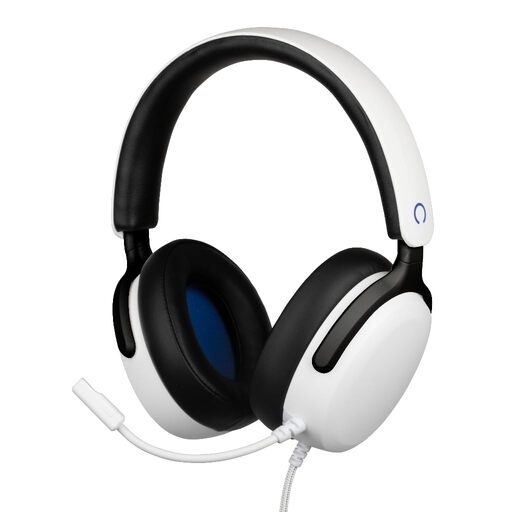
These wired gaming headsets combine a microphone and headphones. Before buying, check that your recording device’s microphone input is compatible with the 3.5 mm connection. A product description for gaming doesn’t confirm how a model will sound when recording a character voice.
 No image available
The flexible, detachable microphone and headphones let you speak and monitor audio; check that your recording device supports the connection.
3.5 mm connection; white version, officially licenced for PS5.
 No image available
You can position the microphone boom by your mouth; check that your recording device supports a microphone input via 3.5 mm.
Wired headset with a 3.5 mm connection and flip-to-mute microphone; white version.
 No image available
Flip the microphone boom up to mute it; check that your device supports the microphone through the 3.5 mm connection.
Wired headset with a 3.5 mm connection; blue and red version.
 No image available
The flexible microphone and headphones provide a combination for speaking and monitoring audio; check compatibility with your recording device.
3.5 mm connection and 1.5 m cable; white version.
 No image available
The headset combines headphones and a microphone; check that your recording device supports the 3.5 mm connection.
White version. A Y-splitter is specified for a computer with separate headphone and microphone ports; check whether you need one for your setup.
No. Shure recommends positioning the SM35 by the corner of your mouth, rather than directly in front of it, to reduce plosives. Make a test recording to see whether that position works for your voice too.
Not with the specified standard cable: the BPHS1 has an XLR connection for the microphone and a separate 6.3 mm connection for the headphones. Check which inputs your recording equipment has.
Shure recommends storing the SM35 in a dry, enclosed place and allowing perspiration to dry first. For other models, follow the manufacturer’s care instructions.
Check whether any required cable is included: beyerdynamic states that DT 297 versions are supplied without a connection cable. For an online consumer purchase from a business, the Dutch Government says you generally have 14 days to change your mind; if a product is faulty, contact the seller about your statutory guarantee.
Not necessarily. The Dutch Authority for Digital Infrastructure says a licence is usually not required, but the frequency band used must be appropriate and may vary by location. Check the frequencies and conditions for the specific wireless system and recording location. This doesn’t apply to the wired headsets discussed here.