
Active puppeteer
You want to keep both hands free and position the microphone so it stays near your mouth when you move your head. Compare how adjustable the boom arm is and how the cable can be routed.


For hands-free puppetry, a head-worn microphone is a natural choice. DPA describes an omni capsule as one option for a quiet room; a directional capsule can help reject more background noise, but needs extra care with positioning and plosive sounds. Also check your recording device’s connection and power requirements, and test your loudest character voice before recording.
You want to keep both hands free and position the microphone so it stays near your mouth when you move your head. Compare how adjustable the boom arm is and how the cable can be routed.
You record soft and loud character voices and want to spot plosive sounds and distortion. A test recording can help you assess the microphone’s position and recording level.
You need to balance reducing background noise with connecting to your existing recording equipment. Check that the capsule, input and required power are right for your setup.
DPA describes an omni capsule as one option for a quiet room; a directional capsule can help when there’s more background noise. Test your chosen position for plosive sounds and handling noise, too.
| What to consider | What to look for | Who is this important for? |
|---|---|---|
| Hands-free use and positioning | Check that the boom arm is adjustable and the cable won’t rub against the puppet or your clothing. | If I’m puppeteering with both hands, I want the microphone to stay near my mouth; for this choice, around 36% of consumers would put freedom of movement first. |
| Soft and loud voices | Make a test recording of the loudest passage and check for plosive sounds and clipping. | I want to capture both soft and expressive voices clearly in a quiet room; around 29% of consumers would make vocal nuance their top priority. |
| Background noise | Compare omni and directional options based on your space, and test the microphone where you’ll actually be performing. | When I record in a shared or noisy space, I want to reduce background noise; for this choice, around 21% of consumers would put isolation first. |
| Connection and setup | Check the input, power requirements and whether the model you choose has a bodypack or USB connection. | For a simple computer setup, I want to know whether the microphone will connect directly to my equipment; around 14% of consumers would make that their top priority. |
RØDE says the HS2 needs a microphone input with plug-in power. So a matching plug alone doesn’t tell you whether your computer or recorder can power the microphone.
Before buying, check your recorder’s input and power, and see whether you’ll need any extra connection equipment for your setup.
DPA says directional microphones can be more sensitive to plosive sounds and handling noise. These can be noticeable when you speak expressively.
Follow the manufacturer’s positioning instructions, use the recommended windscreen and test sentences with lots of P sounds.
HyperX describes the Cloud III microphone as being for voice chat and calls. That description doesn’t show how well it captures soft and loud character voices.
Before choosing it for a production, assess a test recording for soft words, loud passages and the vocal tone you’re after.
The HS2 is a head-worn option for hands-free use in a quiet setup.
The PRO8HEx is a wired, hypercardioid head-worn microphone for an XLR setup.
The SM35 is a head-worn microphone designed for use with a compatible wireless bodypack setup.
The 4088 range includes directional head-worn models for speech and performance.
The ModMic USB 2 adds a boom microphone to an existing pair of headphones for computer recording.
This selection focuses on wired headsets and headphones with microphones for hands-free speaking while puppeteering. Check that the connection on your chosen model is compatible with your recording device.
 Image unavailable
An option if you want to speak hands-free while puppeteering with a wired setup.
Connection: 3,5 mm. Check that your recording device supports this connection.
 Image unavailable
Suited to anyone who wants to speak hands-free while puppeteering and uses a wired connection.
Connection: 3,5 mm. Check that your recording device supports this input.
 Image unavailable
An option if you’re looking for headphones with a microphone for a USB setup.
Connection according to the product name: USB. Check that your recording device has the required USB connection.
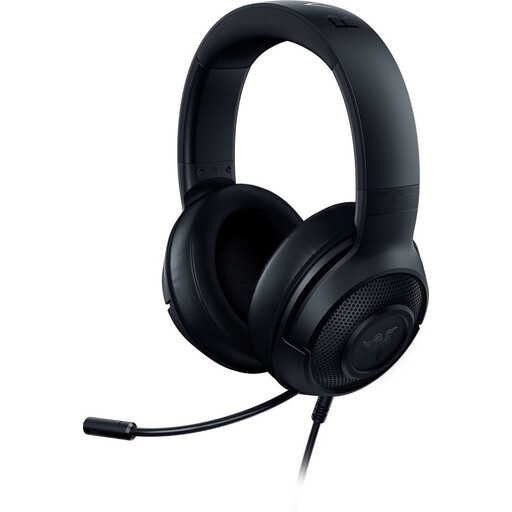 Image unavailable
An option if you want to speak hands-free and your recording device supports a wired audio connection.
Connection: 3,5 mm. Check the input on your recorder or computer.
 Image unavailable
Suited to a hands-free recording setup where you want to use a wired headset.
Wired connection: 3,5 mm. Check that it’s compatible with your recording device.
Position the capsule by the corner of your mouth, rather than directly in front of it, and test it with your loudest passage. The Audacity manual suggests a maximum peak of around −6 dB on the recording meter as a guide. Lower the recording level if you see clipping, then try again.
Not before checking the input and power requirements. RØDE lists a 3,5mm microphone input with plug-in power for the HS2, Audio-Technica specifies a fixed XLR connection for the PRO8HEx, and Shure describes the SM35 as being for use with a wireless bodypack transmitter. Check the exact model you’ve chosen and your recording device.
Not automatically. The Dutch government explains that there is no fixed statutory guarantee period in the Netherlands, and that statutory guarantee rights apply. Extra cover is mainly worthwhile if its terms give you more rights than you already have, so read the details carefully.
A sound recording in which someone can be recognised may count as personal data. If the GDPR applies to the processing, the controller must identify an appropriate legal basis in advance. Consent is one possible legal basis, but not the only one. Based on this information, the Dutch Data Protection Authority makes no general statement about a separate recording permit for a production featuring only your own puppet voice.