
Speaker who listens back to recordings
You want to record your presentation on a computer, listen back to sections and position the microphone correctly. Check the connection and select the right recording input.


If you mainly record on a computer and want to listen back to your presentation, a wired USB headset is a straightforward option, provided it’s compatible with your device. Choose Bluetooth if you want to move around while practising, and check the connection and battery charge. For practising with PA equipment, you’ll need a compatible presentation system, not a regular computer headset. Listening back through the earcups means you won’t need to play your recording through room speakers, but it won’t silence your voice in the room.
You want to record your presentation on a computer, listen back to sections and position the microphone correctly. Check the connection and select the right recording input.
You want to listen back to repeated practice sessions through your headset rather than room speakers. Choose a fit that remains comfortable for you; the headset won’t muffle your voice in the room.
You want to move freely without an audio cable getting in the way. Check whether your recording device can use the headset microphone via Bluetooth; a presentation microphone for PA use needs a compatible transmitter and receiver.
Choose this option: if you’re recording on a computer and want a direct connection.
Bear in mind: the cable limits how far you can move; check whether you need USB-A or USB-C, and select the headset as your recording input.
Choose this option: if your device has a suitable combined headset socket.
Bear in mind: check that the socket also supports the microphone; the cable limits your freedom of movement.
Choose this option: if you want to move around and your recording device supports the headset microphone.
Bear in mind: the connection and battery charge need to be in good order; test it by recording while you move around.
Choose this option: if you want to practise with a PA setup and all the components are compatible.
Bear in mind: this isn’t automatically a computer headset for listening back to recordings. For wireless use, check the frequency band and location requirements with the Dutch Authority for Digital Infrastructure.
| What to consider | What should you check? | Who is this important for? |
|---|---|---|
| Voice recording and listening back | Check the microphone position and recording input, and make a short test recording at your normal speaking volume. | If I want to assess my pronunciation and volume, I need to be able to listen back to my voice clearly. Around 33% of consumers give clear recording and playback top priority. |
| Evening use and wearing comfort | Try the fit and decide whether you want to use one or both earcups. | If I’m doing several practice sessions and don’t want to use room speakers, I look for a comfortable fit. Around 27% of consumers put this first. |
| Freedom of movement | Make a test recording while walking; for wireless use, check the connection and battery charge. | If I want to practise my presentation while walking, I don’t want to be restricted by an audio cable. Around 20% of consumers give freedom of movement top priority. |
| Connection to your device | Check the exact headset model, the port and whether it also supports microphone input. | If I want to record using my own computer or phone, I need to know that it recognises the headset microphone. Around 20% of consumers start by checking compatibility. |
A microphone can reduce background noise in a recording, but it won’t stop housemates from hearing your voice.
Listen back through your headset if you don’t want to use room speakers. Assess how your voice sounds in the room separately.
The Shure SM35 is designed for use with a bodypack. A presentation system has a different signal chain from a USB headset that you can also use to listen back to recordings.
First decide whether you want to record on a computer or practise with PA equipment. For the latter, check that the microphone, transmitter, receiver and audio input are compatible.
According to HP, the 3.5mm option in the HP Poly Blackwire 3300 series is available on models 3315 and 3325. The Logitech H390 is available with different USB connection options.
Compare the full model number and connection with your device’s ports and microphone support.
Manufacturer figures don’t tell you whether the recording will remain clear as you move around your room.
Pair the headset with your recording device, check the battery charge and make a test recording while walking.
The H390 is a wired USB option for recording on a computer; the H151 is designed for devices with a suitable 3.5mm headset socket. The Zone 300 is a Bluetooth headset for moving around without an audio cable.
The Evolve2 30 SE is a wired work headset for anyone who also considers fit important during calls. The Evolve2 range includes several models.
The Blackwire 3300 series is a wired option with mono and stereo wearing styles available, depending on the model.
According to EPOS, the PC 8 USB is a wired stereo headset for PC or Mac.
The SM35 is a head-worn microphone designed for use with a wireless bodypack, for example in a setup for amplified presentations. It isn’t a computer headset with earcups.
Below is a selection of Joybuy headsets and microphones for practising and listening back to recordings. For each model, check that the connection, microphone and recording function suit your device and how you plan to use it.
 No image available
Could suit wired practice and listening back through a headset; check that your recording device’s 3.5mm connection supports the microphone.
The cable is 1.2 m long, which limits your freedom of movement.
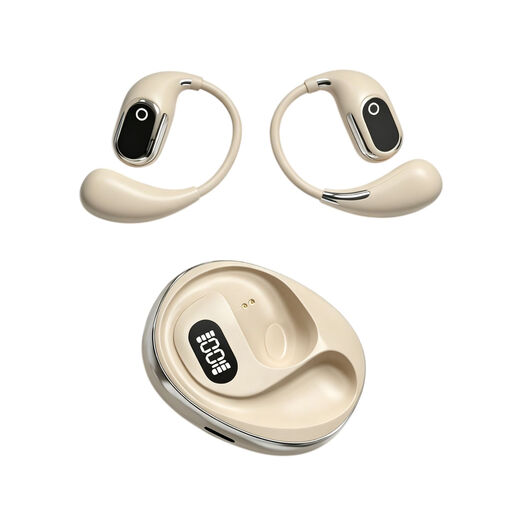 No image available
The product name mentions a built-in microphone and on-location recording; before buying, check that the recording function and microphone work with your device and are suitable for voice recordings.
The name also mentions a charging case with a Type-C connection.
 No image available
Only consider this headset if your recording device recognises the microphone as an input; make a test recording beforehand and listen back to it.
 No image available
A wired USB option to consider if you’re recording on a computer; check that the USB connection is compatible with your device and select the headset as your recording input.
The description mentions an adjustable microphone boom and volume and mute controls.
 No image available
Could suit wired recording on a computer; check that your device supports the USB connection and recognises the microphone as an input.
The description mentions in-line volume controls. The cable limits your freedom of movement.
Yes, as long as your device recognises the headset microphone as an input and your recording app uses that input. In Windows, you can test the microphone, play back a sample and make a recording with Sound Recorder. Start with a short clip at your normal speaking volume.
Position the microphone near your mouth and listen back to a test recording. For the SM35, Shure recommends placing it at the corner of your mouth rather than directly in front of it; for other models, follow the manufacturer’s instructions.
No. Microphone noise cancellation affects the recorded or transmitted signal, not the sound of your voice in the room. Listening back through the earcups does mean you won’t need to use room speakers.
For Bluetooth, the Dutch Authority for Digital Infrastructure lists frequency use as licence-exempt. For a separate wireless presentation microphone system, it depends on the frequency band: according to the Authority, a licence is usually not needed, but some bands do require one, and not every licence-exempt UHF frequency is available at every location. So check the band and the intended location for the system you choose.
For distance purchases from a business, the Government of the Netherlands says you’re entitled to a 14-day cooling-off period in many cases; exceptions may apply. In the Netherlands, products must also meet statutory consumer guarantees, with no fixed statutory guarantee period. Depending on the circumstances, if a product is faulty you may be entitled to a free repair, replacement or refund.