If you mainly record yourself sitting at a computer, start with a wired headset that has a USB connector compatible with your device, then make a test recording in your usual recording software. Choose Bluetooth if you want to move around while practising. A separate headworn microphone is another option if you also want to practise your stage set-up, but you’ll need a compatible microphone input and a separate way to listen back. Call specifications don’t prove how natural a separate speech recording will sound.
Who is this guide for?
Speakers who listen back to themselves
You record practice scripts to assess your voice and how clearly you speak. An adjustable microphone boom and a test recording on the device you’ll be using can help. Logitech, Trust and Jabra describe microphone positions or versions for different connections.
People practising at a laptop or PC
You want to record and listen back with ease. Check that the connector is compatible with your computer, then select the headset microphone as the input in your recording software. Logitech, Trust and Jabra describe wired USB versions.
Speakers who practise while walking
You want to move around as you rehearse. Compare the pairing and charging steps for Bluetooth with the connection required by a separate headworn microphone. Logitech describes the Zone 300 as a Bluetooth headset, while Shure describes the WH20 as a separate microphone.
What should you look for?
Wired USB headset
Choose this option if: you mainly practise at a laptop or PC and the USB version matches the available port.
Bear in mind: the cable limits how much you can move around, and you’ll need to select the headset microphone in your recording app.
Wireless Bluetooth headset
Choose this option if: you want to walk around while practising and your device and recording app work with the headset.
Bear in mind: you’ll need to pair and charge it. Test the connection while moving around.
Separate headworn microphone
Choose this option if: you mainly want to practise your stage set-up and already have suitable recording equipment.
Bear in mind: the Shure WH20 is a microphone, not a complete headset for listening back. Check the connector on the version you choose.
| What to consider |
What to look for |
Who is this important for? |
| Clarity |
Check whether the microphone boom is adjustable. Record a few sentences in your own space and listen back for words that drop out, distortion and background noise. |
I want to assess my pronunciation without the recording distracting me; around 36% of consumers prioritise clarity. |
| Connection and input |
Compare the full version name and connector with your device’s port. Also check which microphone your recording app is using. |
I want to plug in the headset and select the right microphone straight away; around 29% of consumers prioritise a compatible connection. |
| Comfort |
Consider the style, adjustability and whether you want one or both ears covered. Try the headset during a practice session. |
I want to practise repeatedly without the fit distracting me; around 21% of consumers prioritise comfort. |
| Freedom of movement |
Test Bluetooth and your recording app while making the movements you expect to make. For a separate microphone, check that the connector is compatible with your recording equipment. |
I want to rehearse while walking without a cable getting in the way; around 14% of consumers prioritise freedom of movement. |
Avoiding common buying mistakes
-
Confusing call noise reduction with recording quality
Logitech, Trust and Jabra describe microphones for headsets, but a claim about calls doesn’t prove how natural your practice recording will sound in English.
Before choosing, record a few sentences using your own voice, space and recording software, then listen back.
-
Checking only the model or series name
Different versions may have different connections. HP describes several versions within the Blackwire series, while Jabra documents USB-A and USB-C versions of the Evolve2 30. The Shure WH20 versions also have different connectors.
Compare the full version name and connector with the device you’ll use to record.
A separate headworn microphone may require additional compatible recording equipment.
-
Choosing wireless without testing your recording set-up
A Bluetooth headset needs to be paired and sufficiently charged. Your recording app also needs to use the right microphone.
Make a test recording while moving as you would during your presentation, and check the connection before practising for longer.
Brands to consider
Logitech
The H390 is a wired USB headset, while the Zone 300 is a Bluetooth headset. They’re different options for practising while sitting down or moving around.
- Logitech describes the H390 as having an adjustable microphone and controls on the cable.
- Check whether you need the USB-A or USB-C version. The stated call time for the Zone 300 isn’t a measured recording time or proof of recording quality.
Trust
The Ayda USB-ENC is a wired on-ear PC headset with an adjustable microphone.
- Trust describes on-ear volume controls and a mute function activated by flipping the microphone up.
- Trust’s claim about reducing background noise is a manufacturer’s claim; assess the results with a test recording.
HP Poly
The Blackwire 3200 series includes wired business headsets in different styles and connection versions.
- HP lists mono and stereo options, as well as different connections in the series.
- Don’t assume every Blackwire 3220 version has the same connection; HP specifies USB-A for the Blackwire 3220 Stereo USB-A.
Jabra
The Evolve2 30 SE is a wired on-ear headset range with mono, stereo and USB versions.
- Jabra lists a two-microphone system and several versions.
- Check the full version name: connections vary between USB-A, USB-C and USB-C/A.
Shure
The WH20 is a separate headworn microphone for active speakers, among others. It isn’t a complete headset for listening back.
- Shure describes an adjustable headband and a cardioid pickup pattern.
- The WH20XLR, WH20QTR and WH20TQG versions have different connectors; check which input your recording equipment has.
Headsets for practising and recording
This selection includes wired headsets for use with a compatible USB or 3.5 mm connection, plus a wireless Bluetooth headset for practising with greater freedom of movement.
 No image available
Logitech PC 960 USB headset
A wired USB headset for practising and listening back on a computer.
The microphone boom is adjustable; the headset offers stereo sound, with volume and mute controls.
View at Joybuy
 No image available
Logitech H340 USB headset, Black
A wired USB headset for recording on a computer; check that your device selects the right input.
The description lists an adjustable microphone boom, volume and mute controls, an adjustable headband and stereo sound.
View at Joybuy
 No image available
Jabra Evolve2 55 Wireless Stereo Headset
A wireless Bluetooth stereo headset for practising while you move; test the connection with your recording device and app.
The description lists two microphones, a flexible microphone boom and a mute function.
View at Joybuy
 No image available
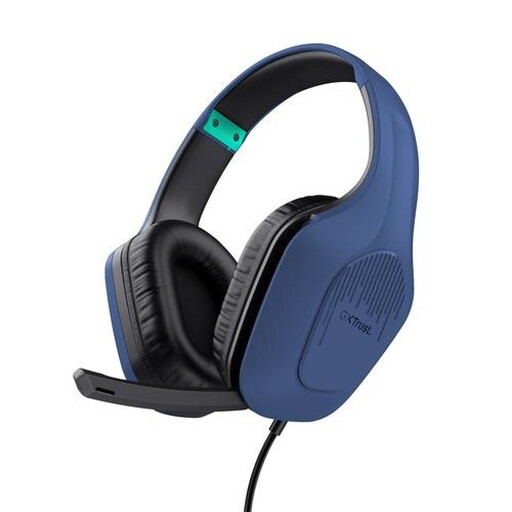
Trust GXT 415B Zirox Gaming Headset
A wired headset with a microphone, for use when its 3.5 mm connection is compatible with your device.
The description lists a flip-up microphone, stereo sound, an adjustable headband and an over-ear design.
View at Joybuy
 No image available
Logitech H150 White (981-000350)
A wired headset with a microphone for practising via a compatible 3.5 mm connection.
The description lists stereo sound, volume controls on the cable, and an adjustable, rotating microphone. Devices with separate microphone and headphone ports may require a splitter, which isn’t included.
View at Joybuy
Frequently asked questions
How can I check that the right microphone is recording before I practise?
Select the headset microphone as the input in your recording app, then play back a short test recording. The right connection and app support depend on the headset version and your device.
Is a stage-focused headworn microphone the same as a headset I can use to listen back?
No. The Shure WH20 is a microphone, and its versions have different connectors. Check which input you need and arrange a separate way to listen back to the recording.
What if a headset I bought online isn’t compatible with my device?
For distance purchases from a business, you generally have a 14-day cooling-off period, according to the Dutch government; exceptions may apply. Check the connection version and the seller’s information before buying.
Can I share a practice recording that contains identifiable voices?
An identifiable audio recording may contain personal data. The Dutch Data Protection Authority distinguishes purely personal or household use from processing that requires a lawful basis under the GDPR. Whether the exception applies depends on the circumstances; don’t assume that taking part in the practice session automatically means you can share the recording.


