What should you look for when choosing?
First, check which input your recording device has and whether the microphone boom can stay close to your mouth. Then compare a test recording for clarity and vocal nuance; none of the connections or microphone types mentioned will, on its own, guarantee that room reverberation is eliminated.
Wired USB headset
A good choice if: you want to record directly on a computer and the headset’s connection is compatible with it.
Bear in mind: USB-A and USB-C versions aren’t interchangeable with every device; a noise-cancellation claim doesn’t mean room reverberation will disappear.
Analogue headset for speaking and monitoring
A good choice if: you want to monitor your voice while recording and your device has a compatible analogue headset input.
Bear in mind: check that your device’s microphone input works; a splitter can separate the signals into individual connections.
Broadcast headset with separate connections
A good choice if: you already have compatible microphone and headphone inputs, or specifically want to record using these connections.
Bear in mind: XLR for the microphone and 6.3 mm for the headphones don’t provide a direct USB connection; keeping the microphone close to your mouth is still important.
| Consideration |
What to check before buying |
Who is this most important for? |
| Reducing room reverberation |
Whether the microphone boom can stay close to your mouth; test it in your usual recording spot. |
I mainly want to stop the room from overpowering my voice. Around 42% of consumers put reducing audible room reverberation first. |
| Preserving vocal nuance |
Listen to both quiet and loud sentences, and check that the words and articulation sound clear. |
When I read poetry, I want to be able to assess quiet words and changes in my voice too. Around 25% of consumers prioritise vocal nuance. |
| Compatible connection |
Compare the headset plug with the input on your computer or recorder; check whether separate inputs are needed. |
I want to connect it without discovering afterwards that I’m missing an input. Around 17% of consumers mainly choose based on direct compatibility. |
| Monitoring and comfort |
Check the headphone connection and fit, and whether the microphone boom can be repositioned securely. |
For repeated recordings, I want to monitor comfortably and check how my voice sounds. Around 16% of consumers make this their top priority. |
Headsets on Joybuy
This Joybuy selection features wired headsets with microphones. For each model, check that the connection is compatible with your recording device and make a test recording to assess the microphone position and how your voice sounds.
 Image unavailable
Turtle Beach Recon 70 PlayStation wired gaming headset, white
The microphone boom can be positioned towards your mouth; make a test recording to see how your voice sounds in your room.
Wired with a 3.5mm connection; microphone with flip-to-mute function.
Joybuy
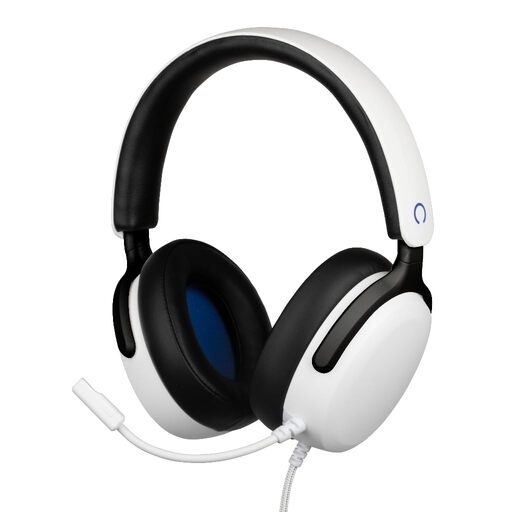 Image unavailable
Konix Nexus over-ear wired gaming headset, white
The flexible microphone can be positioned close to your mouth; listen back to a test recording to assess how clear it sounds.
3.5mm connection; 1.5 m cable; microphone boom and 40 mm drivers.
Joybuy
 Image unavailable
Logitech H340 USB headset, black
A USB headset for a wired connection to a computer; check that it works with your microphone input and recording app.
USB connection; adjustable microphone.
Joybuy
 Image unavailable
Trust Ayda wired headband headset, USB-A
The microphone is designed for spoken communication; test it with your own voice and check that the connection is compatible.
USB-A; the product information also mentions a USB-C adapter cable and flip-to-mute controls.
Joybuy
 Image unavailable
Razer BlackShark V2 X 7.1 wired gaming headset, black
The cardioid microphone is designed to be positioned close to your mouth; make a test recording to hear how your voice and the room reverberation sound together.
Analogue 3.5mm connection. The product information states that a splitter is included for computers with separate microphone and headphone ports.
Joybuy
Frequently asked questions
Will a noise-cancelling headset microphone eliminate room reverberation?
No, don’t assume that room reverberation will disappear. Shure explains that a microphone can’t completely separate direct speech from reflected speech. Position the microphone close to your mouth and compare a test recording with one made somewhere less reverberant.
How do I set up a headset for my first recording?
Select the headset as your microphone input and position the microphone boom close to your mouth. Record a short passage with quiet and loud words, then listen back for plosive sounds, changes in level and reverberation. Logitech and Jabra user guides explain how to adjust the microphone position.
Will a broadcast headset connect directly to my laptop?
Not always. According to its European data sheet, the Audio-Technica BPHS1 has an XLR microphone plug and a separate 6.3mm headphone plug. Check that your recording device has both connections before choosing the headset.
What cancellation period and warranty apply to a headset bought online in the Netherlands?
ACM ConsuWijzer states that online purchases generally come with a statutory 14-day cancellation period from the day of delivery, although statutory exceptions may apply. ACM ConsuWijzer also states that you’re entitled to a product that meets what you could reasonably expect; if there’s a fault, the applicable statutory remedies apply.
Can I recite someone else’s poem in published commentary?
Not automatically. The Dutch government distinguishes between making a copy for personal use and distributing or publishing protected work. Conditions may apply to quotations, such as relevance to the subject and crediting the source; assess the specific poem and the length of the extract before publication.


