If you mostly record sitting at a computer and want to keep extra equipment to a minimum, start with a wired headset that has the right connection for your computer. Make a test recording to check how softly and powerfully delivered lines sound in your voice. If you move around while reciting, you could consider a standalone headset microphone, but you’ll need to arrange the connection and playback separately.
Who is this buying guide for?
Home reciter who cares about vocal sound
You mostly record Dutch poetry sitting down and want to use a short test recording to assess quiet words, emphasis and plosive sounds. RØDE describes the features of its microphone, while Audacity offers guidance on setting the recording level.
Reciter who wants to keep their setup simple
You want to connect your headset straight to a computer rather than put together a separate recording chain first. Check that the plug and version you choose are compatible with your device.
Reciter who moves while speaking
You walk or gesture as you recite and want to wear a microphone that moves with you. Also work out how you’ll connect it and what you’ll use to listen back to the recording.
What should you look for when choosing?
Wired USB headset
A good fit if: you mostly record at a computer and want to keep extra components to a minimum.
Keep in mind: a microphone designed for calls isn’t automatically proof that quiet passages or sibilant sounds will come across naturally.
Headset for recording and playback
A good fit if: you want to wear your microphone and headphones as one set.
Keep in mind: RØDE describes natural voice reproduction as a product feature, not an independent assessment of Dutch poetry recordings. Check the microphone connection too.
Standalone headset microphone
A good fit if: you move around while reciting and want to wear the microphone.
Keep in mind: the microphone doesn’t include headphones. The connection and any power supply must be compatible with your recording equipment.
| What to consider |
What to check before buying |
Who should pay extra attention? |
| Vocal sound |
Make a test recording with quiet and loud lines, as well as p and s sounds. Pay attention to the microphone position and recording level. |
If I want to hear how quiet words and emphasis sound in my recitation, I compare short recordings with my own voice. Around 36% of consumers say vocal sound is their top priority. |
| Connection |
Check the exact port and version. Make sure your computer or recorder supports the microphone through the plug you’ve chosen. |
If I want to get started without extra equipment, I first check that the headset connects directly to my device. Around 29% of consumers say ease of connection is their top priority. |
| Freedom of movement |
Check that the microphone version is compatible with your transmitter or recording equipment, and decide how you’ll listen back to the recording. |
If I walk or gesture while reciting, I want a wearable microphone that suits my setup. Around 21% of consumers say freedom of movement is their top priority. |
| Comfort when wearing and listening back |
Check the fit and make sure the set you choose has a headphone connection that works with your equipment. |
When recording several takes, I want to be able to wear the headset while listening back to my recitation. Around 14% of consumers say comfort when wearing and listening back is their top priority. |
Common buying mistakes
-
Assuming all 3,5mm connections work in the same way
According to RØDE, the microphone on the RØDE NTH-100M works correctly with the supplied TRRS cable. A connection that only supports headphone audio won’t be enough.
Check whether your computer or recorder supports a microphone signal through the connection you’ve chosen, and test recording and playback in advance.
Depending on the input, you may need a suitable adapter or a different recording device.
-
Thinking a headset supplied without a cable is a complete recording set
Sennheiser states that the HMD 26 is supplied without a cable, so you’ll need to work out in advance which cable is right for your equipment.
Before buying, check which cable and microphone input you need.
-
Confusing a standalone headset microphone with a headset
The Shure SM35 is a headset microphone without headphones. The XLR preamp requires phantom power; the TA4F version is designed for a compatible bodypack.
Choose this setup if freedom of movement is your main priority, and arrange the connection and playback separately.
You may also need headphones, a compatible bodypack or a powered XLR setup.
-
Assuming call noise cancellation guarantees a natural-sounding poetry recording
Logitech positions the H390 for calls; that doesn’t prove it will capture quiet passages and sibilant sounds in a poem naturally.
Make short, unedited test recordings of your own quiet and loud passages before recording a full recitation.
Brands to consider
Logitech
The H390 is a wired computer headset for anyone looking for a direct connection.
- Logitech lists an adjustable microphone boom and in-line controls.
- The manufacturer describes the H390 as a headset for calls. Check which USB version you’re choosing and whether it’s compatible with your computer.
RØDE
The NTH-100M combines headphones with a detachable headset microphone.
- RØDE describes the microphone as designed for natural voice reproduction and to reduce plosive sounds.
- These are the manufacturer’s claims, not an independent comparison of Dutch poetry recordings. RØDE says the supplied TRRS cable is needed for the microphone to work correctly.
Shure
The SM35 is a standalone headset microphone for a setup you put together separately.
- Shure lists an adjustable microphone boom and windscreens.
- The TA4F version is designed for a compatible bodypack. According to Shure, the XLR preamp requires phantom power; the microphone doesn’t include headphones.
Audio-Technica
The BPHS1 is a broadcast headset with separate microphone and headphone connections.
- Audio-Technica lists a dynamic cardioid microphone, closed-back earcups, and replaceable cable and ear pads.
- The version listed has an XLR microphone connection and a 6,3mm plug for the headphones. Check that your equipment can connect to both.
Sennheiser
The HMD 26 is a modular broadcast headset for use with a compatible professional connection setup.
- Sennheiser lists a dynamic supercardioid microphone and interchangeable connection cables.
- The headset is supplied without a cable. Choose the cable and input separately, and check that they’re compatible with your recording equipment.
Headsets at Joybuy
This selection includes wired and wireless headsets with microphones for a compact, wearable setup. Check that each model’s connection and microphone are compatible with your computer or recorder.
 No image available
Turtle Beach Atlas 200 PC Gaming Headset, 3,5mm connection
A wired headset with a microphone boom could work well in a compact setup. Check that your device supports both the microphone and headphones through the 3,5mm connection.
The product name lists a flip-to-mute microphone.
View at Joybuy
 No image available
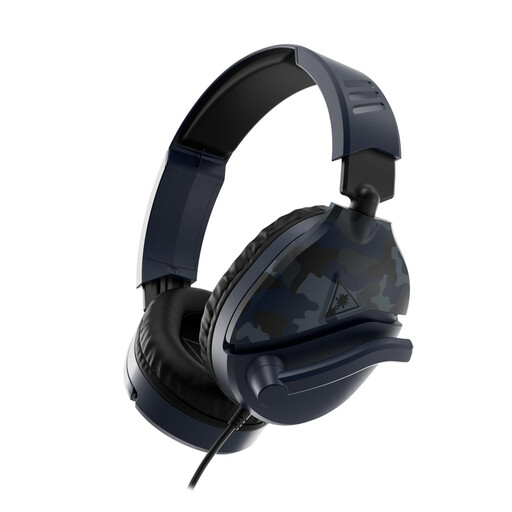
Turtle Beach Recon 70, 3,5mm connection, Blue Camo
This wired headset combines headphones and a microphone in one wearable set. Check that your recording device’s 3,5mm connection supports a microphone input.
The product name lists a flip-to-mute microphone.
View at Joybuy
 No image available
Turtle Beach Airlite Fit, 3,5mm connection, black and white
The product name describes a wired headset with a microphone. Check whether your recording device’s 3,5mm connection supports a microphone signal.
The product name lists a flip-to-mute microphone and a version for Nintendo Switch, Switch Lite and Switch OLED.
View at Joybuy
 No image available
Jabra Evolve2 30 SE
Before choosing, check whether this specific version has a microphone and connects to your computer or recorder in the way you need.
View at Joybuy
 No image available
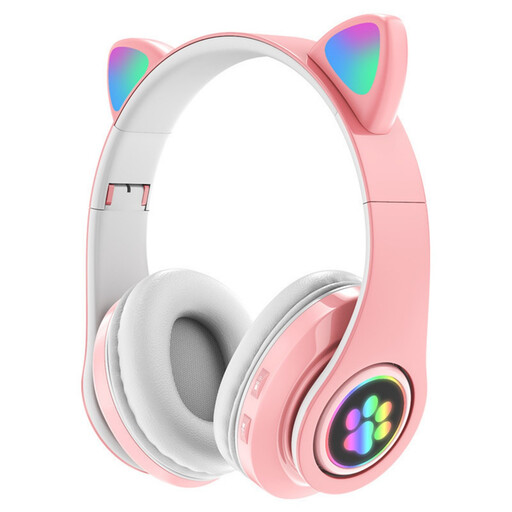
KINSI RGB Cat Ear Headset, wireless, pink
The product name lists Bluetooth, a microphone and a foldable design. Before choosing this headset for a recitation, check whether your recording device supports the microphone over Bluetooth.
The product name also lists LED lighting and three modes.
View at Joybuy
Frequently asked questions
Which cable do I need for the microphone on the RØDE NTH-100M?
According to RØDE, the supplied TRRS cable is needed for the microphone to work correctly. Also check whether your computer or recorder’s microphone input supports that connection.
How can I stop a loud line of poetry from distorting?
First, make a test recording of your loudest passage and check the recording meter. Audacity recommends lowering the input level if the meter reaches the yellow or red zone, from −9 dB to 0 dB, during a test at normal volume.
Can noise reduction completely fix a noisy recording afterwards?
No. According to the Audacity Manual, noise reduction is designed for constant background noise, not one-off sounds such as a door slamming.
Do I always need an audio interface for a broadcast headset?
Not always; it depends on the connections on the headset and your computer or recorder. According to Audio-Technica, the BPHS1 has separate microphone and headphone connections, while the HMD 26 is supplied without a cable. So check which inputs and cables your setup requires.


