What should you look for?
Wired USB headset
Choose this option: if you’re recording directly onto a computer with a compatible USB port.
The trade-off: Logitech and EPOS describe their USB headsets as products for calls. That alone doesn’t tell you how softly spoken poetry will sound.
Analogue headset
Choose this option: if your device has a compatible analogue connection and you want to listen through the same headset.
The trade-off: check whether you need a single combined connection or a compatible splitter. RØDE specifies the supplied TRRS cable for the NTH-100M microphone.
Broadcast headset with recording equipment
Choose this option: if you already have a recorder, mixer or audio interface and can check its connections.
The trade-off: Sennheiser says the cable for the HMD 26 isn’t included, so check the model and the cable you need.
Standalone head-worn microphone
Choose this option: if you already have a compatible microphone input or transmitter and can arrange your own way to listen back.
The trade-off: RØDE specifies a 3.5 mm microphone input with plug-in power or a compatible transmitter for the HS2. Shure SM35 models may have different connection and power requirements.
Voice level, connections, background noise and playback each call for a different check before you choose.
| What to consider |
What should you check? |
Who should pay particular attention? |
| Soft and loud passages |
Record both, check the recording meter and listen back. Audacity recommends aiming for a highest peak of around −6 dB in its recording workflow. |
If I’m recording both soft lines and a louder introduction, I want both to be clear without clipping at the peaks; around 33% of consumers say voice dynamics are their top priority. |
| Connection and power |
Compare the exact port with the headset and check whether you need a splitter, a separate microphone input or a power supply. |
I want to know before buying whether the microphone and headphones will work with my computer, recorder or interface; around 27% of consumers prioritise having the right connection for their device. |
| Background noise and plosive sounds |
Test the headset in the place where you plan to record and listen for background noise and bursts of air. If you have a directional microphone, follow the positioning instructions for the exact model. |
If I’m recording in a shared space, I want to assess unwanted noise and plosive sounds where I’ll actually be performing; around 20% of consumers put background noise first. |
| Comfort and playback |
Check whether the headset includes headphones, whether it remains comfortable during a longer session and how you’ll listen back to the recording. |
For a longer recording, I want to perform comfortably and check the playback; around 20% of consumers give comfort and listening back top priority. |
Joybuy products
This selection includes wired USB headsets and wired headsets with an analogue connection. Choose one that matches the ports on your computer or recording equipment, and check whether you need a splitter.
 No image available
Logitech PC 960 USB headset
An option for recording on a computer if you have a compatible USB port. The product information lists an adjustable microphone boom and in-line controls.
Joybuy
 No image available
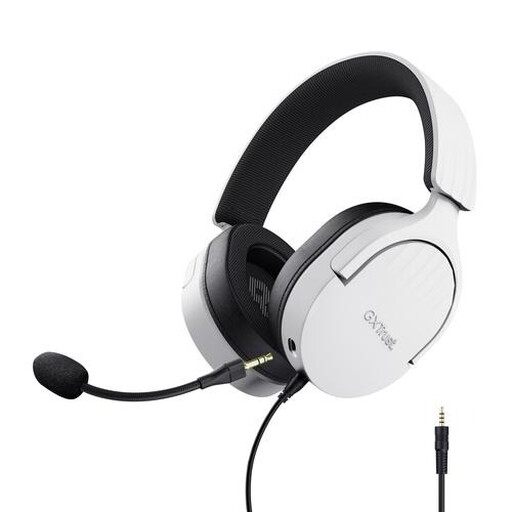
Trust GXT 489W Fayzo wired gaming headset, white
Worth considering if you’re looking for a wired headset with headphones and its analogue connection is compatible with your equipment. The product information lists a flexible, detachable microphone and an extension cable for PC use; check that it suits your connections.
Joybuy
 No image available
Trust Ayda wired USB headset, black
An option for recording on a computer if its connection is compatible with your device. The product information lists USB-A with a USB-C adaptor cable and a microphone that flips up to mute; check which connection you need.
Joybuy
 No image available
Razer BlackShark V2 X 7.1 wired gaming headset, black
An option if you’re looking for a wired headset with a microphone and its 3.5 mm connection is compatible with your recording equipment. The product information lists a cardioid microphone and a splitter for PCs with separate microphone and headphone connections; check your device’s connection.
Joybuy
 No image available
HyperX Cloud III wired gaming headset, black and red
An option if you’re looking for a headset with a detachable microphone. The product information lists 3.5 mm, USB-A and USB-C connections; check which one is compatible with your computer or other recording equipment.
Joybuy
Frequently asked questions
How can you stop your spoken introduction from being recorded louder than the poem?
Before making the final recording, record both a soft line and your loudest introduction, then listen back to the test. Audacity recommends aiming for a highest peak of around −6 dB in its own recording workflow.
Will every headset microphone work directly with your laptop?
No, it depends on the port and the exact model. The Logitech H390 has a USB-A connection; RØDE specifies that you use the supplied TRRS cable with the NTH-100M microphone. Also check whether your laptop has one combined connection or separate audio inputs.
How should you position a head-worn microphone when recording poetry?
Follow the instructions for the exact model and check the position with a test recording. For the SM35, Shure recommends placing the microphone at the corner of your mouth, rather than directly in front of it, to reduce plosive sounds.
When should you choose a USB headset, and when an analogue one?
Choose a USB headset if its connection is compatible with your computer and you want to record directly onto it. An analogue headset may suit equipment with compatible audio inputs, but check whether you need a splitter or a separate microphone input.
Can you use a wireless headset microphone in the Netherlands without a licence?
According to the Dutch Authority for Digital Infrastructure (RDI), wireless microphones usually don’t require a licence, but you must use the correct frequency band. Check the frequency for your specific system and the latest information from the RDI.


