What should you look for when choosing?
Recording headset with headphones
Choose this option if: you also want to listen back through the same device while reading.
Bear in mind: the connection to your recorder and whether the microphone is detachable; claims about voice reproduction do not prove that fan noise is suppressed.
Wired USB call headset
Choose this option if: you want to record directly to a compatible computer and avoid a separate audio interface.
Bear in mind: the exact USB version and compatibility with your computer or app; Logitech BLUE VO!CE on the wired PRO X requires a PC with G HUB.
Directional headworn microphone
Choose this option if: you want to keep the microphone close to your mouth as you move and already have suitable recording equipment.
Bear in mind: the Shure SM35 is not a complete listening headset; the connector and any power requirements must be compatible with the rest of your recording setup.
When recording a Dutch poetry reading with a fan running, the main things to consider are microphone placement, preserving the sound of your voice and connecting to your recording equipment.
| What to consider |
What should you check? |
Who is this important for? |
| Fan noise |
Make a recording with the fan running and compare microphone distance, direction and any noise reduction. |
If I want my reading to remain clear above the constant sound of a fan, I’ll compare the positioning and the recording itself first. Around 36% of consumers say fan noise is their main concern when buying. |
| Natural-sounding voice |
Compare the same passage with and without the available filters; listen to quieter words and plosive sounds, too. |
If you want to preserve the sound and quieter passages of a poem, assess filters for their effect on your voice. Around 29% of consumers prioritise a natural-sounding reading. |
| Connection and recording setup |
Check the exact connector, input and any power requirements for the version you choose. |
If I want to record using my existing computer or recorder without extra steps, I’ll first check that the connection is genuinely compatible. Around 21% of consumers say direct connection is their main concern when buying. |
| Wearing and listening back |
Check whether the setup includes headphones and whether your recording software supports monitoring. |
If you’re recording readings repeatedly, you’ll want to listen back to them and wear the headset comfortably. Around 14% of consumers prioritise monitoring and wearing comfort. |
Products at Joybuy
This selection includes wired headsets with boom or flexible microphones, as well as some headphones and earbuds for anyone who also wants to listen to audio. If you choose headphones or earbuds, check separately whether the microphone and connection are suitable for your recording device.
 No image available
JBL Quantum 300, wired over-ear gaming headset
A wired over-ear headset to consider if you want to position a boom microphone close to your mouth; the product description mentions a directional voice-focus microphone.
The product details list a 3.5mm connection and a USB audio adapter included in the box.
Joybuy
 No image available
Sennheiser MOMENTUM 4 Wireless, white
These wireless over-ear headphones may be worth considering if you also want to listen back in comfort; check separately that your recording device supports the microphone connection.
The product name lists active noise cancellation, four microphones and 60 hours of battery life. These features do not show how fan noise will sound in a recording of poetry.
Joybuy
 No image available
Samsung Galaxy Buds4 Pro, black
These wireless in-ear earbuds may suit anyone who also wants to listen to audio while reading; before use, check that the microphone and wireless connection work with your recording app.
The product details list active noise cancellation and six microphones with DNN for calls. This is not a measurement of recordings of Dutch poetry readings made with fan noise.
Joybuy
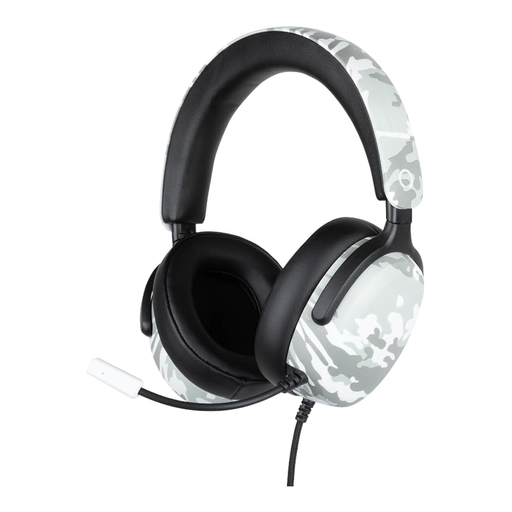 No image available
Konix Nexus, wired over-ear gaming headset
A wired headset with a flexible microphone to consider if you want to direct the microphone towards your mouth; check that the connection is compatible with your recording device.
The product name lists a 1.5 m cable and a camouflage pattern; the product details mention a flexible microphone and a 3.5mm connection.
Joybuy
 No image available
JBL Quantum 120, wired gaming headset
A wired headset to consider if you want to be able to remove the microphone; the product details list a detachable cardioid boom microphone.
The details list a 3.5mm cable. The stated noise-reduction feature for communication is not a measured result for recording poetry with fan noise.
Joybuy
Frequently asked questions
Can I remove fan noise completely afterwards?
Don’t count on it. Audacity describes noise reduction for constant sounds such as fan noise, but notes that a satisfactory result can be difficult if the noise is loud or close to the voice. So start by making the best recording you can.
Where should I position the microphone while reading?
Start by placing it close to your mouth and make a test recording. For the SM35, Shure recommends positioning the microphone at the corner of your mouth, rather than directly in front of it, to reduce plosive sounds; follow the instructions for other models.
What if the headset isn’t compatible with my recorder?
For online consumer purchases in the Netherlands, you generally have a legal 14-day cooling-off period after delivery; check the applicable exceptions and returns policy. The legal guarantee is separate from the manufacturer’s warranty. If a product does not perform as you could reasonably expect under normal use, you can contact the seller.
Can I publish a recording of an existing poem?
Don’t assume you can publish a poem simply because you recorded yourself reading it. In principle, you need permission to make a copyright-protected text available to the public, unless an applicable exception applies or the copyright has expired. Privacy rules may also apply if other people’s voices can be recognised; there is a limited exception for personal or domestic use only.


