Choose a headset microphone to suit where your poetry reading will be heard. For a venue, choose a headset with a connection that’s compatible with the venue’s sound system, while a USB headset is designed for speaking through a computer. If you’d like to move around as you read, a complete wireless system may be a good fit, but check which frequencies are available at your venue with the Dutch Authority for Digital Infrastructure. A headset won’t fix backlighting from a bright window, so adjust the lighting for your video separately.
Who is a headset microphone suitable for?
Poet reading in a venue
You want even quiet lines to be clear through the venue’s sound system. Shure recommends positioning the SM35’s microphone boom by the corner of your mouth. Make sure the microphone and speakers are also set up to work well together.
Presenter who moves around
You want to keep your hands free and move around while making announcements or giving a reading. A complete system with a headset, transmitter and receiver could be a good fit. Check with the Dutch Authority for Digital Infrastructure which frequencies are available at your venue.
Online poet
You speak directly through a computer and may want to monitor the audio as you go. Zoom recommends checking daylight and reflections from a bright window separately, as a headset won’t control the lighting on your face.
What should you look for when buying?
First, decide where your voice needs to go. Then check the connection, freedom of movement and fit that suit your reading.
| What to consider |
What to look for |
Who is this important for? |
| Clarity in the venue |
Check the input on the venue’s sound system, microphone position and speaker placement. |
If you read quietly and want to be heard at the back of the venue, clarity is especially important; around 33% of consumers put it first. |
| Freedom of movement |
Compare the limitations of a cable with the transmitter, receiver and frequency options of a wireless system. |
If you want to be able to move away from your spot during a poem, freedom of movement matters; around 25% of consumers prioritise it. |
| Computer connection or monitoring |
Check whether your computer uses USB or your audio setup has separate microphone and headphone inputs. |
A suitable connection is important for an online reading or if you want to monitor the audio; around 25% of consumers prioritise a computer connection or monitoring. |
| Comfort |
Check the headband, earcups and adjustable microphone boom. Fit is a personal choice. |
If you wear a headset for a long time, you’ll want it to stay comfortably in place without getting in the way of your reading; around 17% of consumers prioritise comfort. |
Common buying mistakes
-
Mistaking a headset microphone for a complete wireless system
A standalone microphone such as the AKG C544 L is designed for use with a compatible AKG WMS bodypack. The Sennheiser XSW 1-ME3-BC is described as a set with a headset, bodypack and receiver.
Check the full connector name, what’s included in the box and whether it’s compatible with your existing equipment.
If you only have the microphone, you may also need a compatible bodypack transmitter or receiver.
-
Assuming a wireless frequency will work everywhere
According to the Dutch Authority for Digital Infrastructure, the available frequency spectrum varies by location, and some bands require a licence.
Check the frequency of the exact model and the Dutch Authority for Digital Infrastructure’s guidance for the location where you’ll be using it.
-
Buying a computer headset without checking the audio connection
A USB computer headset and a broadcast headset with separate connections won’t necessarily work with the same audio equipment.
Before choosing a connection, check the complete signal path from the microphone to your computer, headphones or venue speakers.
Brands to consider
Shure
Stage-focused headset microphones, including the SM35 for readings through a compatible venue sound system.
- Shure specifies a cardioid capsule and adjustable microphone boom for the SM35.
- The SM35-XLR requires 12–52 V phantom power; the TA4F version doesn’t have the same direct XLR connection. Check the version and input you’ve chosen.
Sennheiser
Complete wireless headset systems, such as the XSW 1-ME3-BC for presenters who want to move around.
- According to Sennheiser, this version includes a headset, bodypack and receiver.
- The specified frequency band is 670–694 MHz. The Dutch Authority for Digital Infrastructure says that available frequencies vary by location, so check the exact version and where you’ll be using it.
Logitech
Computer headsets for online readings through a direct computer connection.
- Logitech lists in-line controls and an adjustable headband for the H390.
- Check the USB connection on the version you’ve chosen and make sure it works with your computer. A computer connection won’t necessarily be compatible with a venue sound system.
Audio-Technica
Broadcast headsets such as the BPHS1, for anyone who wants to monitor audio through headphones during a recording or broadcast.
- Audio-Technica describes the BPHS1 as a headset with a dynamic cardioid microphone and closed-back earcups.
- The standard BPHS1 has separate XLR and 6.3 mm connections. Check that you have both inputs, and don’t confuse this version with the BPHS1-XF4.
AKG
Headset microphones for hands-free speech, including the C544 L for use with a compatible AKG WMS bodypack.
- AKG specifies a cardioid microphone and a 3-pin mini XLR plug for the C544 L.
- The standalone microphone isn’t a complete wireless system; check that the transmitter is compatible with your equipment.
Headsets for readings through a computer
The Joybuy options below are headsets for speaking through a computer. Check that each model’s connection is compatible with your computer and any audio equipment you use.
 No image available
Jabra Evolve2 65 USB-A Black MS Mono
An option for an online reading through a computer if you’re looking for a headset for speaking.
View at Joybuy
 No image available
Jabra EVOLVE 30 II MS Stereo
A computer-focused headset for online readings, with a microphone and headphones for speaking.
View at Joybuy
 No image available
Kingston USB Hi-Fi headphones with microphone
An option for speaking through a computer if you’re looking for USB headphones with a microphone.
View at Joybuy
 No image available
Logitech G G432 7.1 Surround Sound Wired Gaming Headset
A computer-focused headset for online readings; bear in mind that the cable may restrict you if you want to move around while reading.
View at Joybuy
 No image available
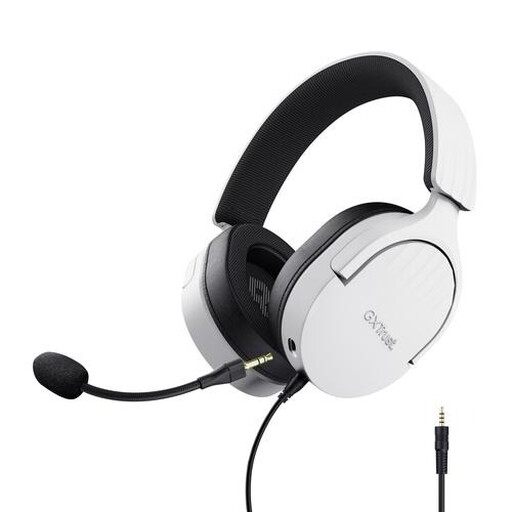
Trust GXT 489W Fayzo Wired Gaming Headset, 50mm, white
An option for reading through a computer or laptop with a compatible 3.5 mm connection.
View at Joybuy
Frequently asked questions
Where should you position the microphone boom to avoid plosive sounds?
Position the microphone boom by the corner of your mouth rather than directly in front of it. Shure recommends this position for the SM35 to reduce plosive sounds. Make a test recording with your own voice.
How can you reduce feedback from speakers in a venue?
Keep the microphone and speakers as far apart as possible, and position the microphone close to your voice. Shure notes that a directional microphone can help, but the venue setup also plays a part.
Will a different headset fix a bright window in your video?
No, a headset won’t control the lighting on your face. Zoom recommends assessing daylight and reflections separately, for example by using light-filtering window coverings.
Can you use a wireless headset microphone in the Netherlands without a licence?
It depends on the frequency band and the conditions that apply. The Dutch Authority for Digital Infrastructure states that some bands require a licence and that not all frequencies are available at every location. Check the exact version and where you’ll be using it.
What are your rights if a headset bought online doesn’t fit or breaks too soon?
For online purchases, ACM ConsuWijzer says you’ll often have a 14-day cooling-off period after delivery, subject to legal exceptions. If the headset is faulty, the seller is responsible for providing an appropriate solution under the statutory guarantee. This right isn’t simply limited to a fixed manufacturer’s warranty period.


