You don't automatically need a headset microphone to read aloud at the kitchen table. If everyone can hear you clearly and there’s no recording or online audience, you can read without a microphone. For online guests, a computer headset is a good option. If you want to amplify your voice for people in the room, first check that the microphone connects to your sound system. Wireless is mainly useful if you move around and have a compatible transmitter and receiver, with a usable frequency.
Who are these options for?
Reader with online guests
You’re reading aloud at the table and want people joining remotely to hear you, while you can still follow their reactions. Check the connection to your computer and whether you can mute the microphone. Logitech and Trust describe computer headsets designed for these kinds of connections.
Reader who wants to amplify their voice
Your audience in the room needs amplification, but you want to keep your hands free for the text and gestures. Check that the headset microphone works with your existing audio setup. Shure and Audio-Technica describe headsets for use with compatible audio equipment.
Host who likes to move around
You often stand up or walk around during the reading. A wireless option may suit you if the complete system is compatible and the frequency can be used at your chosen location. The Dutch Authority for Digital Infrastructure (RDI) provides location-specific information about microphone frequencies.
What should you look for when choosing?
First, decide who needs to hear the reading. Then choose a microphone and connection to suit online listening, amplification in the room or moving around as you read aloud.
| What to consider |
What to look for when buying |
Who is this important for? |
| Whether you need amplification |
Ask someone in the furthest seat to listen, then decide whether you also want to record or stream the reading online. |
If everyone at the table can hear you clearly and you don’t have a recording or online audience, you may not need to connect extra equipment. Around 36% of consumers put the need for amplification first. |
| Being heard clearly online |
Check your computer’s connection, the version you’re buying, and the microphone and mute settings. |
If people are listening remotely, you’ll want the microphone to work with your computer and to be able to listen too. Around 29% of consumers prioritise a working connection with online guests. |
| Hands-free amplification |
Compare the full model variant and plug with the microphone input, and check that you have the rest of the audio equipment you need. |
If people in the room need amplification, you’ll want to be able to hold your text while you speak. Around 21% of consumers put hands-free amplification first. |
| Freedom to move |
Check that the headset, transmitter and receiver are compatible with one another, and consult the RDI information for the location where you’ll be using them. |
If you’ll actually be walking around as you read aloud, a cable can get in the way. Around 14% of consumers put freedom to move first when choosing. |
Pitfalls to avoid
-
Assuming a computer headset is a microphone for the whole room
A USB headset such as the Logitech H390 is designed to connect to a computer. That doesn’t automatically make it suitable for amplifying your voice to people in the room through a sound system.
First decide whether the sound needs to go to online guests, a recording or loudspeakers.
If your audience in the room needs amplification, you may also need suitable audio equipment.
-
Assuming all variants in the same product range are identical
The Audio-Technica PRO8HEx has a different connection from the variants designed for a bodypack. The Logitech H390 is also available with different USB connections.
Before ordering, compare the full variant name and physical connection with your equipment.
-
Buying a wireless headset without checking the system
A standalone headset such as the Sennheiser ME 3 isn’t a complete wireless set. The RDI also notes that usable frequencies can vary by location and that some frequency bands require a licence.
Check that the transmitter and receiver are compatible, and consult the RDI information for the exact location and frequency variant you’ll be using.
Brands worth considering
Logitech
The H390 is a computer headset for readings with online guests. Choose the version that matches your computer’s USB port.
- Logitech lists a microphone boom and in-line volume and mute controls for the H390.
- A computer headset isn’t a standalone amplifier for a room or sound system.
Trust
The Ayda range includes computer headsets; the USB-ENC version is designed for calls on a computer.
- For model 25089, Trust lists controls on the earcup and a flip-up microphone that mutes when raised.
- The 3.5mm Ayda is a different connection variant. Trust’s claims about noise reduction aren’t measurements taken during a poetry reading.
Audio-Technica
The PRO8HEx is a wired headset microphone for use with compatible microphone equipment.
- Audio-Technica specifies a 3-pin XLRM plug and a hypercardioid polar pattern for the PRO8HEx.
- The headset microphone isn’t a complete amplification set. PRO8HEx bodypack variants have different plugs, so check the full variant name.
RØDE
The HS2 is a headset microphone for use with a compatible microphone input or transmitter.
- RØDE specifies an omnidirectional capsule and a 3.5mm TRS output for the HS2.
- When connected directly, the output requires plug-in power. Check that the input supplies it.
Sennheiser
The ME 3 is a headset microphone for use with a compatible wireless system, not a complete wireless set on its own.
- For article 508928, Sennheiser lists a cardioid capsule and a 3.5mm connection.
- Check your chosen system and frequency variant, and whether it can be used at your location.
Shure
The WH20XLR is a wired headset microphone for use with a compatible XLR microphone input.
- The Shure manual distinguishes the WH20XLR with its 3-pin XLR from WH20 variants with different connections.
- Shure’s explanation of the cardioid design isn’t a test in a Dutch kitchen.
Joybuy products for online readings
These product options are intended for reading aloud to online guests via a computer. For each headset, check the connection and any adapter that suits your device. These computer headsets aren’t automatically microphones for a sound system.
 No image available
Jabra Evolve2 30 SE
Worth considering if you want to communicate with online guests via a computer while reading aloud.
Check that the USB-A connection suits your device; a compatible adapter is recommended for USB-C.
Joybuy
 No image available
Logitech H650e Stereo Wired
A wired computer headset to consider if you want online guests to listen in and don’t need a wireless connection.
The product name specifies stereo and a wired design; check that the USB connection suits your computer.
Joybuy
 No image available
Jabra Evolve2 55 Wireless Stereo Headset
A wireless computer headset to consider if you want more freedom to move during an online reading.
The product name specifies wireless stereo sound; check which connection and adapter your computer needs.
Joybuy
 No image available
Kingston USB Hi-Fi Headphones with Microphone
USB headphones with a microphone to consider if you want to speak and listen via a computer while reading aloud.
The product name specifies USB and a microphone; check that the connection and device suit your reading.
Joybuy
 No image available
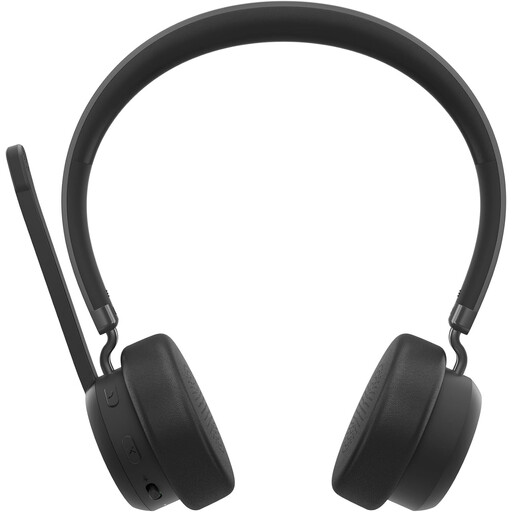
Lenovo 4XD1Q30302 Wireless Headset
A wireless headset to consider if you don’t want to be tethered by a cable when speaking to online guests.
The product name specifies a wireless headset; check the connection options and compatibility with your computer.
Joybuy
Frequently asked questions
Can I read poetry at the kitchen table without a microphone?
Yes, if everyone can hear you clearly without amplification and you don’t need to record or connect online. Shure notes that projecting your voice may be enough in a small room with good acoustics.
Can I plug a standalone XLR headset microphone straight into a laptop?
Not without a compatible XLR microphone input or suitable audio equipment. Audio-Technica specifies a 3-pin XLRM plug for the PRO8HEx, so check the input on your audio interface or sound system before choosing this headset microphone.
Where should you position the microphone when reading aloud?
For the SM35, Shure’s instructions say to position the capsule beside your mouth, rather than directly in front of it, to reduce plosive sounds. For another model, follow its own instructions and make a short test recording if needed.
Can I use a wireless headset microphone in the Netherlands without a licence?
That depends on the frequency band and its conditions of use. The RDI lists licence-exempt bands, but also warns that available frequencies can vary by location and that some bands require a licence. Check the exact equipment and location using the RDI information and the Microphone Bands app.
What cooling-off period applies when buying a headset online?
According to ACM ConsuWijzer, online purchases generally come with a statutory cooling-off period of up to 14 days after delivery, subject to legal exceptions, including certain unsealed hygiene products. Check the applicable terms before trying out or returning a headset.


