If you’re recording on a computer, a wired USB headset is a simple option, provided its USB connection is compatible with your recording app. For speaking and monitoring at the same time, you could consider a headset such as the RØDE NTH-100M. If you’re using a mixer or audio interface, check the microphone and headphone connections, as well as any power requirements. Make a short test recording in both languages and listen for clarity, plosive sounds and comfort. Product specifications can’t predict how it will sound with your voice in your room.
Who is this buying guide for?
Creators who want to hear both languages
You’re practising an intro and want to monitor your voice as you speak, then assess how clear both language versions are. RØDE and Audio-Technica describe headsets with both microphone and headphone functions. Make a test recording to hear how your voice sounds.
Creators who record directly on a computer
You want to record from a fixed seated position without a separate mixer. Check that the headset connection works with your computer and that your recording app can use the headset for both input and output. Logitech describes the H390 as a computer headset; Jabra notes that the Evolve2 40 SE’s compatibility depends on the USB variant, device and app.
Creators with an audio interface
You already have recording equipment and want a headset whose microphone, headphones, cable and any power requirements are compatible with it. Audio-Technica specifies separate microphone and headphone plugs for the BPHS1; Shure states that the BRH440M-LC is supplied without a cable.
What should you look for when choosing?
Start by checking the connection on your recording device, then make sure you can speak and monitor your voice at the same time. A short recording in both languages will help you assess how your voice sounds, whether there are plosive sounds and how the headset fits.
| What to consider |
What should you check? |
Who is this important for? |
| Clarity and plosive sounds |
Record both language versions and listen back. Shure advises positioning the SM35 microphone near the corner of your mouth; this is positioning guidance, not a test of the other models. |
If you want to assess your pronunciation and plosive sounds while practising, prioritise the sound of your voice recording. Around 33% of this group prioritise clarity. |
| Connection |
Compare the headset plugs with the ports on your computer or interface. The Logitech H390 981-001281 uses USB-A; the Audio-Technica BPHS1 has separate XLR and 6.3mm plugs. |
If you want to connect to your existing computer or interface without extra equipment, check the complete connection first. Around 27% of this group prioritise connectivity. |
| Monitoring |
Check whether your recording app can record and play back audio through the selected headset at the same time. A closed earcup alone tells you nothing about how room noise will be captured. |
If you want to hear your own voice as you speak, check for monitoring and a headphone connection. Around 20% of this group prioritise monitoring. |
| Fit and what’s included |
Look for adjustability and check which cables or adapters are included with the version you’re buying. Shure states that the BRH440M-LC is supplied without a cable. |
Fit can matter during repeated practice sessions, as can having all the components you need to connect everything. Around 20% of this group prioritise fit and a complete set. |
Common buying pitfalls
-
Choosing a USB headset for an XLR microphone input
USB and an XLR microphone plug are different connections. The Logitech H390 uses USB-A, while the Audio-Technica BPHS1 has a separate XLR plug for the microphone.
Before buying, compare the ports on your recording device with the headset’s microphone and headphone connections.
If the connections aren’t compatible, you may need different recording equipment.
-
Assuming a broadcast headset always comes with a cable
Shure states that the BRH440M-LC is supplied without a cable. Without a suitable connection, you can’t connect it to your recording equipment.
Check the exact version, what’s included in the box and which cable plugs your equipment requires.
With this version, you’ll need to allow for a separate connection cable.
-
Confusing an adapter with microphone power
For connecting the RØDE NTH-100M microphone to an XLR mixer input, RØDE describes a suitable adapter that supplies plug-in power.
For this set-up, check that the adapter is compatible and supplies the power required.
As well as the headset, you may need a suitable adapter that supplies plug-in power.
Brands to consider
RØDE
According to RØDE, the NTH-100M combines headphones for monitoring with a detachable headset microphone, and is designed for uses including podcasting.
- RØDE describes a microphone position designed to help reduce plosive sounds.
- According to RØDE, connecting the microphone to an XLR mixer input requires a suitable adapter with plug-in power. The description doesn’t prove how your voice will sound in your room.
Audio-Technica
The BPHS1 is a closed-back broadcast stereo headset with a dynamic microphone boom, designed for use with compatible recording equipment.
- The microphone boom can be positioned on either the left or right.
- Audio-Technica specifies separate XLR and 6.3mm plugs. Check both connections before choosing the headset for a computer set-up.
Logitech
The H390 is a wired computer headset for use from a fixed seated position; version 981-001281 has USB-A.
- Logitech specifies in-line volume and mute controls.
- Its positioning for calls isn’t an independent test of podcast recordings in two languages.
Jabra
The Evolve2 40 SE is a USB office headset available in mono and stereo versions for computer use.
- Depending on the version, Jabra specifies a USB-A or USB-C connection.
- Jabra warns that not every mobile USB-C device or app supports audio with this headset. Check the version and your intended use.
Shure
The BRH440M is a broadcast headset with closed-back earcups and a dynamic microphone, for use with a suitable cable and compatible inputs.
- Shure mentions replaceable cables and ear pads.
- The BRH440M-LC is supplied without a cable, so it isn’t a USB headset you can connect straight away.
Headsets at Joybuy
These Joybuy products are wired and wireless headsets with microphones for speaking and monitoring. Check that each model’s connection is compatible with your recording device.
 No image available
Trust GXT 498W Forta, wired headset, white
The detachable microphone and wired connection may suit a set-up where you speak and monitor your voice through the headset at the same time. Check that your device has a compatible 3.5mm connection.
3.5mm connection; detachable microphone; 50mm drivers; over-ear.
Joybuy
 No image available
Turtle Beach Recon 70, wired headset, Green Camo
The microphone can be flipped up to mute it. Check that the 3.5mm connection is compatible with your recording device and software.
3.5mm connection; flip-to-mute microphone; adjustable headband.
Joybuy
 No image available
Razer Kraken V3 X, black
This wired USB headset may suit a computer set-up. Check that your recording device and software support the USB microphone and headphone playback.
USB connection; cardioid microphone.
Joybuy
 No image available
Jabra Evolve2 75 USB-A MS Teams, black
Before using it with recording equipment, check that the USB-A version and your recording app support recording and playback.
USB-A version; MS Teams variant.
Joybuy
 No image available
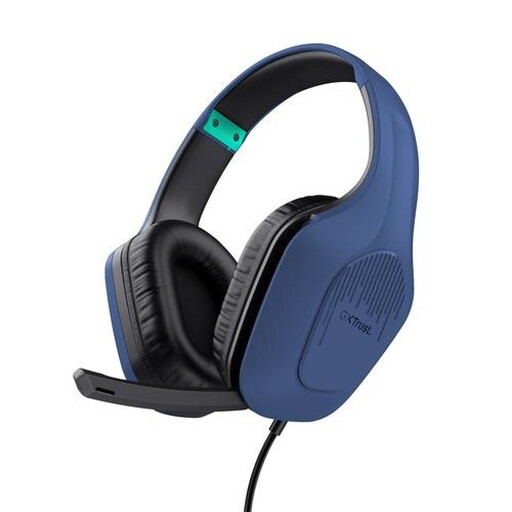
Trust GXT 415B Zirox, wired headset
The wired connection may suit a fixed recording set-up. Check that your device supports the 3.5mm connection.
3.5mm connection; 50mm drivers; over-ear.
Joybuy
Frequently asked questions
How should I position the microphone for a test recording in two languages?
Position an adjustable microphone boom near the corner of your mouth rather than directly in front of it to help reduce plosive sounds. This positioning advice comes from the Shure SM35 manual. Then record the same short intro in both languages and listen for pronunciation, breathing sounds and volume.
Can I connect the RØDE NTH-100M directly to an XLR mixer input?
Not with just the included splitter. According to RØDE, connecting the microphone to an XLR input requires a suitable adapter that supplies plug-in power; the headphones connect separately to a headphone output.
What should I check if I’m recording on a mobile device with the Jabra Evolve2 40 SE?
Check the USB version, your mobile device and the recording app. According to Jabra, not all mobile USB-C devices or apps support an audio connection with this model.
What returns and warranty rights apply to online purchases in the Netherlands?
According to ACM ConsuWijzer, online purchases generally come with a cooling-off period of up to 14 days after delivery, subject to exceptions that you should check before buying. The statutory guarantee is separate from a manufacturer’s warranty; according to ACM ConsuWijzer, your rights if a product is faulty depend, among other things, on its expected lifespan and the circumstances.


