What should you look for when choosing?
First, decide whether you only want to practise on your computer or whether the same microphone also needs to work through the sound system at your showcase. Then check the connection and, if you’re going wireless, the venue’s frequency requirements.
| Consideration |
What to look for |
Who is this important for? |
| Recording and listening back |
Check that the headset connects to your computer and can be selected as the microphone input. Make a test recording. |
If I want to record and listen back to my speech in Dutch at home, I want a straightforward computer setup. Around 33% of consumers say recording is their main purchasing need. |
| Freedom of movement |
Ask what mixer or sound system is available and whether a receiver can be connected to it. If you’re going wireless, check the exact frequency band. |
If I want to walk around and gesture during a showcase, I need a hands-free connection to the venue’s sound system. Around 27% of consumers say freedom of movement is their main need. |
| Connection and power |
Compare the exact microphone input, plug and power requirement with the full model variant and the equipment you already have. |
If I want to use an existing computer, mixer or bodypack, I need to be sure the microphone and connection are compatible. Around 27% of consumers say compatibility is their main purchasing need. |
| Wearing comfort |
Check how adjustable the headset is and where the microphone boom sits. If possible, try it during a practice session. |
If I’m practising my speech several times, I want a fit that stays comfortable throughout the session. Around 13% of consumers give wearing comfort top priority. |
Brands to consider
The brands below illustrate different options for computer use, venue equipment and existing wireless systems. Always check the exact variant and connection.
Logitech
A computer-focused option for practice recordings: the H390 is a USB headset with a boom microphone and in-line controls.
- For the USB-A variant described, Logitech lists a 1.9 m cable and a noise-cancelling microphone. These are manufacturer specifications and claims, not independent measurements for your seminar room.
- A USB computer connection is not the same as a standalone microphone for a venue mixer.
Sennheiser
A complete wireless stage setup: Sennheiser describes the XSW 1-ME3-BC as a set with a headset, bodypack and stationary receiver.
- Sennheiser lists automatic frequency management for the system.
- The BC variant is listed as 670–694 MHz. Check the actual frequency, transmission requirements and connection at the venue. These details don’t guarantee interference-free operation. The RDI sets out the applicable frequency requirements in the Netherlands.
Shure
A standalone headset for use with a compatible existing system: the PGA31-TQG is designed for compatible Shure bodypacks with a TA4F/TQG connection.
- Shure describes a cardioid pickup pattern and an included windscreen.
- The PGA31-TQG isn’t a complete wireless set on its own. For wired use, Shure specifies an additional preamplifier and phantom power.
Audio-Technica
A wired stage option: the PRO8HEx is the variant with a fixed cable and 3-pin XLR output.
- Audio-Technica lists an adjustable microphone boom and a hypercardioid pickup pattern.
- Other PRO8HE variants have different plugs. Check the full variant name and the microphone input available.
RØDE
A low-profile headset microphone for equipment with a suitable powered microphone input: the HS2 uses 3.5 mm TRS.
- RØDE specifies an adjustable microphone boom and an omnidirectional capsule.
- According to RØDE, the HS2 requires plug-in power. It isn’t a standalone USB headset or a complete wireless set.
Headsets for practising on your PC
These Joybuy products are headsets for speech and practice sessions on a computer. Check each model for the connection and features you need.
 No image available
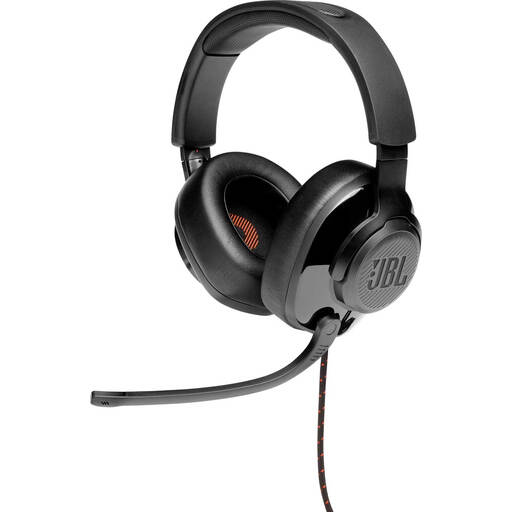
JBL Quantum 300 – wired over-ear gaming headset, black
A wired headset option for practising on your PC, with a microphone you can mute while speaking.
The product description lists PC compatibility via 3.5 mm or the included USB audio adapter, a directional boom microphone and a flip-up microphone that mutes when raised. It warns against listening at high volume for extended periods.
View at Joybuy
 No image available
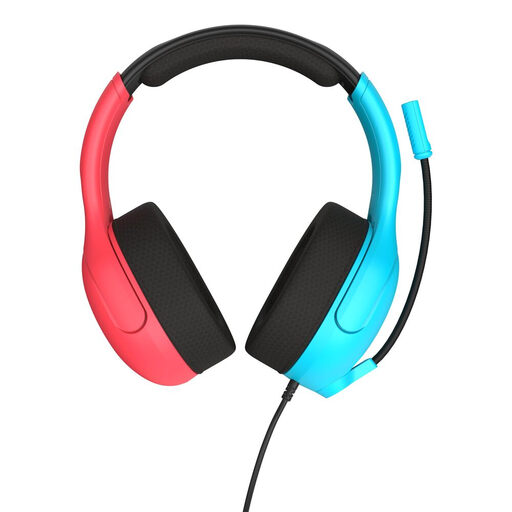
Turtle Beach Airlite Fit – wired headset, 3.5 mm, blue/red
A headset for practising on your PC if the 3.5 mm connection is compatible and you want a microphone that’s easy to mute.
The product description lists a 3.5 mm connection for PC, a flip-up microphone that mutes when raised and an adjustable design. It also mentions a 40 mm speaker and breathable mesh ear cushions. The description warns against listening at high volume for extended periods.
View at Joybuy
 No image available
Razer Kraken V3 X – headset, black
A headset option for speech practice. Before buying, check that the connection is compatible with the computer you use.
The product description lists a cardioid microphone, a mute function and a weight of 285 g. It warns against listening at high volume for extended periods.
View at Joybuy
 No image available
Jabra Evolve2 75 – headset
A headset for practice calls if the available Bluetooth or USB-C cable connection is compatible with your computer.
The product description lists eight microphones, noise cancellation, an adjustable headband and padded ear cushions. Check which connection option you need and whether the cable is included with the product.
View at Joybuy
 No image available
Logitech PC 960 USB headset
A computer-focused option for practising, with a microphone boom and in-line controls.
The product description lists a USB connection to a computer, an adjustable microphone boom and in-line volume and mute controls. It also mentions a lightweight design and soft ear cushions. The description warns against listening at high volume for extended periods.
View at Joybuy
Frequently asked questions
Can I speak in a venue straight away with a standalone headset microphone?
Not without a suitable signal path to the sound system. The Shure PGA31-TQG is designed for a compatible bodypack; Sennheiser describes the XSW 1-ME3-BC as a set with a receiver. Ask the venue what inputs and amplification are available.
Where should I position the microphone during a practice presentation?
Shure recommends positioning the PGA31 capsule beside your mouth, rather than directly in front of it, to reduce plosive sounds. Then make a test recording at your normal speaking volume. The precise positioning will depend on the headset.
Can I use a wireless headset microphone without a licence in the Netherlands?
That depends on the actual transmission frequency and the requirements that apply to it, not simply on whether the system is wireless. The Dutch Authority for Digital Infrastructure lists licence-exempt bands with conditions; a licence is required for some other bands. Check the information from the RDI to confirm the exact system and frequency permitted at the venue.
What if the headset doesn’t work properly or I’m not happy with it?
If a product doesn’t do what you could reasonably expect during normal use, the seller must put this right under the legal guarantee, according to ACM ConsuWijzer. The cancellation period for an online purchase is a separate arrangement and may have exceptions. Check the applicable terms before buying; a returns policy doesn’t replace your statutory rights.


