If you mainly rehearse in one place, a wired headset may be suitable, provided the plug, microphone input and any power requirements are compatible. If you want to move around the museum during your talk, look for a complete wireless set. Check that the receiver connects to the sound system and that the frequency variant can be used at the venue.
Who is this guide for?
Speaker who walks around the museum
You want to move freely and point to objects without holding a handheld microphone. A wireless set may be suitable, provided the receiver connects to the room’s sound system and the frequency can be used at the venue. Sennheiser describes the XSW 1-ME3-BC as a set comprising a headset, bodypack and receiver.
Speaker who rehearses at home
You want to record your talk or practise in one place. Pay particular attention to the connection and any power requirements for the microphone input. Audio-Technica lists the PRO8HEx as having a fixed cable with an XLR plug; RØDE specifies that the HS2 needs a compatible 3.5 mm microphone input with plug-in power.
Speaker addressing a larger group
You want visitors to hear your presentation, so you need to check which speaker or sound system is available. Shure describes how microphone and speaker placement, as well as amplification, can affect feedback.
What should you look for when choosing?
First decide whether you’ll only be rehearsing in one place or also want to walk around during your presentation. Then check the entire connection from the headset to the recorder or sound system.
| What to consider |
What should you check? |
Who is this important for? |
| Freedom of movement |
Check whether the set includes a headset, transmitter and receiver, how the receiver connects, and whether the frequency variant can be used at the venue. |
When I move between objects during a tour, I want to keep my hands free and avoid being tethered by a cable. Around 33% of consumers consider freedom of movement their top priority. |
| Connection |
Compare the plug and required microphone power with the input on your recorder or sound system. Also check which components are included. |
I want to use my existing equipment and know in advance whether the headset will work with it. Around 25% of consumers put compatibility first. |
| Clarity |
Test the microphone in the room where you’ll be speaking, and check the microphone and speaker placement and amplification level. |
If visitors need to hear what I’m saying from a distance, I want to test the complete set-up and limit feedback. Around 25% of consumers put clarity first. |
| Ease of set-up |
Compare the complete set-up you need with the equipment you already have. Check whether you still need a receiver, cable, power supply or speaker. |
For a rehearsal or a limited number of presentations, I don’t want to connect more components than necessary. Around 17% of consumers prioritise simplicity and the equipment needed. |
Common pitfalls
-
Confusing a headset with a complete sound system
A standalone headset or wireless receiver won’t amplify sound for a group on its own. Even a complete wireless set needs to be connected to a suitable sound system.
Make a note of the microphone input and speaker you already have, then compare these with everything included in the set.
-
Assuming every frequency in a specified band can be used
The frequencies available for wireless microphones can vary by location. A broad frequency-band specification doesn’t mean that every frequency in that band can be used at your venue.
Check the exact frequency variant and the frequencies available at the venue with the Dutch Authority for Digital Infrastructure (RDI).
-
Assuming a matching plug means full compatibility
The Audio-Technica PRO8HEx uses an XLR connection, while the RØDE HS2 requires a compatible 3.5 mm input with plug-in power. So a plug that fits doesn’t necessarily mean the input meets the headset’s requirements.
Before buying, compare both the plug type and the input and power requirements.
-
Testing only the microphone
Feedback depends on the microphone, amplification, speaker and room. Testing the headset on its own won’t show you how the complete set-up will sound.
Where possible, rehearse with the sound system you plan to use. Start at a low volume and check the microphone and speaker placement.
Brands to compare
Audio-Technica
The PRO8HEx is a wired headset option for a set-up with a compatible XLR microphone input.
- Audio-Technica lists an adjustable boom arm and a fixed 2.2 m cable with a 3-pin XLR plug.
- Check that the cable and input suit your rehearsal set-up. The specifications listed don’t indicate that a speaker is included.
RØDE
The HS2 is a standalone headset for a compatible 3.5 mm microphone input with plug-in power.
- RØDE lists an adjustable boom arm and an omnidirectional capsule.
- Check that the input supplies the required power. The standalone headset isn’t a complete wireless set or a speaker.
Sennheiser
The XSW 1-ME3-BC is an example of a wireless headset set with a bodypack and stationary receiver.
- Sennheiser states that the set includes a headset, bodypack and receiver.
- The BC version operates within 670–694 MHz. Check that the exact frequency can be used at your venue, and connect the receiver to a compatible sound system.
Samson
The AirLine Micro Earset is an example of a portable wireless set without a separate bodypack.
- Samson lists a rechargeable earset transmitter and a receiver with a 3.5 mm mic/line output.
- Check the battery life of the transmitter and receiver, and whether the output and frequency variant suit your set-up.
Shure
The SM35 is a headset option for use with a compatible Shure bodypack set; the connection depends on the version.
- Shure specifies a TA4F connection and cardioid polar pattern for the SM35-TQG.
- Check whether you’re buying a standalone microphone or a complete wireless set. Claims about sound quality or feedback resistance aren’t independent comparative test results.
Headsets at Joybuy
This Joybuy selection includes headsets with microphones for hands-free practice, including models for computer use and wireless calls. Separately check that your chosen headset connects to the sound system in the museum room.
 No image available
Jabra Evolve2 55 wireless stereo headset, black
May be suitable for hands-free practice using a laptop. Check that the headset and your intended use are compatible with your equipment.
The product description mentions a flexible microphone boom and an included Link 380 USB adapter. Zoom and Google Meet are listed as compatible applications.
View at Joybuy
 No image available
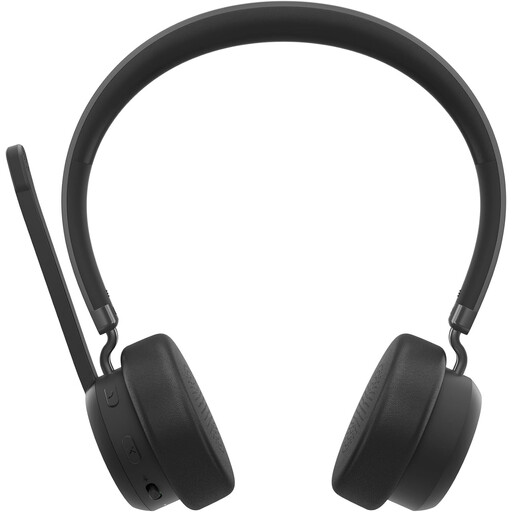
Lenovo 4XD1Q30302 wireless headset
May be suitable for hands-free practice with a device that supports the Bluetooth headset connection listed. Check the pairing in advance.
The product description lists Bluetooth 5.3 and a foldable microphone.
View at Joybuy
Frequently asked questions
Do I need a licence for a wireless headset microphone in the Netherlands?
According to the Dutch Authority for Digital Infrastructure (RDI), wireless microphones usually don’t require a licence if you use the correct frequency band and follow the relevant conditions. Check the exact version and the frequencies available at the venue; some other bands may require a licence.
Is a headset microphone enough to address a group?
Not if you want to amplify your voice for a group: the headset or wireless receiver needs to be connected to a suitable amplified speaker or sound system. Check which input is available and which components are included with the headset.
How can I prevent feedback while rehearsing?
Test the microphone and speaker together in the room and start at a low volume. Shure describes microphone placement, speaker placement and amplification as factors that can contribute to feedback.
Which marking should I check on microphone equipment?
The Dutch Authority for Digital Infrastructure states that equipment must carry the CE marking. For a wireless model, this marking doesn’t replace the need to check whether its frequency variant can be used at the venue.
Can I clean a shared headset microphone myself?
Follow the instructions for the specific model. Shure advises against cleaning the microphone element itself on its microphones, and recommends letting a removed foam windscreen dry completely before putting it back. Check the instructions separately for other models.


