Who practises with a headset microphone?

Speaker who listens back to their own recordings

Practises from a fixed position and wants to record their Dutch text to check how clear it is, along with their pace and volume. A suitable computer connection and a consistent microphone position are important. Logitech explains how the H390 connects, while CORSAIR discusses the importance of keeping the microphone in a consistent position.

Speaker who also uses the venue sound system

Wants the microphone to work with the system that will amplify the talk. The connection and whether a suitable bodypack or receiver is available determine what equipment is needed. Shure and Sennheiser describe different components for setups like these.

Speaker who practises for long periods

Practises repeatedly with a headset on and wants to choose between keeping one ear free and listening with both earcups. HP Poly describes mono and stereo options in the Blackwire 3200 series, but comfort is a personal matter.

What should you look for when choosing?

Wired computer headset

Choose this option: if you speak into a computer from the same spot and listen back to your recording.

Bear in mind: the cable limits your movement, and a computer headset will not automatically connect to a venue mixer.

Microphone for the venue sound system

Choose this option: if you also speak through the existing sound system and want the microphone to stay close to your mouth as you move your head.

Bear in mind: a separate earset and a complete wireless set need different connections and components. Check the frequency variant too.

What to consider What to check before buying Who is this important for?
Clear, consistent recordings Check that you can position the boom in the same way each time, and make a short test recording in your practice space. If I want to listen back to my talk without the distance between my mouth and the microphone changing, I look for a consistent position; around 40% of consumers say consistent voice recording is their main buying priority.
Connection to your recording device Check the input on your computer or mixer, the exact USB or microphone connector, and which components are included. If I want to make sure the headset works with my computer or system, I check the connections first; around 30% of consumers give device compatibility their highest priority.
Comfort during repeated practice Compare mono and stereo options, adjustability and ear cushions. If possible, try the fit and listen back to a test recording. If I practise several times in a row, I want a style that suits me and feels comfortable; around 20% of consumers say comfort is their main reason for buying.
Use with the museum sound system Ask which input and equipment are available. For wireless use, check the variant and which frequencies are available locally. If I want to use the microphone with the museum's sound system too, I make sure it works with the equipment already there; around 10% of consumers say use in a venue is their main buying priority.

Common buying mistakes

  • Mistaking a separate earset for a complete computer headset

    A separate microphone with a bodypack connector is not the same as a USB headset. The Shure MX153 we looked at has a TQG/TA4F connector for compatible Shure bodypacks.

    Before buying, check the connector and which components you already have. For direct computer recording, choose a headset with a suitable computer connection.

  • Choosing a wireless frequency variant by model name alone

    The Sennheiser EW-D ME3 SET is available in different frequency variants. According to the Dutch Authority for Digital Infrastructure, the availability of shared UHF frequencies varies by location.

    Before use, check the exact variant, the applicable frequency requirements and the museum's location against the latest information from the Dutch Authority for Digital Infrastructure.

  • Assuming noise cancellation guarantees a good recording of your talk

    The product descriptions we consulted focus mainly on use for conversations. Microphone placement and distance from your mouth still matter when recording a talk.

    Make a test recording in the room where you practise, then listen back to check that the words, pauses and volume are clear.

Brands to compare

Logitech

The H390 is a wired USB computer headset for recording and listening back on a computer.

  • For the USB-A variant we looked at, Logitech lists a positionable boom microphone, in-line controls and a 1.9 m cable.
  • Check which USB variant you choose. These specifications do not confirm that it will connect to a venue mixer.

Jabra

The Evolve2 30 SE is a wired work headset for anyone who also considers comfort during repeated practice.

  • Jabra describes two microphones and memory foam ear cushions for this product range.
  • Claims about sound quality and comfort are the manufacturer's statements about calls, not an independent assessment of recordings in a museum. Check the exact variant and connection.

HP Poly

The Blackwire 3200 series includes wired computer headsets with different wearing styles and connection options.

  • HP lists mono and stereo options in the series. The Blackwire 3220 Stereo USB-C we looked at includes a USB-A adapter.
  • Information about the series does not mean every variant has the same connector or adapter. Check the version you choose.

EPOS

The IMPACT SC 60 USB ML is a wired, dual-ear headset for computer use.

  • The EPOS product sheet lists a flexible boom microphone, in-line controls and a noise-cancelling microphone.
  • These specifications do not measure how clearly a museum talk will be recorded.

Shure

The MX153 is a separate professional earset for use with a compatible Shure bodypack.

  • Shure specifies a TQG/TA4F connector.
  • You will need a compatible transmitter and any further recording or amplification equipment separately. Do not assume it connects directly via USB.

Sennheiser

The EW-D ME3 SET is a complete wireless option for a compatible venue sound system.

  • Sennheiser lists a receiver, bodypack and ME 3 microphone in the set, which is available in several frequency variants.
  • Check that you have the right variant and that it is available for use locally in the Netherlands. You do not automatically need these components for recording directly to a computer.

Joybuy products for practice and recording

These headsets are options for practising from a fixed position or recording on a computer. For each model, check that the connection and wearing style suit your equipment and how you plan to listen back.

Logitech PC 960 USB Wired Headset

Logitech PC 960 USB Wired Headset

A wired USB headset for practising on a computer and listening back to your recording. Check that the connection is compatible with your computer.

View at Joybuy

Logitech H340 USB Headset, black, wired

Logitech H340 USB Headset, black, wired

A wired USB headset for practising and listening back on a computer. Check that your computer has the right USB connection.

View at Joybuy

Jabra Evolve2 65 USB-A Black MS Mono

Jabra Evolve2 65 USB-A Black MS Mono

The mono version may suit you if you want to keep one ear free while listening. Check that the included USB-A solution is compatible with your computer.

View at Joybuy
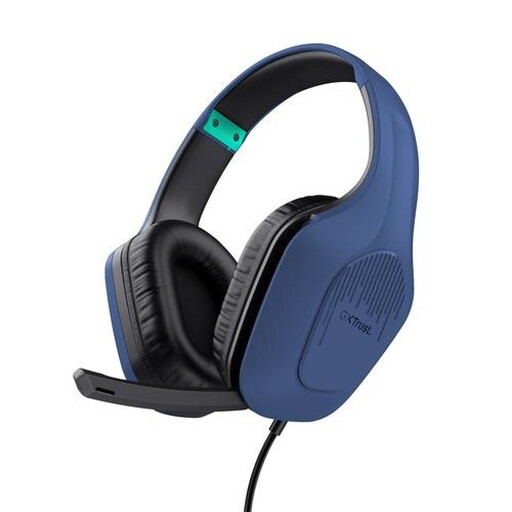
Trust GXT 415B Zirox gaming headset, wired, over-ear, 50 mm drivers

Trust GXT 415B Zirox Gaming Headset, 50 mm, Over-Ear

A wired headset for practising from a fixed position. Check whether your computer has a compatible 3.5 mm connection.

View at Joybuy

Logitech H150, white, model 981-000350

Logitech H150, white, 981-000350

A wired stereo headset with a 3.5 mm connection for a computer with a compatible port. If your computer has separate microphone and headphone ports, you may need a splitter; according to the product information, one is not included.

View at Joybuy

Frequently asked questions

Can I connect a separate stage earset directly to my laptop?

Do not assume you can: the Shure MX153 we looked at has a TQG/TA4F connector for compatible Shure bodypacks. Check the full signal chain. For direct computer recording, choose a headset with a suitable computer connection.

How can I make my practice recordings comparable?

Position the boom in a similar place each time and make a short test recording with the same setup before recording the whole talk. Listen back to check whether head movements, breathing or background noise make the words less clear.

What should I do if the headset turns out to be faulty after purchase?

If a product is faulty, contact the seller, who is responsible for providing a product that works as it should. The Dutch Government states that there is no fixed statutory guarantee period that applies to all products in the Netherlands. When you buy online from a business, you will often also have a 14-day cooling-off period, with some exceptions. This is separate from your rights if a product is faulty.

Do I need a licence for a wireless headset microphone in the Netherlands?

Not for every frequency variant. The Dutch Authority for Digital Infrastructure publishes the frequencies that can be used without a licence, while some bands require one. The availability of shared UHF frequencies varies by location. Before use, check the exact variant, the conditions and the museum's location. This does not apply to a wired-only headset.

Can I record visitors while practising?

If you record visitors' identifiable voices, check with the museum first. The Dutch Data Protection Authority states that organisations need an appropriate legal basis to collect and use personal data. Which basis applies depends on the situation.
