Who is a headset microphone suitable for at a shared desk?

Speaker in a noisy open-plan office

You want your contribution to come through clearly while colleagues are talking nearby. Pay particular attention to the microphone: noise reduction for what you hear doesn’t necessarily tell you anything about what the microphone picks up. Microsoft describes open-office headsets as focusing on the wearer’s voice, while Logitech lists microphone noise cancellation for the Zone Wired.

Note-taker with several people around the table

You also need the other people’s contributions for a useful summary. A headset microphone designed to pick up the wearer’s voice won’t necessarily capture people around the table clearly; Microsoft makes this distinction for open-office headsets.

Meeting attendee who moves between workspaces

You want to connect your headset to different computers and check whether the microphone is muted. The USB connection on the specific version must match the available port; Logitech describes the H540 as having USB-A and a mute indicator.

What should you look for in a headset for meeting summaries?

Headset for one speaker

A good choice when: you’re attending an online meeting yourself and mainly want your voice to come through clearly above nearby conversations.

Bear in mind: a microphone designed to pick up the wearer’s voice doesn’t guarantee that people around the table will be captured clearly too.

Headset plus shared audio setup

A good choice when: people around the desk also need to be heard; decide how they’ll join the online meeting, or consider a shared microphone for your setup.

Bear in mind: agree how the audio will be recorded and processed beforehand, so contributions aren’t missed or captured twice.

What to consider What should you check? Who is this important for?
Making sure your own voice is clear Check whether the noise-cancellation information refers to the microphone, and how to position the microphone boom. Logitech describes microphone noise cancellation for the Zone Wired; Jabra recommends positioning the Evolve2 40 SE close to your mouth. If I’m speaking while people nearby are talking, I want my contribution to come through clearly. Around 36% of consumers say making their own voice clear is their top priority.
Capturing contributions from people around the table Decide whether everyone will join the meeting separately or whether you need a shared microphone; if you choose the latter, check the stated pickup range. If I want other people to feature in the summary too, their voices need to be audible through the setup I choose. For around 29% of consumers, capturing people around the table comes first.
Connection and moving between workspaces Compare your computer’s port with the exact headset version. The Jabra Evolve2 40 SE is available in USB-A and USB-C versions, according to its manual; the Logitech H540 uses USB-A. If I switch between computers, I want to use my headset without connection problems. Around 21% of consumers say an easy, compatible connection is their top priority.
Comfort during longer meetings Check whether the version is mono or stereo, and whether the fit and ear cushions feel comfortable; if possible, try them before a long meeting. For longer conversations, I want a comfortable version that suits how much of the surrounding noise I want to hear. For around 14% of consumers, comfort is the top priority.

Common mistakes when choosing

  • Choosing a microphone for one speaker to capture the whole table

    A headset that focuses on the wearer’s voice won’t necessarily pick up other people’s voices. Microsoft describes open-office headsets as focusing on the user, rather than the people around them.

    First decide whose voices need to feature in the summary. Then choose how each participant will join the meeting, or what shared audio setup you’ll need.

  • Confusing ANC for your ears with microphone noise cancellation

    ANC and microphone noise cancellation are different features. EPOS describes adaptive ANC and microphone beamforming separately; one doesn’t automatically tell you what the other does.

    Check separately what the headset does for your listening environment and what the microphone picks up for the other participants.

  • Relying on the model name alone when checking the connection

    USB connections can vary between versions. The Jabra Evolve2 40 SE is available in USB-A and USB-C versions; the Logitech H540 uses USB-A.

    Compare your work computer’s port with the connection on the exact version, and check whether you’ll need an adapter.

Brands to consider

Logitech

The Zone Wired and H540 are wired USB headsets for different situations. Logitech describes the Zone Wired as suitable for open workspaces and positions the H540 as a USB-A option for calls.

  • For the Zone Wired, Logitech lists two noise-cancelling microphones and in-line controls; for the H540, it lists a positionable microphone and a mute indicator.
  • These are model specifications and manufacturer descriptions, not an independent comparison. The H540’s specifications don’t support the same open-office positioning as the Zone Wired.

Jabra

The wired Evolve2 40 SE may be worth considering if fit, the microphone boom and the choice of USB version are important to you.

  • The manual lists three microphones and recommends positioning the microphone boom close to your mouth.
  • Jabra describes the ear cushions as providing passive noise isolation; this doesn’t prove that people around the table will be captured clearly. Check the USB, mono or stereo, and Teams version.

HP Poly

The Blackwire range includes the mono Blackwire 3310 and the stereo Blackwire 8225, which is marked as a Teams version on HP’s Dutch product page.

  • For the Blackwire 3310, HP lists a flexible microphone boom, USB-C and a USB-A adapter. For the Blackwire 8225, HP lists a stereo Teams version with USB-C and a USB-A adapter.
  • Check the version you choose; features of these models don’t automatically apply to every Blackwire headset.

EPOS

EPOS describes the wired IMPACT 800 series as suitable for use in an open-plan office. The range includes versions with and without adaptive ANC.

  • The EPOS factsheet lists microphone beamforming and USB-C with a USB-A adapter; adaptive ANC is available on ANC versions.
  • Claims about voice pickup and concentration are manufacturer descriptions. Check the exact IMPACT 860 version before assuming that features apply across the series.

Wired headsets at Joybuy

These products are wired headsets for computer calls. Check that the connection and microphone suit your meeting setup for each version; a headset designed for one speaker won’t automatically pick up people around the table.
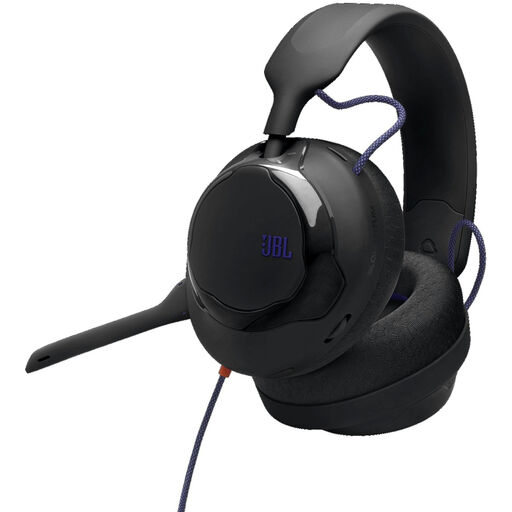
JBL Quantum 120 wired multiplatform gaming headset, black

JBL Quantum 120 wired multiplatform gaming headset, black

This wired version may suit you if you’re looking for a headset microphone for computer calls; check that the connection works with your device.

The product information lists a detachable cardioid microphone and a 3.5mm connection. According to the information, the microphone is designed to pick up your voice and reduce background noise.

Joybuy

Logitech H540 wired USB headset

Logitech H540 wired USB headset

This wired headset may suit you if your computer has USB-A and you want to check whether the microphone is muted during calls.

Logitech describes the H540 as having a USB-A connection, a positionable microphone and a mute indicator. Check that your computer’s port matches this version.

Joybuy

Jabra Evolve2 75 USB-A MS Teams, black

Jabra Evolve2 75 USB-A MS Teams, black

This version may be worth considering if you’re looking for a headset marked USB-A for use with MS Teams. Check that it’s compatible with your meeting software and computer.

Joybuy

Logitech PC 960 USB wired headset

Logitech PC 960 USB wired headset

This wired USB headset may suit you if you’re looking for a microphone you can position during calls. Before use, check that it’s selected as the input device.

The product information lists an adjustable microphone boom, volume and mute controls, and a mute indicator.

Joybuy

Logitech H650e stereo wired headset

Logitech H650e stereo wired headset

The stereo version may suit calls or conferences over USB. Check that your selected audio input and output match your meeting settings.

The product information lists in-line controls and acoustic echo cancellation.

Joybuy

Frequently asked questions about headset microphones and meeting summaries

Will my headset pick up the people sitting next to me clearly too?

Don’t assume that it will. Microsoft describes open-office headsets as focusing on the wearer’s voice, without picking up the voices of people nearby. If their contributions need to feature in the summary, decide separately how each participant will be heard through the meeting setup.

What should I check when connecting the headset and before recording?

Compare your computer’s port with the connection on the exact headset version, select the correct microphone and speaker in your meeting software, and check the mute setting. For the Jabra Evolve2 40 SE, position the microphone close to your mouth as directed in the manual. Live transcription in Teams is a software feature; a headset doesn’t create a summary itself.

Can I record or transcribe a meeting in the Netherlands without any further steps?

No. Buying a headset doesn’t in itself give you permission to process personal data without further consideration. If an organisation processes identifiable voices or transcripts that can be linked to individuals, it must establish an appropriate GDPR legal basis before processing and tell people what will happen to their data and why. Consent is one possible legal basis, but it isn’t automatically the right one for every meeting.

How long can a recording be kept or shared with a transcription service?

According to the Dutch Data Protection Authority, personal data must not be kept for longer than necessary for the purpose; there is no single specific retention period that applies to every recording. If an external service processes data on behalf of an organisation, the Dutch Data Protection Authority says that the relationship requires a data processing agreement. So assess the service and the processing involved, not just the headset.
