If you’re only recording your own voice in the booth, choose a headset with a boom microphone that you can position close to your mouth, and a connection that works with your computer. If the summary also needs to include other people in the booth, a personal headset microphone alone isn’t a complete recording solution: first decide how their voices will be captured and test it. Choose wired or wireless based on how much freedom of movement you need, your connections and charging routine; ANC for your ears doesn’t, by itself, tell you how the microphone sounds.
Who is this guide for?
Speaker recording only their own voice
You want to capture your contribution to an online meeting clearly. Pay attention to the position of the boom microphone and the connection to your computer; Logitech and Jabra describe models with boom microphones and wired connections.
Note-taker who also needs to record people in the booth
Your summary needs to include contributions from other people in the same room. Microsoft Support and Zoom Support describe meeting audio recording features, but a headset microphone worn by one person doesn’t establish whether other people in the room will be picked up clearly.
User who works in different locations
You use different devices or workspaces and are weighing up freedom of movement against charging, pairing and connectivity. Jabra and JLab describe models with different connection options; always check the exact model and how your computer uses its microphone.
What should you look for when buying?
First decide whose voices need to be included in the summary. Then check the microphone position and recording input, and only after that choose the connection, fit and controls.
| What to consider |
What should you check? |
Which consumers does this matter to? |
| Clarity of your own voice |
Check whether the boom microphone can sit close to your mouth, and make a test recording with the usual ventilation and background noise on. |
If I’m mainly summarising my own contribution, I want to hear whether my voice is captured clearly; consumers with this priority make up around 36%. |
| Other speakers in the booth |
Decide whether the recording also needs to include other people in the room, and test with every speaker who should be included in the summary. |
When other people are speaking in the same booth, I want their contributions to be included in the recording; consumers who prioritise this make up around 29%. |
| Connection and recording input |
Compare USB-A, USB-C, Bluetooth or a dongle with your device, and check which microphone the software is using as its input. |
If I work in different places or use different devices, I want to know before the meeting that the connection and microphone input are correct; consumers who consider this most important make up around 21%. |
| Comfort and controls |
Check the fit and whether the microphone is easy to mute, and make sure the model suits your preference for mono or stereo. |
For longer meetings, I want a comfortable headset with a microphone that’s easy to control; consumers whose main priority is this make up around 14%. |
Common buying mistakes
-
Buying a headset as if it records everyone in the booth
The boom microphone is designed to sit by the wearer’s mouth. That doesn’t tell you whether other people in the same room will be included in the recording.
Decide in advance who needs to be included in the summary, then make a test recording in which every person in the room speaks.
Recording several speakers may require a different setup, which takes extra time to configure.
-
Confusing ANC for your ears with microphone noise reduction
Noise isolation that affects what the wearer hears doesn’t automatically tell you how their voice sounds in the recording.
Assess these features separately and listen to a test recording in the usual booth conditions.
-
Choosing a model name without checking the version
Connections and styles can vary within the same product range. A USB version won’t necessarily work with every device.
Check the full model name, connector and included accessories. Depending on your device, you may need an adaptor or a different version.
An incompatible connection may mean you need an extra adaptor or a different version.
Relevant brands to consider
Logitech
Logitech describes the wired H390 with USB-A, as well as the Zone Wired range of business headsets.
- The manufacturer says the Zone Wired has two microphones and a flip-to-mute control.
- These specifications show differences between models, but don’t prove that one will record better in a booth. Check the exact connection.
Jabra
Jabra describes the wired Evolve2 40 SE as having a boom microphone, with different connection and wearing options available.
- The product information lists three microphones; the user guide recommends positioning the microphone close to your mouth.
- Passive noise isolation for the wearer doesn’t prove that everyone in the booth will be recorded clearly. Check whether it’s the USB, UC or Teams version.
HP Poly
HP describes the Blackwire 3300 series as a range of wired business USB headsets, with several versions available.
- HP lists plug-and-play connectivity and an adjustable fit for models in the range.
- According to HP, the 3.5mm connection is available on certain models, including the Blackwire 3315 and 3325; check the exact model.
EPOS
The IMPACT 400 range includes business headsets; EPOS describes a microphone mute control on one wired version.
- The product information lists plug-and-play connectivity and a mute control.
- The range includes different versions. Check ANC, connectivity and certification for the exact model; EPOS product claims are not an independent assessment of recording quality.
JLab
According to JLab, the original GO Work combines Bluetooth with an included cable for wired use.
- This combination may suit you if you want to choose between wireless and wired use.
- The published battery specification applies to the original GO Work version and not necessarily to GO Work Gen 2 or Gen 3. Check which connection your computer and software use.
Headsets at Joybuy
These headsets are intended to capture the wearer’s voice; if other people in the booth also need to be recorded, assess the entire recording setup separately.
 No image available
JBL Quantum 120 wired gaming headset, black
A wired option for capturing your own voice if your device has a compatible 3.5mm connection.
The product description lists a cardioid boom microphone and a detachable microphone.
Joybuy
 No image available
Jabra Evolve2 75, USB-A, MS Teams, black
A wireless option if you want freedom of movement and the connection suits your workspace; bear charging and connection management in mind.
The product description lists Bluetooth, connection to two devices at once, and eight-microphone beamforming for calls.
Joybuy
 No image available
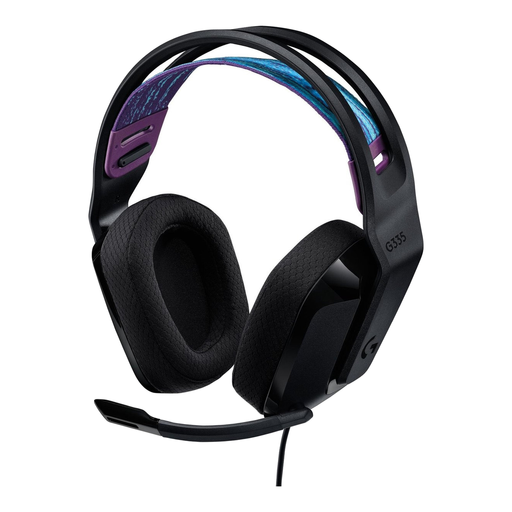
Logitech G G335 gaming headset
A wired option for capturing your own voice if your device has a compatible 3.5mm connection.
The product description lists a flip-up mute microphone and a weight of 240 g.
Joybuy
 No image available
Trust Ayda headset with USB-A, black
A wired option for a computer with a compatible USB-A port.
The product description lists a microphone for calls, volume controls on the headset and a flip-up mute microphone.
Joybuy
 No image available
Razer BlackShark V2 X 7.1 wired gaming headset
A wired option for capturing your own voice if your device has a compatible 3.5mm connection.
The product description lists a cardioid microphone, close-to-mouth positioning and a mute button.
Joybuy
Frequently asked questions
Does a headset automatically record the whole meeting?
No. A headset sends microphone audio to a device; recording is handled by the software and settings you choose. Microsoft Support explains that a Teams meeting recording can include meeting audio. Check separately whether other people in the booth are captured clearly.
How do I test the recording setup before a meeting?
Position the boom microphone close to your mouth, select the intended microphone in your meeting software and listen back to a short recording. During the test, ask everyone in the room who needs to be included in the summary to speak.
Do you always need permission to record a meeting in the Netherlands?
There isn’t a simple yes or no that applies to every meeting. If an organisation processes personal data, the Dutch Data Protection Authority says an appropriate legal basis is required; consent is one possible legal basis, but it isn’t automatically the only one. People affected have the right to clear information about the processing in advance. Consider the specific purpose and the people involved before recording.
How long can I keep a recording for a summary?
The Dutch Data Protection Authority states that the GDPR doesn’t set a specific general retention period. Don’t keep personal data for longer than necessary for the purpose, and check whether other applicable rules specify a time limit.
What should I check with a wireless headset?
Check whether the version connects to your computer using the Bluetooth connection or dongle you want, and whether the software uses the headset as its microphone. Remember to account for charging and pairing too. The published specifications for the original JLab GO Work don’t automatically apply to GO Work Gen 2 or Gen 3.


