Who is this guide for?

Quiz host who wants clear speech recordings

If you’re recording a spoken introduction, pay attention to the microphone position and check the sound of your voice in a test recording. Audacity recommends lowering the recording level and testing again if the sound is distorted.

Presenter wearing a headset for long takes

If you’re recording for an extended period, you’ll want a headband and ear cushions that feel comfortable in your usual recording position. RØDE, EPOS and Jabra describe adjustable or lightweight features on specific models, but you’ll need to judge the fit for yourself.

Recorder with existing equipment

If you already use a computer, headset socket or microphone input, make sure the plug and model variant match your equipment. Connections vary by model: manufacturers specify USB, TRRS and XLR, among others.

What should you look for?

Wired USB headset

A good fit if: you record directly on a computer and want a straightforward connection.

Bear in mind: product information for models such as the Logitech H390 and EPOS PC 8 USB focuses mainly on calls; this doesn’t tell you how they’ll sound during a long quiz recording.

Recording-focused headset

A good fit if: you want to listen through the same headset while recording and are looking for a model also marketed for media or podcast work.

Bear in mind: RØDE specifies that the supplied TRRS cable must be used with the NTH-100M; check how it connects to your device.

Standalone headset microphone

A good fit if: you already have suitable recording equipment and don’t need headphones as part of the same headset.

Bear in mind: the Shure WH20 is a microphone only; choose the exact plug variant that suits your equipment.

What to consider What to look for Who is this for?
Clarity Position the microphone and listen to a recording of your loudest passage; lower the level if it sounds distorted. If I want my quiz introduction to be easy to follow, I test my voice before the long take. Clear speech is the top priority for around 25% of consumers.
Comfort Check how the headband and ear cushions fit during a full test take. If I’m recording several takes or longer ones, I want the headset to stay comfortable in my recording position. Long-wearing comfort comes first for around 25% of consumers.
Connection Compare the plug and exact model variant with the available computer or recording ports. I want to avoid finding that my microphone won’t connect to my existing equipment, so I check the port before buying. Compatibility is the top priority for around 20% of consumers.
Background noise Make a test recording in the room you plan to use and listen for noise from ventilation or other sources. If there are sounds in my recording space that could end up in the recording, I want to hear what the microphone picks up first. Around 15% of consumers are most concerned about distracting background noise.
Playback and controls Check that the correct recording input is selected and the mute setting is right; make a short test recording and listen back. Before a long recording, I want to be able to check easily that the microphone is working and the recording sounds good. Around 15% of consumers prioritise checking their recordings.

Common buying mistakes

  • Assuming the WH20 microphone is a complete headset

    The Shure WH20 is a head-worn microphone, not a pair of headphones with a built-in microphone. The WH20XLR, WH20QTR and WH20TQG also have different connections.

    Choose the plug variant that suits your recording equipment, and decide separately how you’ll listen back to the recording.

    If the connections don’t match, you may need a suitable adapter.

  • Assuming noise cancellation guarantees a clean recording

    A manufacturer’s description of a microphone doesn’t guarantee that your recording will be free of background noise or distortion. The room and recording level you set also make a difference.

    Test the microphone in the room you plan to use, listen back to the file and lower the recording level if the sound is distorted.

Brands to consider

RØDE

The NTH-100M combines over-ear headphones with a detachable headset microphone, and RØDE also positions it for media and podcast applications.

  • RØDE describes a microphone position designed to reduce plosive sounds, an adjustable headband and detachable cushions.
  • RØDE specifies the supplied TRRS cable for the microphone to work; this isn’t a USB plug-and-play connection.

Logitech

The H390 is a wired computer headset for anyone who wants to record a quiz introduction directly on a computer.

  • Logitech describes an adjustable microphone boom, a microphone said to reduce noise, and in-line volume and mute controls.
  • Check whether the specific version has a USB-A or USB-C connection. Call-focused specifications don’t tell you how it will sound during a long quiz recording.

EPOS

The PC 8 USB is a lightweight stereo USB headset for a simple computer setup.

  • EPOS specifies in-line volume and mute controls, as well as a unidirectional noise-cancelling microphone.
  • The described uses and comfort features focus on calls; judge the fit and recorded sound of your voice for yourself.

Shure

The WH20 is worth considering if you’re looking for a head-worn microphone and already have suitable recording equipment.

  • Shure describes the WH20 as lightweight, adjustable and cardioid.
  • The WH20XLR has a three-pin XLR plug; the WH20QTR and WH20TQG have different connections. The WH20 is not a complete headset with headphones.

Jabra

The Evolve2 40 SE is a wired office headset for anyone looking to assess the fit and USB connection.

  • Jabra describes soft ear cushions and an adjustable headband; the manual distinguishes between USB-A and USB-C versions.
  • Manufacturer claims about sound isolation during calls are not an independent measure of quiz recording quality.

Joybuy products

This selection focuses on wired USB headsets for computer recording; check the connection and make a test recording before recording a long take.

Logitech PC 960 USB headset

Logitech PC 960 USB headset

An option to consider if you want to record directly to a computer via USB.

The product name specifies a USB headset.

Joybuy

Logitech H340 USB headset, black, wired

Logitech H340 USB headset, black, wired

An option to consider for computer recording if you’re looking for a wired USB headset.

The product name specifies a black wired USB headset.

Joybuy

Kingston USB Hi-Fi headphones with microphone

Kingston USB Hi-Fi headphones with microphone

An option to consider if you’re looking for a USB headset for computer recording.

The product name specifies USB headphones with a microphone.

Joybuy

Trust Ayda wired headset with USB Type-A

Trust Ayda wired headset, USB Type-A

An option to consider for a computer with a compatible USB Type-A port.

The product name specifies a wired USB Type-A headset.

Joybuy
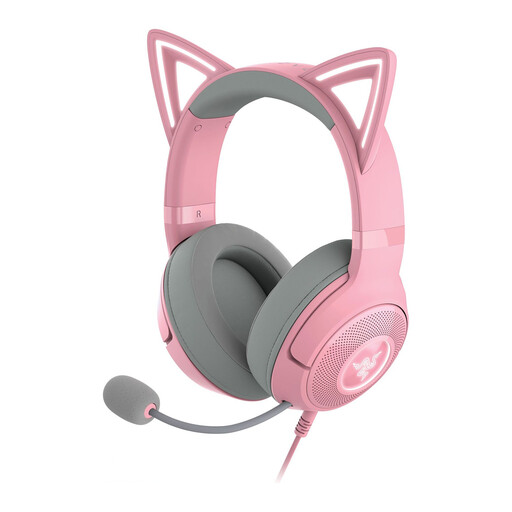
Razer Kraken Gaming Headset Kitty Edition V2, Quartz

Razer Kraken Gaming Headset Kitty Edition V2, Quartz

An option to consider if you’re looking for a headset with a microphone for computer recording; check the connection on the specific version.

The product name specifies the Kitty Edition V2 in Quartz.

Joybuy

Frequently asked questions

How can you stop a long introduction take from distorting?

Start with a short recording of your loudest passage, check the recording level and listen back. If Audacity shows clipping, lower the recording level and test again; clipping in a recording can’t be fixed afterwards.

Can the RØDE NTH-100M be connected to separate microphone and headphone ports?

Yes. RØDE says to use the supplied splitter with the supplied TRRS cable. Check which ports your recording device has before buying.

Which Shure WH20 version works with an XLR microphone input?

According to Shure, the WH20XLR has a three-pin XLR plug. The WH20QTR and WH20TQG have different plugs, so check the full model name.

How should you look after a headset you use regularly for long takes?

Follow the manual for your specific model when removing and cleaning parts. RØDE describes the NTH-100M as having detachable ear and headband cushions; don’t assume parts on other models can be removed in the same way.

What are your rights in the Netherlands if a headset bought online disappoints or breaks?

Online purchases generally come with a statutory cooling-off period that ends 14 days after delivery; check whether an exception applies. Separately, you have statutory rights if, under normal use, the product doesn’t meet what you could reasonably expect. The seller must then offer an appropriate solution at no cost.
