Who is this buying guide for?

Creator making long spoken recordings

You’re recording the appeal yourself and want a microphone position and fit you can keep using over several takes. RØDE and Audio-Technica describe features of their models for spoken-word productions; fit and sound quality still depend on the user and recording conditions.

Volunteer recording on a computer

You want to record directly on a computer. Check that the headset connection is compatible with your computer and select the correct microphone input. Logitech describes the USB-A version of the H390 as a headset for calls.

Creator with an existing recording setup

You may be using separate microphone and headphone inputs or a mixer. The plugs and any adapters determine whether the headset can connect to your equipment; Audio-Technica and RØDE describe different connection options for their models.

What should you look for when buying?

Wired USB call headset

When to choose it: if you want to record directly on a computer and a simple connection matters.

Trade-off: Logitech positions the H390 for calls; this doesn’t prove how its microphone sounds in a long production recording.

Wired headset with multiple connections

When to choose it: if you want to switch between devices with compatible USB-C, USB-A or 3.5 mm connections.

Trade-off: the Poly Blackwire 5220 version described has several connection options, but check the microphone input on each device too.

Broadcast headset for recording equipment

When to choose it: if your recording setup has compatible inputs and you’re looking for a headset described for spoken-word productions.

Trade-off: the version of the Audio-Technica BPHS1 described has separate microphone and headphone connections; the RØDE NTH-100M may need an additional adapter for certain setups.

What to consider What to look for Who should prioritise it?
Clear speech Make a test recording with the same speaker, microphone position, room and recording settings as you plan to use for the final message. If I’m recording the message myself, I want to hear in advance whether my voice sounds clear in the room. Around 29% of consumers say clear speech is their main concern.
Comfort during long takes Wear the headset for a session of a similar length and pay attention to pressure, warmth, microphone position and whether you wear glasses. If I’m doing several long takes, I want to be able to wear a headset without the fit interrupting my recording. Around 29% of consumers put wearing comfort first.
Connection to your equipment Check both the microphone input and headphone output, and compare them with the exact model version and the cables supplied. If I want to use my current computer or mixer, both the microphone and monitoring need to work. Around 24% of consumers make device compatibility their top priority.
Easy to connect and use Check which cables and adapters are included, and where the mute and volume controls are. Before recording, I want to know whether I need any extra connection components and how to mute the microphone. Around 18% of consumers say ease of buying and use is their main concern.

Avoid common buying mistakes

  • Assuming a call headset is a proven recording microphone

    A headset described for calls isn’t automatically suitable for a long recording. The final sound also depends on the speaker, microphone position, room and recording settings.

    Make a test recording in the same conditions as the full appeal and listen back before recording the whole thing.

  • Checking only the headphone plug

    The microphone and headphones may need separate connections. The version of the Audio-Technica BPHS1 described has different professional plugs; for using an RØDE NTH-100M with a RØDECaster Pro II, RØDE specifies a suitable additional adapter.

    Check the microphone input, headphone output, cable version and any power requirements separately.

  • Assuming a stated warranty period is the full legal guarantee

    According to the Government of the Netherlands, there is no fixed statutory guarantee period in the Netherlands. A period stated for a product doesn’t remove your legal rights if the product is faulty.

    Keep your purchase details and contact the seller if there’s a fault.

Brands to consider

RØDE

RØDE positions the NTH-100M for uses including podcasting and media production.

  • According to RØDE, the headset has a detachable microphone, an adjustable headband and ear cushions. The included splitter is intended for devices with separate 3.5 mm microphone and headphone ports.
  • For connection to an XLR input on a RØDECaster Pro II, RØDE describes a suitable additional adapter. This is manufacturer information, not an independent recording test.

Audio-Technica

The BPHS1 is a broadcast headset for spoken-word applications such as presenting and interviews.

  • According to Audio-Technica, the BPHS1 version described has a directional dynamic microphone and earcups that enclose the ears. The cable is replaceable.
  • The microphone and headphone cables have different plugs. The BPHS1-XF4 has a different connection, so check which version you’re buying.

Logitech

Logitech describes the H390 as a wired computer headset for calls.

  • For the USB-A version described, Logitech lists a microphone boom, in-line controls and a 1.9 m cable.
  • Its positioning for calls doesn’t assess how it sounds in a long production recording. Make your own test recording to find out.

Poly

The Blackwire 5220 is a wired headset for calls; the 8X231AA version described has several connection options.

  • For this version, HP specifies USB-C, a USB-C-to-USB-A adapter and 3.5 mm. The controls include mute and volume.
  • When using 3.5 mm, check on your device that both the microphone and monitoring work. The specifications don’t prove its recording quality for long voice-overs.

Jabra

Jabra positions the Evolve2 40 SE for calls and collaboration.

  • Jabra describes three microphones, passive isolation and memory foam ear cushions.
  • These are brand claims relating to calls and don’t demonstrate an improvement for this recording. Check the connection and exact version.

Headsets at Joybuy

The Joybuy products below are headsets with microphones. For this recording scenario, compare them mainly on microphone controls, connection and fit. Features listed for calls and gaming don’t, by themselves, prove how well a long message will be recorded.

Trust GXT 498W Forta wired gaming headset, white

Trust GXT 498W Forta, wired headset, white

The detachable microphone and volume and mute controls may be useful if you want to position and operate the microphone while recording.

Wired 3.5 mm connection; over-ear; 50 mm drivers. The description mentions a padded headband and soft ear cushions. Check that the connection is compatible with your recording equipment.

View at Joybuy
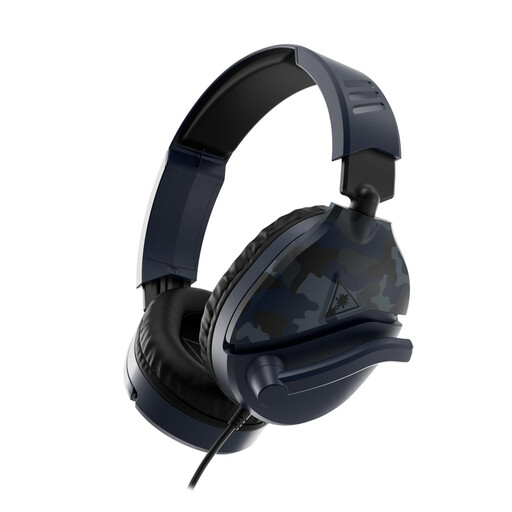
Turtle Beach Recon 70 headset, Blue Camo

Turtle Beach Recon 70, Blue Camo

The flip-up microphone boom with mute function may come in handy if you want to mute the microphone while recording.

Wired 4-pole 3.5 mm connection and microphone boom. Older computers with separate audio and microphone ports may need a splitter; according to the product description, one isn’t included.

View at Joybuy

Jabra Evolve2 55 wireless stereo headset

Jabra Evolve2 55, wireless stereo headset

The flexible microphone boom and mute function are useful if you want to position and operate the microphone while recording.

The description lists a Link 380 USB-C Bluetooth adapter and a USB-A cable, two microphones for voice transmission and a padded headband. Check which connection you want to use with your recording setup.

View at Joybuy

Razer BlackShark V2 X 7.1 wired headset

Razer BlackShark V2 X 7.1, wired

The description mentions a cardioid microphone and gives guidance on positioning it; assess how your voice sounds in a test recording.

Analogue 3.5 mm connection, volume control and microphone mute. The description lists a weight of 240 g and memory foam ear cushions.

View at Joybuy
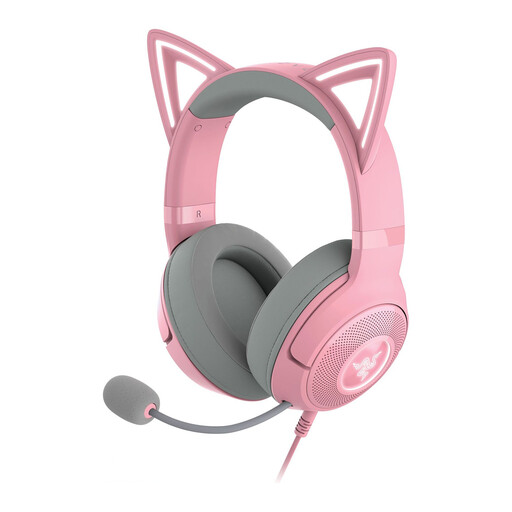
Razer Kraken Kitty Edition V2, Quartz

Razer Kraken Kitty Edition V2, Quartz

The detachable microphone may be useful if you don’t want to leave it on the headset after recording.

The description lists a USB connection, adjustable headband and memory foam ear cushions. Check that the USB connection is compatible with your recording equipment.

View at Joybuy

Frequently asked questions

How do I test a headset before recording the full message?

Connect the headset to the device you intend to use, select the correct microphone input and make a short recording in the actual location. Listen back and check that your speech is clear, there’s no unwanted background noise and mute isn’t switched on. The result depends on your recording conditions.

Can the RØDE NTH-100M connect directly to a mixer with an XLR microphone input?

Not necessarily. For the RØDECaster Pro II, as well as the included splitter, RØDE describes a 3.5 mm-to-XLR adapter that converts phantom power to plug-in power, such as the VXLR Pro or VXLR+. If you’re using a different mixer, check the inputs and power requirements of that setup.

What can I do if my headset develops a fault prematurely?

According to the Government of the Netherlands, you’re entitled to a product that works as it should, and there’s no fixed statutory guarantee period in the Netherlands. If there’s a fault, contact the seller. What you can reasonably expect from a product depends on factors including the product information, price and how it’s used.

Can I record other identifiable people and post their contributions online?

Not automatically. According to the Dutch Data Protection Authority, processing personal data requires a lawful basis under the GDPR, and in most cases you need permission to publish information about others online. What applies to a particular recording depends on who can be identified, who publishes it and for what purpose. So discuss the planned recording and publication with participants in advance.
