What should you look for when choosing?
First decide whether you want to assess only your own answers or your practice partner’s voice too. This affects both the microphone set-up and the connection you need.
| What to consider |
What to look for |
Who is this important for? |
| Clarity of your own voice |
Check that the microphone boom stays in an adjustable position, and make a test recording that includes sounds such as p and b. |
I want to listen back to my own answers to assess my pronunciation, pace and phrasing; around 33% of consumers put the clarity of their own voice first. |
| Audibility of both speakers |
Decide in advance whether your practice partner’s voice needs to be in the recording, and test the set-up with both speakers. |
If I want to listen back to both the interviewer and interviewee, the recording needs to capture both voices clearly enough to be useful; around 25% of consumers prioritise both participants being audible. |
| Connection to your recording device |
Check the exact USB, TRRS or separate audio connections, and select the microphone as the input in your recording software. |
I want to avoid my device failing to recognise the headset as a microphone; around 25% of consumers prioritise a working connection to their existing equipment. |
| Comfort during longer practice sessions |
Consider the design, adjustability and any replaceable ear cushions. If possible, try the fit during a practice session. |
When I practise for longer and listen back to recordings, I want a headset that stays comfortable; around 17% of consumers put wearing comfort first. |
Brands to consider
The features listed below apply to the specific product ranges mentioned and are not a general assessment of these brands.
RØDE
The NTH-100M combines closed-back over-ear headphones with the detachable NTH-Mic for recording and listening back, using a suitable connection.
- RØDE mentions an adjustable FitLok headband and a microphone position designed to help reduce plosive sounds.
- According to RØDE, the supplied TRRS cable is needed for the microphone function. The stated microphone position doesn’t guarantee the same result for every voice or room.
Jabra
The wired Evolve2 40 SE is an option if you want to record your answers on a computer using a USB headset.
- Jabra offers USB-A and USB-C versions and describes an adjustable microphone boom.
- Its description for calls doesn’t prove that the headset will deliver the sound you want for an unprocessed practice recording.
Audio-Technica
The BPHS1 is a broadcast headset with a microphone boom, designed for uses including interviews and working with suitable recording equipment.
- The product specifications list a cardioid microphone, replaceable cable and ear cushions, a 3-pin XLR microphone plug and a separate 6.3 mm headphone plug.
- If you only have a standard laptop headset socket, check how you can use the separate connections.
EPOS
The wired stereo IMPACT 460T is worth considering if you’re also looking at an office headset for practice recordings.
- EPOS describes microphone filtering for calls.
- This product claim isn’t an independent assessment of Dutch speech recordings. Listen back to hear how the headset sounds with your software.
HyperX
The wired Cloud III has a detachable microphone and several connection options, making it a choice if you also use the same headset beyond interview practice.
- HyperX lists 3.5 mm, USB-C and USB-A connections, and describes a noise-cancelling microphone for calls and gaming.
- This description alone doesn’t show how naturally the headset will capture interview practice. Make sure you compare the wired version, not the Wireless model.
Joybuy products for close-mic recording
These wired headsets with microphones are options to consider for close-mic recording and listening back. Check that each model’s connection works with your recording device, and make a test recording.
 No image available
Turtle Beach Recon 70 PlayStation Gaming Headset, white
An option to consider if you want to use a wired headset with a microphone boom to record and listen back to your own answers.
Wired 3.5 mm connection; according to the product information, the microphone can be positioned close to your mouth. The title mentions a flip-to-mute microphone.
View at Joybuy
 No image available
Turtle Beach Airlite Fit Gaming Headset, blue and red
An option if you want to combine an adjustable microphone boom with wired listening. Check that the connection suits your recording device.
The product information lists a 3.5 mm connection, an adjustable headband and mesh ear cushions.
View at Joybuy
 No image available
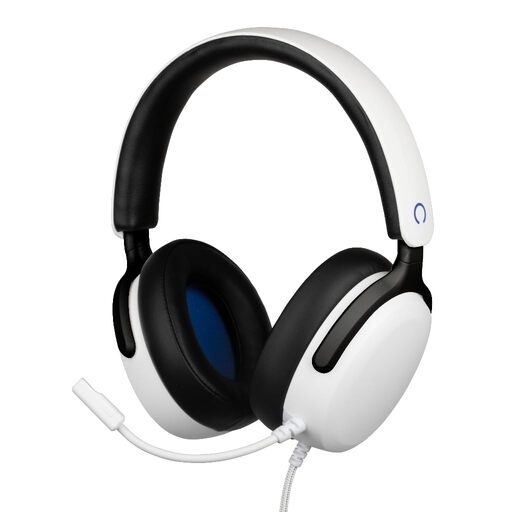
Konix Nexus Over-Ear Wired Gaming Headset, white
An option to consider if you want an over-ear headset with a flexible microphone boom for recording and listening back.
The title lists 40 mm drivers, a 1.5 m cable and a 3.5 mm connection.
View at Joybuy
 No image available
Corsair HS55 Stereo Gaming Headset, white
An option if you’re looking for a wired headset with a flexible microphone boom. Check in advance that your recording software recognises the microphone and that it sounds right.
The product information lists a 3.5 mm connection, an omnidirectional microphone with flip-to-mute and a supplied Y-splitter.
View at Joybuy
 No image available
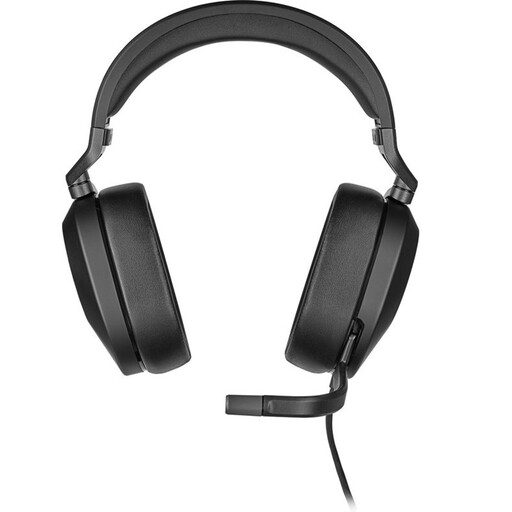
Corsair HS65 Surround Gaming Headset, carbon
An option to consider if you’re looking for a wired headset for recording and listening back. Check which input your recording device uses.
The product information lists a 3.5 mm connection, a supplied USB adapter and a flip-to-mute microphone.
View at Joybuy
Frequently asked questions
Where should I position the microphone for a test recording?
Position an adjustable microphone beside the corner of your mouth rather than directly in front of it if you hear plosive sounds. Shure gives this placement guidance for the SM35; also check your headset manual and make a test recording.
Why doesn’t my headset appear as a microphone input?
First check the version and connection, then select the intended input in your recording software. Jabra offers USB-A and USB-C versions; for the microphone function of the RØDE NTH-100M, RØDE specifies the supplied TRRS cable. Then make a short test recording.
Do I always need permission to record a practice interview?
There isn’t one answer for every situation. It depends, among other things, on who you record, who processes the recording and whether you publish it. The Dutch Data Protection Authority describes an exception for use that is purely personal or domestic. Where the GDPR applies, you need a valid legal basis, and consent is one possible basis. If you’re practising with someone else, agree in advance what you’ll record and what you’ll do with it.
What can I do if my headset doesn’t work properly soon after purchase?
In the Netherlands, you’re entitled to a product that works properly and can contact the seller for a solution if it’s faulty. According to the Dutch government, there is no set statutory guarantee period; what you can expect from a product depends partly on the product and the information provided at purchase. An additional guarantee doesn’t replace your statutory rights.
Do the same rules apply to recordings of employees as to private practice?
No. The Dutch Data Protection Authority sets out separate conditions for employers recording employees’ telephone conversations. Employees and the other person on the call must be informed about such recordings; don’t assume these employer rules apply in the same way to private practice.


