For a quiz intro recorded with a fan running, look for an adjustable microphone that can sit close to your mouth, and make a test recording in the room where you plan to record. A complete headset is handy if you want to record and listen back directly on a computer; a standalone headset microphone is best if you already have a suitable input or transmitter. A noise-cancelling claim does not guarantee a quiet recording.
Who is this guide for?
Voice-over artist with audible fan noise
You want the quiz intro to remain clear while the fan is running. A steady microphone position and a test recording in your own room can help you judge how your voice and the background noise sound together; Shure explains that the result also depends on the distance from the microphone and the noise level.
Computer user who wants to record directly
You’re looking for one headset for recording and listening back. Check that the headset connection is compatible with the computer or other equipment you’ll use to record.
Presenter with existing audio equipment
You want freedom of movement or a less noticeable microphone, and can connect a standalone headset microphone to suitable equipment. Check in advance that the input provides the required power.
What should you look for when choosing?
Complete wired headset
Best if: you want to record directly on a computer and listen back through the headset.
Bear in mind: check that the connection is compatible with your recording device; a headset designed for calls does not guarantee a quiet voice-over.
Headset with software filters
Best if: you record on a PC and want to adjust filters while recording.
Bear in mind: Logitech states that BLUE VO!CE on the PRO X Wired only works on PC via G HUB; judge the effect with a test recording.
Standalone headset microphone
Best if: you want to record hands-free and already have a suitable microphone input or transmitter.
Bear in mind: the RØDE HS2 has a 3.5mm TRS connection and requires plug-in power; it is not a complete headset.
| What to consider |
What should you look for? |
Who is this important for? |
| Clarity with fan noise |
Can you position the microphone boom close to your mouth? Make a test recording with the fan on. |
If I want to know whether my voice will remain clear in the room where I record, I test the microphone there with the fan on. Around 39% of consumers put clarity first when choosing what to buy. |
| Connection to recording equipment |
Check that the USB or 3.5mm connection you choose is compatible; if you’re buying a standalone microphone, also check the power it requires. |
If I want to connect the headset to my existing computer, recorder or transmitter, I check the input and power requirements in advance. Around 23% of consumers prioritise compatibility with their device. |
| Checking and adjusting your recording |
Listen back to a test recording; check that the software filters work with your model and computer. |
If I want to assess the recorded voice and adjust the settings, I make a test recording and listen back to it. Around 23% of consumers put control over their recording first. |
| Comfort and freedom of movement |
Check that the headset feels comfortable and that the microphone boom stays in a useful position. |
If I move my head while recording or want to wear a lightweight microphone on my head, I look for a good fit and freedom of movement. Around 15% of consumers put wearing style first. |
Avoid common buying mistakes
-
Assuming noise cancellation guarantees a recording without fan noise
A microphone designed for speech can still pick up background noise. Shure explains that the balance between your voice and ambient noise also depends on the noise level and your distance from the microphone.
Test it in the room where you plan to record, with the fan on, and listen to both the spoken parts and the pauses between sentences.
If the noise spoils the recording, you may need to record it again.
-
Buying a standalone headset microphone as if it were a complete USB headset
The RØDE HS2 has a 3.5mm TRS microphone output that requires plug-in power. Don’t assume it will work without a suitable input or transmitter.
Before buying, check the connection, power requirements and how you’ll listen back to the recording.
-
Confusing ANC in the earcups with noise reduction in the recording
ANC for what the wearer hears and microphone processing are different features; ANC alone tells you nothing about how the recorded voice will sound.
Assess a test recording with the fan on rather than relying solely on the ANC claim.
Relevant brands to consider
Logitech G
The G432 is a wired headset with a documented USB DAC and 3.5mm cable; the PRO X Wired is aimed at PC users who want to adjust software-based voice filters.
- According to Logitech, the G432 has a flip-to-mute microphone boom.
- Logitech states that BLUE VO!CE filters on the PRO X Wired only work on PC via G HUB. This is not an independent guarantee of a quiet quiz recording.
HyperX
The Cloud III Wired is designed for anyone looking for a wired headset with a detachable microphone and several connection types.
- HyperX lists a 10mm microphone, USB-C, USB-A and 3.5mm connections, and a mute indicator.
- Noise cancellation is a claim made by HyperX, not a measurement of fan noise in a quiz recording.
Jabra
The Evolve2 50 is a wired work headset with microphone processing; when choosing, check whether you need the mono, stereo or USB version.
- Jabra describes microphone processing for calls and ANC.
- ANC for listening is not the same as noise reduction in a microphone recording; specifications vary by version.
RØDE
The HS2 is a standalone headset microphone for anyone who wants to use suitable audio equipment they already own.
- RØDE specifies an adjustable boom, an omnidirectional capsule and a 3.5mm TRS output.
- The microphone input must provide plug-in power; the HS2 does not include headphones for listening back.
Products for recording a quiz
These product choices include headsets with microphones for recording and listening back; check that each model’s connection is compatible with your recording device.
 No image available
Trust GXT 498W Forta wired gaming headset, white
An option if your recording device has a 3.5mm connection and you want to be able to mute the microphone.
Features a detachable 3.5mm cable, flexible microphone and mute control on the headset.
View at Joybuy
 No image available
Turtle Beach Airlite Fit wired gaming headset
Could be suitable if your recording device has a 3.5mm connection and you want to be able to mute the microphone quickly.
Features a 3.5mm connection and a bidirectional flip-to-mute microphone boom.
View at Joybuy
 No image available
Jabra Evolve2 30 SE stereo headset
An option if your computer has USB-A and you want one headset for speaking and listening back.
Features USB-A, stereo sound and two integrated microphones.
View at Joybuy
 No image available
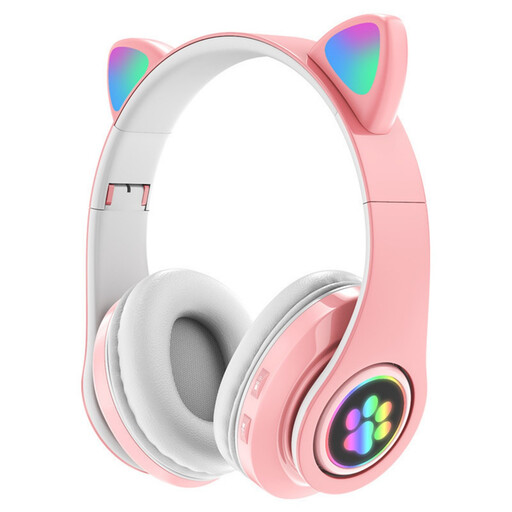
KINSI RGB Cat Ear wireless Bluetooth headset
Could be suitable if a wireless headset works with your recording set-up; check in advance that the Bluetooth microphone is compatible with your recording device.
The product name lists Bluetooth, a built-in microphone and LED lighting; the model is described as being for children.
View at Joybuy
 No image available
Logitech H650e stereo headset
An option if you want to record on a computer via USB and position the microphone close to your mouth.
Wired stereo headset with a USB connection and adjustable microphone.
View at Joybuy
Frequently asked questions
How should I prepare for a recording if the fan needs to stay on?
Position the microphone close to your mouth and make a short test recording with the fan on, including a pause between sentences. Shure explains that how audible the ambient noise is also depends on the noise level, speaking distance and the balance you want between your voice and the background noise.
Does ANC in the earcups help with fan noise in my recording?
Not necessarily: ANC for listening is not the same as microphone processing. Jabra describes them as separate features, so assess a test recording with the fan on.
Can I connect a standalone RØDE HS2 directly to any laptop?
No, you can’t tell from the shape of the plug alone. RØDE specifies a 3.5mm microphone input that provides plug-in power; check that your laptop or audio interface supports this combination.
What should I check when choosing a connection for a complete headset?
Check that the input on your recording device matches the headset’s USB or 3.5mm connection. If you’re using a standalone headset microphone, you also need to check that the input provides the required power.
What cooling-off period and guarantee apply to a headset bought online in the Netherlands?
When you buy online from a business, you usually have 14 days to change your mind, although exceptions and the terms of purchase still apply. ACM ConsuWijzer also explains that legal guarantees apply to products that, under normal use, do what you could reasonably expect; a manufacturer’s guarantee does not replace this right.


