Start with a headset that lets you position the microphone close to your mouth, then make a test recording with the fan running. Shure and RTINGS explain that placing a microphone close to the sound source can improve the balance between your voice and background noise; no microphone or filter can guarantee that the fan will disappear from your recording. Also check that the connections and any required software are compatible with your recording device.
Who is this choice relevant to?
Creator recording with an audible fan
You record product demonstrations and want to check that your voice remains clear while the fan is running. Shure and RTINGS point out that the distance between the microphone and your mouth affects the balance between speech and background noise.
Creator with a fixed recording setup
You want to monitor your audio while recording, so you need a suitable microphone input and a headphone output. RØDE describes the NTH-100M as using a TRRS cable and splitter.
Presenter who moves around
You want to be able to move around while explaining a product. Check that the wireless connection works with your recording device, and assess the recording quality with your own setup.
What should you look for when choosing?
For a product demonstration with an audible fan, clear speech, a compatible connection, the ability to monitor your audio and freedom of movement are all important considerations. Make a test recording with your own device and the fan running.
| What to consider |
What should you check? |
Who is this most relevant to? |
| Clear speech |
Check that you can position the microphone boom close to your mouth, then make a recording with the fan running. |
If I want my explanation to remain clear while the fan is running, I’ll focus on how my voice sounds in the recording. Around 36% of consumers make clear speech their top buying priority. |
| Connection to your recording setup |
Check the microphone input, any cables you need and whether any software filters are available on your device. |
If you want to connect a headset to a specific recorder or computer, make sure it can receive the microphone signal. Around 29% of consumers prioritise compatibility with their recording device. |
| Comfort and monitoring |
Check that you can record and listen at the same time, and that the fit is comfortable for the length of your recording. |
If I’m recording several takes, I want to be able to check my audio without the headset becoming uncomfortable. Around 21% of consumers prioritise monitoring and wearing comfort. |
| Freedom of movement |
Check the wireless connection method and product variant, and make sure your recording software uses the headset microphone. |
If you move around a product during a demonstration, a cable may get in the way. You’ll still need to test the recorded voice for yourself. Around 14% of consumers put freedom of movement first. |
Common buying mistakes
-
Confusing ANC for your ears with noise reduction in your recording
A quiet listening experience doesn’t automatically tell you how the microphone will pick up fan noise. Jabra describes both ANC and microphone technology for the Evolve2 65 Flex, but that doesn’t prove your recording will be free of fan noise.
Assess the listening features and the microphone separately, and make a test recording with the fan running.
-
Buying a headset without checking the microphone input
A connection that lets you listen isn’t necessarily suitable for recording the microphone signal too.
Compare the headset connections with those on your recording device, and check which cables are included.
Depending on your setup, you may also need a suitable splitter, adapter or interface.
-
Assuming software filters work on every device
According to Logitech, the advanced Blue VO!CE features on the wired PRO X are only available on PC via G HUB.
Before buying, check that your recording device supports the microphone features you want to use.
Brands to consider
RØDE
RØDE positions the NTH-100M as a wired headset for media, content creation and more.
- RØDE describes a TRRS cable, a splitter and the option to record and monitor your audio at the same time.
- Check your device’s connections. For certain XLR mixer inputs, RØDE specifies additional adapter and power requirements; this is not an independent test with fan noise.
Logitech G
The wired PRO X is a PC option if you want to adjust voice filters during product demonstrations.
- According to Logitech, the advanced Blue VO!CE features are available on PC via G HUB.
- These features require a PC and the relevant software. A filter doesn’t guarantee that fan noise will disappear or that your recording will sound natural for your demonstration.
Jabra
Jabra designed the wireless Evolve2 65 Flex for hybrid working and calls.
- Jabra describes this model as featuring ANC and microphone technology.
- Information about calls and ANC doesn’t prove that fan noise will be filtered out of a product demonstration recording.
EPOS
The analogue, closed-back H6PRO is an option with a detachable microphone boom.
- EPOS specifies a bidirectional microphone and separate PC connections for this model.
- Check which microphone input your device has. EPOS recommends moving the microphone closer to your mouth if you have noise issues; this doesn’t guarantee a quiet recording.
Audeze
The Maxwell 2 is a wireless headset worth comparing if you’re looking for a microphone boom and adjustable microphone processing.
- Audeze describes this model as having a detachable microphone boom and noise-processing settings.
- These are manufacturer specifications for this model, not an independent test with a fan. Also check whether you need the PlayStation/PC or Xbox/PC version.
Headsets at Joybuy
This selection includes wired and wireless headsets with microphones for product demonstrations. Check that each model’s connection is compatible with your recording device, and test your recording with the fan running.
 No image available
Turtle Beach Atlas 200 PC Gaming Headset, wired, 3.5 mm, flip-to-mute microphone, black
A wired option to consider for a fixed recording setup; make a test recording with the fan running.
The product name specifies a 3.5 mm connection and a flip-to-mute microphone.
View at Joybuy
 No image available
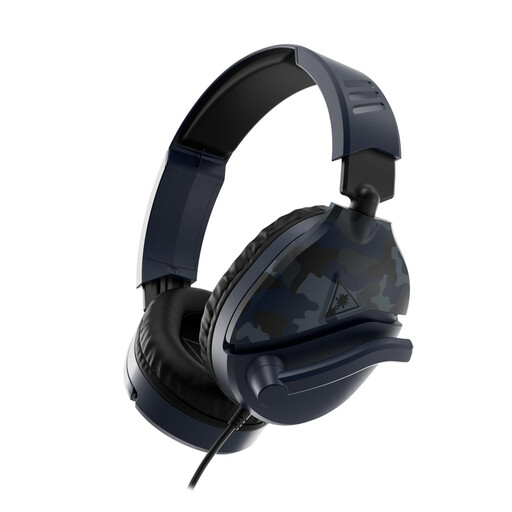
Turtle Beach Recon 70 Gaming Headset, wired, 3.5 mm, Blue Camo
A wired option to compare if you want to use a microphone boom during your demonstration; check the result with the fan running.
The product name specifies a 3.5 mm connection and compatibility with PC, PS5, Xbox Series X|S and Switch 2, among others. Check that the connection is compatible with your recording device.
View at Joybuy
 No image available
Razer Kraken V3 X Headset, black
You could include this headset in a comparison for a fixed recording setup; listen back to your test recording while the fan is running.
View at Joybuy
 No image available
Logitech H340 USB Headset, wired, black
A wired headset to consider for a fixed recording setup; check that your recording device recognises the microphone through the connection.
The product name specifies a USB connection.
View at Joybuy
 No image available
HyperX Cloud III S Wireless Gaming Headset, detachable 10 mm boom microphone, black
A wireless option if you want to move around during your product demonstration; check that your recording device uses the headset microphone with your chosen connection.
The product name specifies a detachable boom microphone and a 2.4 GHz or Bluetooth connection.
View at Joybuy
Frequently asked questions
Does ANC in the earcups reduce fan noise in my recording?
Not automatically: ANC affects what you hear, which is different from what the microphone records. Jabra describes ANC and microphone technology for the Evolve2 65 Flex, but make a test recording to hear how your fan sounds.
How do I connect a headset so I can record and monitor my audio at the same time?
Check your device’s microphone input and headphone output separately. For the NTH-100M, RØDE describes a TRRS cable and splitter for separate 3.5 mm connections; certain XLR connections may require a suitable adapter and plug-in power.
What can I do if the fan is still audible?
Move the microphone closer to your mouth and, where possible, point it away from the fan. Shure recommends recording your voice at a stronger level relative to unwanted background noise. Check the result in a test recording and adjust your recording position if needed.
What are my rights when I buy a headset online as a consumer?
According to the Dutch Government, when you buy from a business at a distance, you generally have 14 days to change your mind. You’re also entitled to a product that conforms to the contract; contact the seller if there’s a fault. In the Netherlands, there is no general statutory warranty period fixed at two years.
Can I film and publish identifiable people in a commercial product video?
If other people are identifiable in professional or commercial footage, the GDPR applies and an appropriate legal basis is required. The Dutch Data Protection Authority explains that this applies both to filming and to publishing footage. Whether this applies to your video depends on whether other people are identifiable in it.


