Keep the microphone close to your mouth and, if possible, point it away from the fan. Then make a test recording while the fan is running. A directional XLR headset is a good fit if you have a suitable XLR microphone input, while a USB headset can connect directly to a computer more easily. Manufacturer claims about call noise don’t guarantee that your local recording will be clear.
Who is this option for?
People recording next to a running fan
You want every instruction to be clear in the recording. Consider the microphone’s position and pickup pattern, and test it in your actual setup with the fan running. Shure recommends keeping the microphone close to your voice and pointing it away from unwanted noise.
People recording directly to a computer
You don’t want to use a separate XLR recording setup. Check that the headset connects to your computer and that your recording software is actually using its microphone as the input. Logitech and Jabra describe USB headsets, but check the exact connection and recording settings.
Creators with existing recording equipment
If you have a suitable microphone input, you could consider a standalone headset microphone. Check that the connection and any power requirements match your recorder or interface, as these vary by model.
What should you look for when buying?
Directional XLR headset
A good fit if: the fan needs to stay on and you have a suitable XLR microphone input. The Shure WH20XLR is cardioid, while the Audio-Technica PRO8HEx is hypercardioid.
Keep in mind: XLR doesn’t connect directly to a computer via USB. Check your recording equipment and test the microphone in the room.
Wired USB headset
A good fit if: connecting directly to a computer is important. Logitech says the Zone Wired’s two microphones help suppress HVAC noise, among other sounds, during calls.
Keep in mind: a claim about call audio doesn’t prove how a locally recorded safety announcement will sound. Also check which USB version you need.
Omnidirectional headset microphone
A good fit if: you can make the room quieter and want a lightweight, adjustable hands-free microphone. RØDE describes the HS2 as having an omnidirectional capsule.
Keep in mind: this capsule doesn’t offer the same directional approach to recording as cardioid models. The HS2 also requires a suitable 3.5mm microphone input with plug-in power.
| What to consider |
What to check before buying |
Who is this important for? |
| Clear speech |
Record a representative sentence with the fan on and listen back; check the microphone’s position and pickup pattern. |
If I want to know whether the safety instructions sound clear despite the fan noise, I test the microphone in my own room. Around 36% of consumers put speech clarity first. |
| Direct connection |
Check the USB version, microphone input and input settings in your recording software. |
If I want to record on a computer without a separate microphone interface, I check that both the headset and the software use the microphone as the input. Around 29% of consumers prioritise a direct computer connection. |
| Existing recording equipment |
Compare the exact connector and any power requirements with those of your recorder or interface. |
If I want to use my existing recorder or interface, I look for a headset that connects to the input I have. Around 21% of consumers prioritise compatibility with existing recording equipment. |
| Comfort and vocal sound |
Check the fit, adjustability and connection; make a test recording with the fan on. |
If I want to wear the microphone securely and find a vocal sound that suits my recording, I check the fit and listen back to the file. Around 14% of consumers start with comfort and vocal sound. |
Common buying mistakes
-
Assuming call noise reduction guarantees a clear recording
A manufacturer’s claim about calls doesn’t automatically tell you how a locally recorded safety announcement will sound. The balance between voice and background noise also depends on your setup.
Make a locally saved test recording with the fan on and listen back before recording the final version.
If the instructions aren’t clear, you’ll spend extra time recording them again.
-
Assuming every plug will work with your recorder
The wired Audio-Technica PRO8HEx has an XLR connection, while the RØDE HS2 requires a 3.5mm microphone input that provides plug-in power.
Compare the exact headset version with the input and power options on your recording equipment.
-
Confusing ear-cushion isolation with less noise in your recording
Jabra describes the ear cushions’ passive isolation in terms of what the wearer hears. That doesn’t, by itself, tell you how much fan noise the microphone picks up.
Check the microphone’s features separately and listen to the saved file.
Brands to consider
Shure
The WH20XLR is a wired cardioid headset microphone for a recording setup with a compatible XLR input.
- Shure describes this model as having a cardioid pickup pattern and says windscreens are included.
- This isn’t independent proof that fan noise will be reduced enough in your recording. Check that you’re looking at the XLR version.
Audio-Technica
The PRO8HEx is a wired hypercardioid headset microphone with a 3-pin XLR connection.
- Audio-Technica says the hypercardioid pattern helps isolate the desired sound source. The microphone boom can be worn on either the left or right.
- Recording to a computer requires a compatible XLR recording input. Assess the recording in your own room.
Logitech
The Zone Wired is a USB headset for use with a computer.
- Logitech says its two-microphone system helps suppress HVAC noise, among other sounds, during calls.
- That brand claim isn’t an independent test of a locally recorded safety announcement.
Jabra
The Evolve2 40 SE is a wired headset available in separate USB-A and USB-C versions.
- The manual mentions three microphones and recommends positioning the microphone close to your mouth.
- Jabra says that not all mobile USB-C devices or apps support audio through the connection. The ear cushions’ passive isolation describes what the wearer hears, not necessarily what the recording captures.
RØDE
The HS2 is a lightweight, adjustable omnidirectional headset microphone for a compatible 3.5mm microphone input.
- RØDE says a pop filter and wind protection are included.
- The microphone input must provide plug-in power. An omnidirectional capsule isn’t designed to reject fan noise directionally.
Headsets with microphones at Joybuy
This Joybuy selection features wired headsets with microphones. Check the connection and recording settings for each model; the product listing alone can’t tell you how clear your recording will be with fan noise.
 No image available
Trust GXT 498W Forta wired gaming headset, white
The detachable, flexible microphone could suit you if you want to record hands-free and remove the microphone afterwards.
3.5mm connection; the product name mentions official PS5 licensing.
View at Joybuy
 No image available
Turtle Beach Atlas 200 PC wired gaming headset, black
This wired headset could suit you if you want to record using a microphone on the headset. Check that the connection works with your recording device.
3.5mm connection, flip-to-mute microphone and included USB adapter; the product description mentions PC use.
View at Joybuy
 No image available
Trust Ayda wired USB headset, black
The USB connection could suit you if you want to record directly to a computer. Check which microphone is selected as the input.
USB-A with USB-C adapter cable. The product description mentions a noise-cancelling microphone for calls; test the sound of a local recording yourself.
View at Joybuy
 No image available
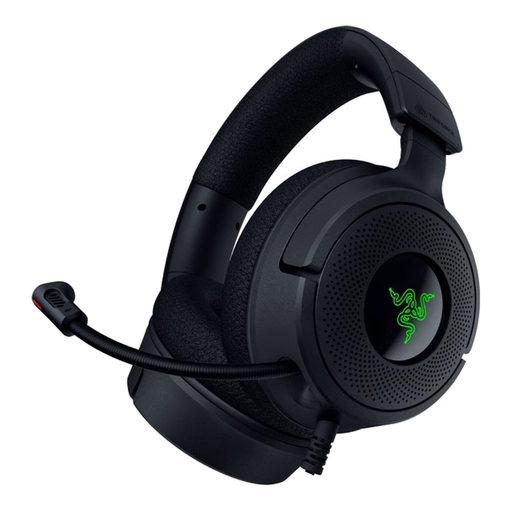
Razer Kraken V4 X wired gaming headset
The product description mentions a cardioid microphone and advice on positioning it, which is relevant if you’re looking for a directional headset microphone.
3.5mm connection; the description recommends placing the microphone about 1–2 inches from your mouth. Check whether your computer has separate audio and microphone ports, and whether the included splitter is compatible.
View at Joybuy
 No image available
Razer BlackShark V2 X 7.1 wired gaming headset, black
The product description mentions a cardioid microphone for recording speech. A test recording will show how it performs with the fan noise in your space.
Foldable microphone; the description mentions USB-C and USB-A connections, as well as an adjustable microphone position.
View at Joybuy
Frequently asked questions
Is noise isolation for your ears the same as having less fan noise in the recording?
No. Jabra describes the passive isolation of the ear cushions separately from the microphone technology. So assess the saved file, not just what you hear while recording.
How can I check whether a test recording is clear?
Record a representative safety instruction with the fan on, then listen back to the file. Shure recommends keeping the microphone close to your mouth and pointing it away from unwanted noise.
Will the RØDE HS2 work with every 3.5mm connection?
No. RØDE says it needs a 3.5mm microphone input that provides plug-in power. Check that your recorder or interface supports this before choosing the headset.
Is a USB headset with noise reduction automatically suitable for a local recording?
No. A claim about call noise doesn’t prove that a locally saved safety announcement will be clear. Check that your recording software is using the headset microphone, then listen back to a test file recorded with the fan on.
Can I assume a headset will work if it has a compatible plug?
Not without checking the connection requirements. Compare the exact connector with your recorder or interface’s microphone input, and check whether the input supplies the required power if necessary.


