Start with a headset microphone that you can position close to your mouth, then make a test recording while the fan is running. A wired USB headset is suitable for recording directly on a computer; the Audio-Technica BPHS1 is an option if you have the corresponding XLR and headphone connections. Shure highlights the importance of microphone distance and background noise, while Audacity explains how to reduce constant fan noise afterwards.
Who is this choice relevant to?
Voice artist recording with a fan running
You want to know whether your voice will remain clear while the fan is on during recording. Positioning the microphone close to your mouth and recording with the actual source of noise will help you assess the result. Shure points out that the distance between the speaker and microphone, as well as the level of background noise, both matter.
Creator recording directly on a computer
You want to record your synopsis without a separate audio interface. Check which USB connection the headset has and whether you can position the microphone boom comfortably. Jabra and Logitech offer product variants with different connections.
Creator with an audio interface
You can use separate microphone and headphone connections and are also considering a broadcast headset. The standard Audio-Technica BPHS1 has specific plugs for this purpose, so check that they’re compatible with your equipment.
What should you look for when buying?
First, decide what matters most for your recording: clear speech with the fan on, the sound of your voice, a suitable connection or comfort during longer takes.
| What to consider |
What should you look for? |
Who is this most important to? |
| Clear speech with fan noise |
Can you position the microphone close to your mouth? Listen back to a test recording with the fan on. |
If the fan needs to stay on while I record, I want to hear whether my words are clear. Around 36% of consumers prioritise clear speech alongside fan noise above all else. |
| Sound of your voice |
Record a full paragraph and listen to your voice; check whether your recording software has noise reduction for constant noise. |
I want to be able to listen back to my recorded synopsis comfortably and assess how my voice sounds. Around 29% of consumers prioritise voice quality and clear speech. |
| Connection and equipment |
Check the available ports and the exact variant; the standard BPHS1 has separate XLR and 6.3mm plugs. |
I want to connect the headset directly to my computer and know in advance whether I’ll need extra audio equipment. Around 21% of consumers prioritise a suitable, straightforward connection. |
| Wearing comfort and listening back |
Consider how comfortable the fit will be for the expected recording time and check whether the model has the controls you want. |
During longer takes, I want to record comfortably and check my recording without the headset getting in the way. Around 14% of consumers prioritise wearing comfort and listening back. |
What to watch out for when buying
-
Confusing earcup isolation with a clean microphone recording
Passive isolation affects what you hear, but it doesn’t tell you how much fan noise the microphone picks up. So, assess a voice recording made while the fan is running.
Take the time to listen back to the recording; constant noise may need an extra post-production step.
-
Treating a broadcast headset like a USB headset
The standard Audio-Technica BPHS1 has a 3-pin XLR connection for the microphone and a 6.3mm connection for the headphones. Compare these plugs with your recording equipment before choosing.
You may need compatible audio equipment in addition to the headset.
-
Choosing a connection based on the product family name
Models in the same product family can have different USB and audio connections. Check the full variant description and compare it with your computer’s port.
If the connection isn’t right, you may need a suitable adapter.
Relevant brands to consider
Audio-Technica
The BPHS1 is a broadcast headset for anyone who can use a directional microphone and separate audio connections.
- For the standard BPHS1, Audio-Technica specifies a dynamic cardioid microphone, a 3-pin XLR microphone plug and a 6.3mm headphone plug.
- The BPHS1-XF4 has a different connection. The specifications alone don’t show how much fan noise will remain in your recording.
Jabra
The Evolve2 40 SE is a wired office headset with a microphone boom, designed for anyone who wants to listen and speak over USB while working.
- Jabra describes the Evolve2 40 SE as having three microphones, signal processing and passive isolation.
- These descriptions aren’t comparative measurements of a recording made with fan noise. Also check the exact mono or stereo version and connection.
Poly
The Blackwire 5220 is worth considering if you record on a computer using a wired connection and also want the option of a 3.5mm connection.
- HP specifies USB-C, a USB-A adapter and a 3.5mm connection for the Blackwire 5220. HP also describes the ear cushions as providing passive noise reduction.
- Noise reduction for the wearer isn’t the same as reducing fan noise in a microphone recording.
Logitech
The H390 is a straightforward USB computer headset with an adjustable microphone boom and in-line controls.
- Logitech describes the H390 microphone as noise-cancelling and lists USB-A and USB-C options on its Dutch product page.
- The product description doesn’t show how much fan noise will be reduced in your recording. Check the connection you’ve chosen and make a test recording.
Wired headsets for PC recording
These wired headsets with microphones are designed for a PC setup. Check the connection and microphone positioning for each model, then make a test recording with the fan on to assess the sound.
 No image available
Turtle Beach Atlas 200 PC Gaming Headset, 3.5 mm, Black
An option for a PC setup if you’re looking for a wired headset with a flip-to-mute microphone.
The product information lists a 3.5mm connection and a USB adapter. Check which connection you want to use and whether it’s compatible with your computer.
Joybuy
 No image available
Turtle Beach Recon 70 PC Gaming Headset, Green Camo
Suitable for a wired PC setup if you want to be able to flip up the microphone to mute it while recording.
Connection listed in the product name: 3.5 mm. Check that your recording device has a compatible input.
Joybuy
 No image available
Razer BlackShark V2 X 7.1 Wired Headset, Black
A wired headset to consider if you can position the microphone close to your mouth and want to assess the recording with fan noise yourself.
The product information describes a cardioid microphone and recommends positioning it approximately 1–2 inches from your mouth.
Joybuy
 No image available
Edifier G2II USB Gaming Headset, Black
A wired USB option for a PC setup if you’re looking for a detachable microphone and in-line controls.
The product information lists a USB connection and a detachable microphone.
Joybuy
 No image available
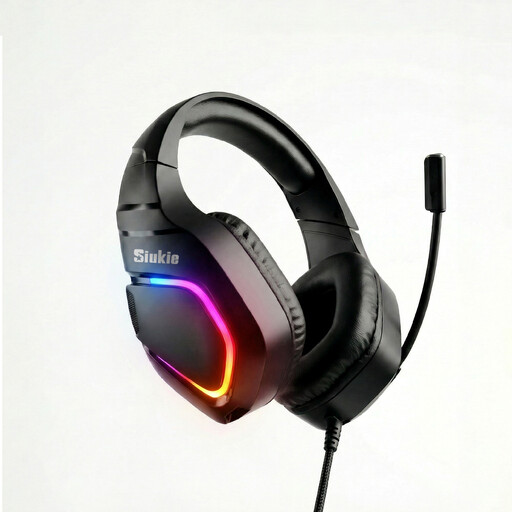
Siukie H100 Wired Headset, USB and 3.5 mm
A wired PC headset to consider if you want both USB and 3.5mm connections as options.
The product information lists USB, 3.5 mm and an omnidirectional microphone. Check which connection is compatible with your recording device.
Joybuy
Frequently asked questions
Is noise reduction in the earcups the same as less noise in my recording?
No. Manufacturers describe passive earcup isolation separately from microphone features. Record a voice sample with the fan on and listen back to that recording in particular.
How can I reduce constant fan noise after recording?
Audacity describes noise reduction for constant sound sources such as fans. You can use a section containing only background noise to create a noise profile, then listen back to the edited result. This doesn’t replace positioning the microphone appropriately.
Can I connect the standard Audio-Technica BPHS1 directly to USB?
Not with the standard plugs specified by Audio-Technica: this version has a 3-pin XLR plug for the microphone and a 6.3mm plug for the headphones. Before buying, check that your recording equipment can connect to them.
What are my rights if a headset I bought online doesn’t fit or breaks too soon?
ACM ConsuWijzer states that online purchases generally come with a cooling-off period of up to 14 days after delivery, subject to legal exceptions. If a product breaks sooner than you could reasonably expect under normal use, the statutory guarantee applies; the seller is your point of contact.
Do I need to consider privacy rules when publishing a recorded synopsis?
If an organisation processes personal data in this context, the Dutch Data Protection Authority says it needs a legal basis under the GDPR. Consent is one possible basis, but not the only one. This information does not indicate any separate product-specific permit requirement for a recording of your own voice alone.


