What should you look for when buying?
Shure stresses that a microphone cannot improve a room’s acoustics. Keeping the microphone boom close to your mouth and making a test recording will help you assess how clearly your voice comes across in your recording space.
| What to consider |
What to look for |
Who should prioritise this? |
| Speech clarity in an echoey room |
Check that the microphone boom stays securely in position and make a test recording; don’t rely on the term ‘noise-cancelling’ alone. |
If I’m recording in an echoey room, I want my voice to be captured clearly and to be able to keep the microphone close to my mouth. Around 36% of consumers prioritise speech clarity despite room echo. |
| Connection |
Compare the headset version with your device’s ports and check whether you’ll need an adapter or splitter. |
If your main concern is getting the microphone and headphones to work with your recording device, check the exact connection. Around 28% of consumers prioritise compatibility. |
| Monitoring |
Check whether the headset includes headphones and whether your connection supports input and output at the same time. |
If I want to assess my delivery while or after recording, I need a working headphone connection. Around 22% of consumers prioritise monitoring and listening back. |
| Comfort |
Look at adjustability, ear cushions and whether the cable suits your recording space and how much you move around. |
If you want to record comfortably, look for a fit that suits your head and setup. Around 14% of consumers prioritise comfort while recording. |
Headsets at Joybuy
These Joybuy products are wired headsets with microphones for recording speech. Check that each model’s connection and input are compatible with your device.
 No image available
Jabra Evolve2 30 SE
A good fit if you want to record via USB-A and listen back while or after recording.
USB-A connection; the description lists a USB-C adapter as an alternative. Two integrated microphones and stereo speakers are listed.
View at Joybuy
 No image available
Logitech PC 960 USB
A good fit if you’re looking for a wired USB headset with an adjustable microphone boom.
USB connection; adjustable microphone boom; in-line volume and mute controls.
View at Joybuy
 No image available
Logitech H340 USB headset, black
A good fit if you’re looking for a wired USB headset with an adjustable microphone.
USB connection; adjustable microphone; in-line volume and mute controls.
View at Joybuy
 No image available
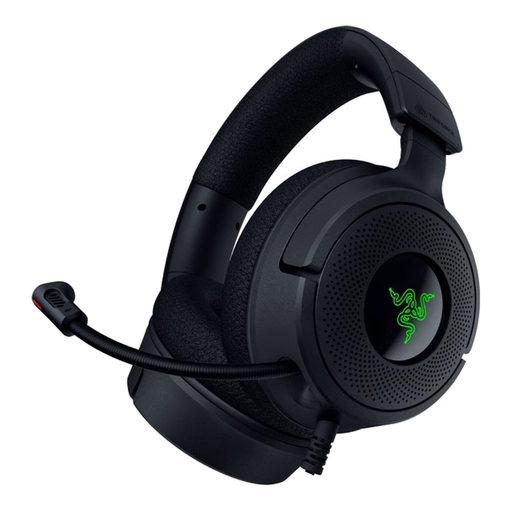
Razer Kraken V4 X
A good fit if you want to be able to flip the microphone out of the way after recording.
Wired headset with USB-C and USB-A connections; foldable, positionable cardioid microphone; memory foam ear cushions.
View at Joybuy
 No image available
Razer Blackshark V2 X 7.1
A good fit if you’re looking for a wired headset with an analogue connection and want to position the microphone close to your mouth.
3.5mm connection; cardioid microphone. For computers with separate microphone and headphone ports, the description says you’ll need the included splitter.
View at Joybuy
Frequently asked questions
Will a noise-cancelling headset microphone remove room echo?
No, don’t assume it will: Shure explains that a microphone won’t improve a room’s acoustics. Position the microphone close to your mouth and assess a test recording in the room where you’ll actually be recording.
How do I connect a headset to a computer with two separate 3.5mm audio ports?
For the RØDE NTH-100M, the manufacturer describes an included splitter for a separate microphone input and headphone output. For other models, check which cables are included and whether they match your computer’s connections.
Is the shape of the USB-C plug enough to tell whether a headset will work?
No. Jabra warns that not every mobile device or app with USB-C supports the audio connection for the Evolve2 40 SE. Check compatibility and select the headset microphone as the input in your recording software.
What are my rights if I’m unhappy with a headset bought online or it breaks soon after purchase?
According to ACM ConsuWijzer, online consumer purchases usually come with a 14-day cooling-off period after delivery, subject to legal exceptions. You’re also covered by the legal guarantee if, under normal use, the product doesn’t meet the standard you could reasonably expect. In the Netherlands, there isn’t one fixed guarantee period for every headset.


