What should you look for when choosing?
Wired USB headset with microphone boom
Best for: recording on a computer with a compatible USB port and using a fixed, straightforward connection.
Trade-off: the cable limits your freedom of movement. Features that reduce background noise during calls don’t prove that echo will disappear from a recording.
Analogue headset for recording and monitoring
Best for: a recording setup with a suitable 3,5mm microphone input, if you want to monitor your voice as you speak. RØDE describes the NTH-100M as having a detachable microphone and a splitter for separate connections.
Trade-off: check that the input and any splitter are compatible. RØDE describes the NTH-Mic as omnidirectional, so don’t assume it will reduce echo based on the product’s recording-focused description.
Wireless headset with microphone boom
Best for: presenting while moving around, if a wireless connection matters more to you than a simple wired setup.
Trade-off: you’ll also need to consider pairing and charging. Jabra documents several Evolve2 65 versions with different adapters and variants; call quality isn’t a measure of echo in your recording.
Start with the microphone position, then check the connection and listen to the actual recording. Echo and other background noise are different problems, even when you can hear them at the same time.
| What to consider |
What should you check? |
Who should pay particular attention? |
| Room echo |
How adjustable the microphone boom is; make a short recording in the room you’ll be using. |
If I can hear reflections in my voice, I want a repeatable position close to my mouth and the ability to assess the recording itself. Around 36% of consumers prioritise audible room echo. |
| Other background noise |
Test how your voice sounds with the noise in the room, and listen to the starts of words and soft consonants. |
If there’s noise such as ventilation or voices in addition to echo, I want to hear every word clearly without assuming that call noise reduction will also remove echo. Around 29% of consumers prioritise intelligibility in the presence of other background noise. |
| Connection |
Check whether your device has USB-A, USB-C or a suitable 3,5mm input, and select the headset as the input device. |
If I want to record using my existing computer, I want to make sure the microphone is recognised. For around 21% of consumers, device connectivity is their main concern. |
| Controls and freedom of movement |
Check where the controls are and whether your chosen setup remains comfortable throughout a full weather forecast. |
If I want to read my script or move around while presenting, I want to keep the microphone in position without awkward controls getting in the way. Around 14% of consumers focus primarily on comfort and ease of recording. |
Headsets on Joybuy for a wired recording setup
According to their product information, these wired headsets have a microphone and a connection or adapter for a computer setup. Check the connection listed and always listen to a test recording made in the room you intend to use.
 No image available
JBL Quantum 300, wired over-ear gaming headset, black
The flip-up microphone boom gives you a consistent microphone position to assess in a test recording.
The product description lists a directional microphone and a USB audio adapter included in the box.
The headset has a wired 3,5mm connection.
Joybuy
 No image available
Turtle Beach Atlas 200 PC, wired gaming headset, black
You can mute the flip-up microphone while speaking; use a test recording to hear how your voice sounds in your room.
The product description lists a 3,5mm connection and a USB adapter.
The description mentions monitoring via PC software; check that this is compatible with your recording device and software.
Joybuy
 No image available
Logitech H340, wired USB headset, black
The adjustable microphone lets you set the position for your test recording.
According to the product description, the headset has a USB connection and is plug and play with a computer.
The product description mentions reducing background noise during calls; this isn’t proof that it will reduce echo in a recording.
Joybuy
 No image available
Corsair HS55 Stereo, wired gaming headset, white
You can mute the flip-up microphone; make a test recording to assess your voice and the room echo.
The product description lists an omnidirectional microphone, a 3,5mm connection and a Y-splitter.
The description also mentions controls on the earcup.
Joybuy
 No image available
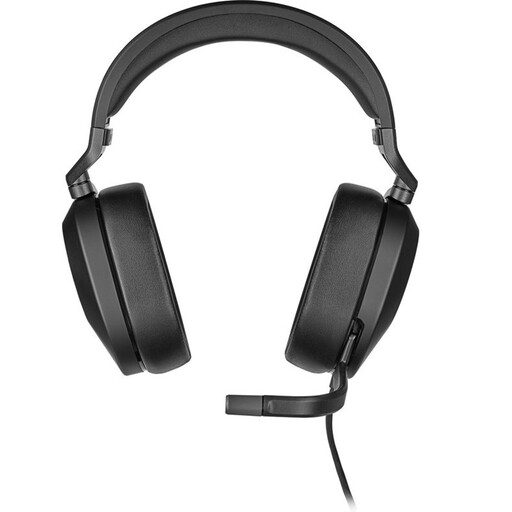
Corsair HS65 Surround, wired gaming headset, Carbon, 7.1 Surround
You can mute the flip-up microphone; assess your recorded voice in the room where you plan to record the weather forecast.
The product information lists a 3,5mm connection and an omnidirectional microphone.
Joybuy
Frequently asked questions
Will buying a noise-cancelling headset get rid of the echo?
No, not by itself. Shure explains that a microphone can’t correct the acoustics of a room. Position the microphone close to your mouth and assess a test recording; a claim about reducing other background noise doesn’t prove that it will reduce echo.
How close should the microphone be to my mouth?
Position the microphone close to your mouth and test it with a short recording in the room you plan to use. Shure explains that microphone placement matters when the room acoustics are less than ideal; listen for yourself to make sure your voice remains clear.
Should I choose a USB, 3,5mm or wireless headset?
Choose based on your recording device and how you present. USB suits a computer with the right port, while 3,5mm requires you to check the microphone input and any splitter. A wireless headset may suit you if you want to move around while presenting. In every case, make a test recording.
How do I connect a headset with a single 3,5mm plug to a computer with separate ports?
Check whether your headset has a suitable splitter for the microphone and headphone ports. RØDE describes using a splitter with the NTH-100M when connecting to separate ports; then select the correct microphone as the input device in your recording software.
What should I check before recording a full weather forecast?
Start with a short test recording and listen to check that the microphone is selected correctly and your voice is clear in your room. If you’re using a RØDE NTH-100M, also check that you’re using the supplied TRRS cable, which RØDE specifies is required for the microphone to work.


