What should you look for?
When room echo is noticeable, being able to position the microphone consistently and making a test recording matter more than the name of a noise-cancelling feature. Shure makes clear that a microphone can’t change the room’s acoustics by itself.
Wired USB headset
A good fit if: you want to record directly on a computer and the USB connection on your chosen model is compatible.
Bear in mind: a simple connection doesn’t mean room echo will disappear from a saved recording. Check the result with a test recording.
Analogue recording headset
A good fit if: you want to connect the microphone and headphones to suitable separate inputs.
Bear in mind: plugs and power requirements vary by model. RØDE says the NTH-100M needs an adaptor that provides plug-in power when connected via XLR.
| What to consider |
What should you check? |
Who is this important for? |
| Clear speech despite room echo |
Adjustable microphone boom and an unprocessed test recording in your own room. |
I want my voice to sound less distant in a tutorial, and I want to listen back to the recording first. Around 36% of consumers prioritise clear speech despite room echo. |
| Easy connection |
The USB connection on your chosen model and the recording input in your software. |
I want to record directly on my computer without a complicated setup. For around 29% of consumers, recording directly on a computer is the main priority. |
| Wearing the headset and listening back |
Comfort during a full session and speech clarity in the saved file. |
I wear my headset while recording and editing, and want to assess my voice clearly. Around 21% of consumers prioritise comfort over long sessions and being able to listen back. |
| Connections and equipment |
Microphone and headphone plug types, available inputs and any power requirements. |
I want to connect my headset to my existing computer or interface without discovering afterwards that the plug isn’t suitable. For around 14% of consumers, connection compatibility comes first. |
Headsets at Joybuy
These headsets are options to consider for voice recordings when making a software tutorial. Check the connection and recording input for each model, then listen back to a test recording made in your own room.
 No image available
Jabra Evolve2 75 USB-A MS Teams, black
Consider this version if USB-A is compatible with your computer. Make a test recording and check that your chosen recording input captures your voice clearly.
Joybuy
 No image available
HyperX Cloud Stinger II, wired, white, PS5/PS4
The product name specifies a wired version for PS5 and PS4. Check that the connection and recording input are also compatible with the computer you’ll use to record your tutorial.
Joybuy
 No image available
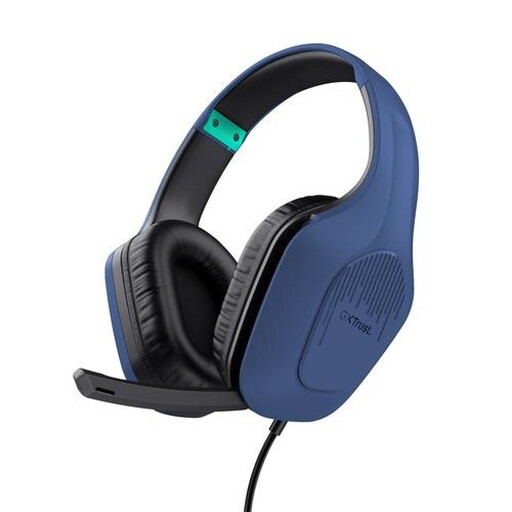
Trust GXT 415B Zirox, wired
Check that the stated 3.5mm connection is compatible with your recording device. Also consider whether you’ll want to mute the microphone while recording.
Joybuy
 No image available
Razer BlackShark V2 X 7.1, wired
Check that the connection is compatible with your computer and that you can position the microphone close to your mouth. Listen back to an unprocessed test recording to assess the result in your own room.
Joybuy
 No image available
Sony INZONE H3, wired, PC/PS5
The product information lists a 3.5mm cable and an included USB audio box for the stated PC connection. Check that this setup works with your computer and recording software.
Joybuy
Frequently asked questions
Will room echo disappear if I buy a noise-cancelling headset?
Not necessarily. Position the microphone close to your mouth and compare an unprocessed test recording made in the same room. Shure explains that a microphone can’t effectively separate direct speech from reflected speech or change the room’s acoustics.
How should I set up my headset for my first tutorial recording?
Select the headset as your recording input, position the microphone boom close to your mouth and record a short passage. Listen back to the saved file before recording a long tutorial. For the Evolve2 40 SE, Jabra recommends keeping the microphone close to your mouth.
Will I need extra equipment for the Audio-Technica BPHS1 or RØDE NTH-100M?
That depends on the inputs on your computer or interface. Audio-Technica lists separate XLR and 6.3mm connections for the BPHS1. RØDE describes a TRRS splitter for the NTH-100M and, when connecting the microphone via XLR, an adaptor that supplies the required plug-in power. Check both signal paths before buying.
Can I return a headset bought online after making a test recording?
For online consumer purchases, you generally have a statutory 14-day cooling-off period from delivery. ACM ConsuWijzer explains that there are exceptions, including for certain unsealed hygiene products. Check whether an exception applies before using the headset.
Who should I contact if the headset is faulty, and how long does the statutory guarantee last in the Netherlands?
Report a fault to the retailer. According to the Dutch government, there is no fixed statutory guarantee period in the Netherlands: a product must work for as long as you can reasonably expect it to. A manufacturer’s guarantee does not replace this right.


